






About Configurable Spyglass
From Steam WorkshopFeatures: Like the name says the spyglass is configurable in game via UI. Show Wild Stats: if this option is checked the wild dino stats will be shown. ( how many levels it has put in for exmaple…
Features:
Like the name says the spyglass is configurable in game via UI.
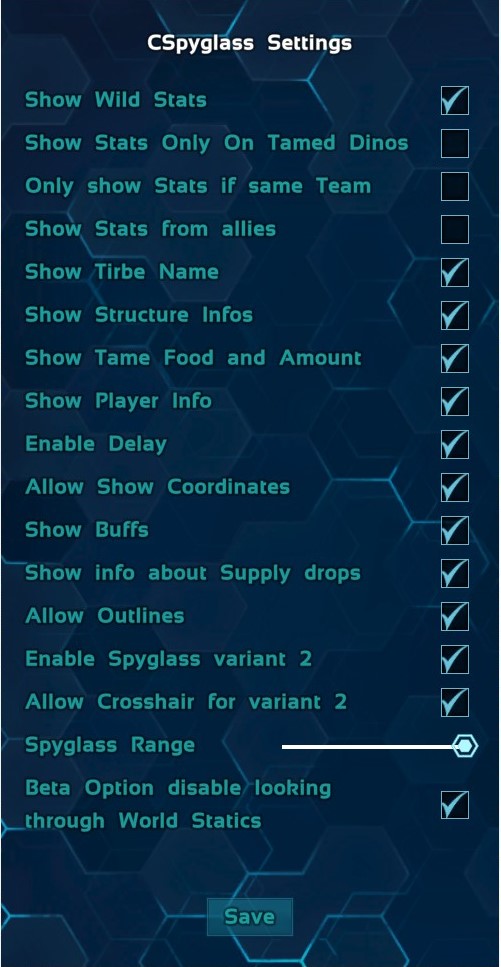
- Show Wild Stats: if this option is checked the wild dino stats will be shown. ( how many levels it has put in for exmaple Stamina )
- Show Stats only on Tamed: if this is checked Stats like HP Stam will only be shown if the creature is tamed but health and torpor are still shown.
- Show Stats only for team: if this is checked Stats will only show for creature in your tribe.
- [list]
- Show HP and Torpor on enemys: If Show stats only on team is on you can allow to show hp and torpor on enemys with this.
[*]Show Stats for allies: if this is checked and team only you can also see stats from allied tribes. [*]Show Tirbename: also shows the Tribename. [*]Show Structure infos: Shows name and health of structures also shows tribename if enabled. [*]Show Tame Food and Amount: If enabled shows the Food and the amount needed to tame a creature. [*]Show Player Info: Will show Name, Health and Tribename if enabled. [*]Enable Delay: If this option is checkt there wil be a delay after losing focus on a creature before the UI will close. Every player then can chose from 1 to 3 seconds delay in the same menu were you change background color. [*]Allow Show coordinates: If this is enabled player can chose to show coords [*]Show Buffs: If this is enabled it will show activ buffs on creatures and tribemates. [*]Show info about Supply drops: Will show what is in a supply or orbital drop. [*]Allow outlines: Allows players to toggle on and off outlines. [*]Enable spyglass variante 2: If enabled you wont need to hold the spyglass in your characters hands to use it.
- Allow crosshair for variante 2: Allows players to toggle an crosshir on and off for variantw 2.
[*]Spyglass Range: Will set the range of the spyglass. [*]Disable looking through world statics: This will Disable teh ability to detect stuff through Rocks trees and other things. [*]Enable Egg Info: Activats that the spyglass will show advanced information about fertilized egg. [/list]
Options can be combined.
to open the Options UI hold the spyglass in your hands or have variante 2 active and press Alt+F9 or open the console and use this command "cheat scriptcommand cspyglasssettings" in multiplayer only an admin can change these and they are the same for every player.
Controlls:
- Press mouse button 1 to lock your current target. Press it again to unlock.
- Shift+C Lock stats of the dino you are looking at to the left of the screen to compare with others.
- When looking at one of you tames press R to switch between Tamed Stats and LevelUps.
- Ctrl+R Show / Hide Coordinates.
- Alt+Right to move the UI to the right.
- Alt+Left to move the UI to the left.
- Alt+Up to move the UI up.
- Altl+Down to move the UI down.
- Alt+R to reset the UI position.
- Alt+C to open the customize UI. ( If delay is enabled you can chose your delay here also )
- Alt+O toggle outlines.
- Alt+S toggle StructureInfo if Allowed.
- Alt+G to open the global options UI.
- Alt+D toggle Dino Colors ON and OFF
Variant 2 controlls:
- Alt+Leftmouse button to lock your current target. Press it again to unlock.
- Shift+C Lock stats of the dino you are looking at to the left of the screen to compare with others.
- When looking at one of you tames press Alt+Q to switch between Tamed Stats and LevelUps.
- Ctrl+R Show / Hide Coordinates.
- Alt+Right to move the UI the the right.
- Alt+Left to move the UI the the left.
- Alt+Up to move the UI up.
- Alt+Down to move the UI down.
- Alt+Wheel UP/Down to zoom In/Out.
- Alt+RightMousebutton resets the zoom to normal.
- Alt+R to reset the UI position.
- Alt+C to open the customize UI. ( If delay is enabled you can chose your delay here also )
- Alt+O toggle outlines.
- Alt+X to toggle crosshair on or off.
- Alt+S toggle StructureInfo if Allowed.
- Alt+G to open the global options UI.
- Alt+D toggle Dino Colors ON and OFF
These settings are not globel every player can do them and customize the Spyglass how they like it. Also this changes are saved in the spyglass item.
CSpyglas table:
- Can craft the CSpyglass
- Can copy the settings of one CSpyglass to all otheres in the table.
Spawncode:
cheat gfi cspyglass 1 0 0
cheat gfi copysettingstable 1 0 0
modid: 1891446920
If you like this mod: 
My other mods: Click me
Donate
If you want to support me Donate
Highlights
From source dataFootprint
Rated a light load on a server.
Last update
Its author last shipped an update 5 yr ago.
Configurable Spyglass on Nxeon
From our catalogue- One-click install
- Supported on Nxeon ARK: Survival Evolved servers. We download it from Steam Workshop, place it, and restart the server.
- Server load
- light
- Smallest plan we suggest
- ARK — 8 GB (8 GB RAM). This follows our own load rating above, not a benchmark.
- Latest build
- 2021-09-06, released 2021-09-06
Game versions by loader
| Loader | Game versions | Newest |
|---|---|---|
| Workshop |
From 1 recorded build of Configurable Spyglass.
Run Configurable Spyglass on a ARK: Survival Evolved server
Pick a server or deploy a new one above; it is installed in one click.
What kind of mod it is
From the catalogCreatures & NPCs
Adds or changes creatures, NPCs and how they behave.
Compatibility
- Game
- ARK: Survival Evolved
Verified at the source
- ✓Steam WorkshopOfficial listing, checked 2026-11-01Open ↗
- ✓AuthorKAVAN, as published on Steam Workshop
- ✓LicenseNot published by the sourceFree














