






About 超级望远镜FAST(SuperSpyglassPlusFAST)
From Steam Workshop(交流群:296317399(BUG提交以及意见提交建议加群,不会配置INI的可以进群讨论) (FAST超级望远镜功能) -显示有关目标生物的详细信息信息。 -显示野生和驯服的统计数据和突变计数。 -显示驯服所需的驯服食物和数量。 -显示生物颜色和区域。 -显示增益和计时器。 -显示有关受精卵的所有信息。 -显示纬度和经度以及您面对的指南针方向。( GPS的位置可以选择 )…
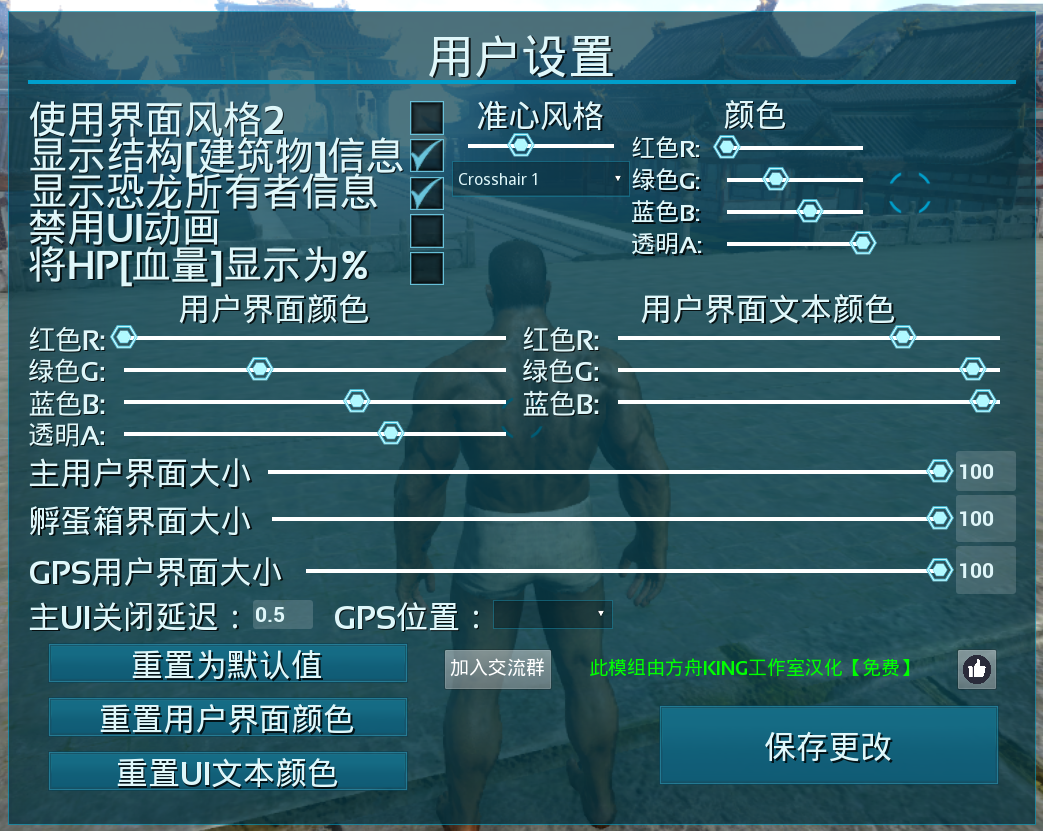
(交流群:296317399(BUG提交以及意见提交建议加群,不会配置INI的可以进群讨论) (FAST超级望远镜功能) -显示有关目标生物的详细信息信息。 -显示野生和驯服的统计数据和突变计数。 -显示驯服所需的驯服食物和数量。 -显示生物颜色和区域。 -显示增益和计时器。 -显示有关受精卵的所有信息。 -显示纬度和经度以及您面对的指南针方向。( GPS的位置可以选择 ) -显示有关供应下降的信息。 -显示有关托运物品袋的信息。 -显示有关结构的信息。 -具有内置夜视,捕食者视觉和轮廓模式。 -UI颜色,UI文本颜色和UI大小可以配置。 -有6种十字准线样式可供选择。并且可以配置十字准线的大小和颜色。 -提供4种不同的使用Spyglass的方式。一个像香草一样使用。基于此的皮肤可以装备在头甲上。一个遥控器,用于打开或关闭它,一个在使用时打开或关闭它的遥控器。 2 种 UI 样式
(按键绑定) -左 Ctrl - 切换目标锁定 ( 版本是你拿着间谍镜切换与主开火按钮) -Alt+MWheel切换 -扫描 Alt+MWheel 缩放 Alt+鼠标重置 -缩放 Alt+Num+ 更改 UI 样式 -Alt+Num- 切换结构信息 -Alt+Num* 切换恐龙所有者信息 -Alt+Num/切换 UI 动画开/关 -Shift+F3 捕食者视觉 -移位+F4 夜视 -移位+F5 轮廓模式 -Alt+Home 打开用户设置菜单 (由方舟KING工作室汉化) (QQ交流群:296317399) (需要定制可以联系管理员)
Chinese version(中文版)- https://steamcommunity.com/sharedfiles/filedetails/?id=2684347797 English version(英文版)- https://steamcommunity.com/sharedfiles/filedetails/?id=2594067220
(SuperSpyglassFAST) -Shows detailt Info about the targeted creature. -Shows Wild and Tamed Stats and Mutation counts. -Shows the tame food and amount needed for a tame. -Shows creature colors and the region. -Shows Buffs and there timers. -Shows All information about fertilized Eggs. -Shows Lat and Lon and the Compass direction you are facing. ( Postion of the GPS can be chosen ) -Shows info about supply drops. -Shows info about droped item bags. -Shows info on structures. -Has build in night vision, Predator vision and Outline mode. -UI Color , UI text color and UI size can be configured. Has 6 crosshair styles to choose from. And the size and color of the crosshair can be configured. Offers 4 different ways to use the Spyglass. One that is used like the vanilla one. A skin based on that can be equiped on the head armor. A remote to toggle it on or off and one that will just toggle it on or off when used. 2 UI styles
(Keybinds) -Left Ctrl - Toggle Target Lock ( The Version were you hold the spyglass Toggles with primary fire button ) -Alt+MWheel Toggle Scan -Alt+MWheel Zoom -Alt+Right Mouse Reset Zoom -Alt+Num+ Change UI Style -Alt+Num- Toggle Structure Info -Alt+Num* Toggle Dino Owner Info -Alt+Num/ Toggle UI Anims On/Off -Shift+F3 Predator Vision -Shift+F4 Night Vision -Shift+F5 Outline Mode -Alt+Home Opens the User Settings Menu
Highlights
From source dataFootprint
Rated a light load on a server.
Last update
Its author last shipped an update 5 yr ago.
超级望远镜FAST(SuperSpyglassPlusFAST) on Nxeon
From our catalogue- One-click install
- Supported on Nxeon ARK: Survival Evolved servers. We download it from Steam Workshop, place it, and restart the server.
- Server load
- light
- Smallest plan we suggest
- ARK — 8 GB (8 GB RAM). This follows our own load rating above, not a benchmark.
- Latest build
- 2021-12-17, released 2021-12-17
Game versions by loader
| Loader | Game versions | Newest |
|---|---|---|
| Workshop |
From 1 recorded build of 超级望远镜FAST(SuperSpyglassPlusFAST).
Run 超级望远镜FAST(SuperSpyglassPlusFAST) on a ARK: Survival Evolved server
Pick a server or deploy a new one above; it is installed in one click.
What kind of mod it is
From the catalogWorkshop
Its source category doesn’t say more about what it does, so NxLabs lists it under Other.
Compatibility
- Game
- ARK: Survival Evolved
Verified at the source
- ✓Steam WorkshopOfficial listing, checked 2026-11-01Open ↗
- ✓Author柏柏, as published on Steam Workshop
- ✓LicenseNot published by the sourceFree














