
About GG Ocular Implant [Retired]
From Steam WorkshopMod ID: 2442087696 This mod is no longer supported, works fine except if you use the middle mouse button to scan favorite foods of modded dino's you might crash. This mod is Clean and Stackable…
Mod ID: 2442087696 This mod is no longer supported, works fine except if you use the middle mouse button to scan favorite foods of modded dino's you might crash. This mod is Clean and Stackable Description: Adds new items that improve the quality of life in game.
Attachments
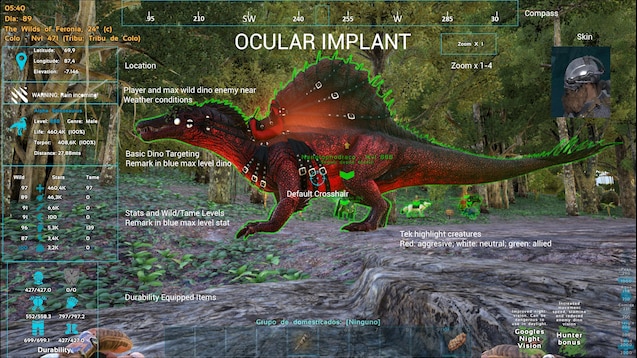
Ocular Implant: Electronic device that show HUD with additional information. Can be activate on armor with remote control. Displays basic information of targeting dinos. Hands free and ignore current riding dino. Display additional taming info of targeting dino - activate with middle button mouse: type of diet, tameable, prefered food: quantity and time. Press Shift to lock dino info without center it in the screen. Remark of higher wild level. Coordinates of position and elevation. Warn you about incoming weather conditions such as Sand Storm and Electrical Storm. Alerts: Rain, Electrical Storm, Superheat, Sandstorm, Earthquake. Grants default crosshair for targeting. Durability of equipped items. Horizontal compass. Tek highlight dino and characters: red: agressive, white: neutral, green: allied, blue: max level wild dino. Warning about enemy character near and max levels wilds dinos. Warning before sunrise for Aberration map. UI Configuration for local player: Shift+F1. Natural night vision: press Shift+F2 to activate/deactivate. Electronic night vision: press Shift+F3 to activate/deactivate. Infrared vision: press Shift+F4 to activate/deactivate.
Engrams Ocular implant: EngramEntry_OcularImplant
Spawn codes Ocular implant: cheat GiveItem "Blueprint\\\'/Game/Mods/GGImplant/OcularImplant/PrimalItemSkin_OcularImplant.PrimalItemSkin_OcularImplant\\\'" 1 0 0
This Mod uses Open Sourced Material from the following Mods and Creators, thank you for paving the way for me to grow and learn how to use the Dev Kit: Nemesis - Accessories Plus
Highlights
From source dataFootprint
Rated a light load on a server.
Last update
Its author last shipped an update 5 yr ago.
GG Ocular Implant [Retired] on Nxeon
From our catalogue- One-click install
- Supported on Nxeon ARK: Survival Evolved servers. We download it from Steam Workshop, place it, and restart the server.
- Server load
- light
- Smallest plan we suggest
- ARK — 8 GB (8 GB RAM). This follows our own load rating above, not a benchmark.
- Latest build
- 2021-11-02, released 2021-11-02
Game versions by loader
| Loader | Game versions | Newest |
|---|---|---|
| Workshop |
From 1 recorded build of GG Ocular Implant [Retired].
Run GG Ocular Implant [Retired] on a ARK: Survival Evolved server
Pick a server or deploy a new one above; it is installed in one click.
What kind of mod it is
From the catalogQuality of life & UI
Small conveniences, tweaks and interface improvements players notice straight away.
Compatibility
- Game
- ARK: Survival Evolved
Verified at the source
- ✓Steam WorkshopOfficial listing, checked 2026-11-01Open ↗
- ✓AuthorPhantom, as published on Steam Workshop
- ✓LicenseNot published by the sourceFree