






About HLNA Everywhere - Configurable Hexagon Shop
From Steam Workshophttps://i.imgur.com/Yr7H1yK.png 2093204830 If you enjoy this mod, please like and favourite. https://i.imgur.com/F5urB9I.gif Join me on Discord https://i.imgur.com/DWKBSCb.png The video is outdated.…
 2093204830
If you enjoy this mod, please like and favourite. 
Join me on Discord

- Ensure HexagonCostMultiplier is NOT 0, otherwises crashes.[/list]

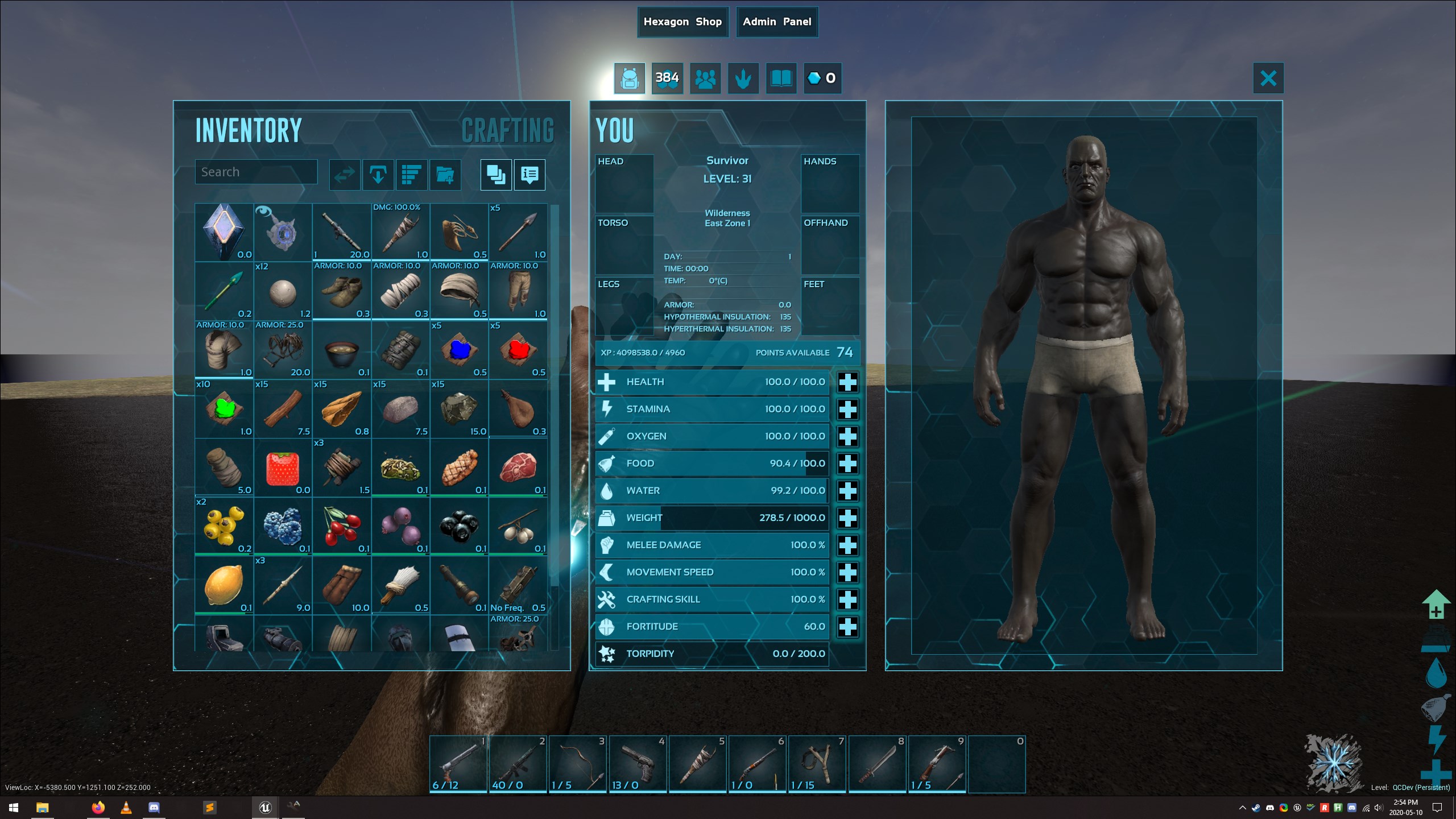
- [list][*]Configurable Hexagon Shop.[*]Works on all maps.[*]Owning Genesis required.[*]This is NOT a custom shop/store.[*]The main feature of this mod is adding the ability for admins to add/remove entries from the Hexagon shop.[*]You may have to turn your UI General Scaling down a few points in order to avoid overlaps for the inventory screen buttons. https://i.imgur.com/1eQvGVZ.png[/list]
- [H1]Admin Commands:[/H1]
- Manual access the admin menu. If you disable the admin button on the inventory screen, this will be the only way to turn it back on.
- [quote]cheat scriptcommand hlnaadminmenu[/quote]

- [h1]GameUserSettings.ini Configs:[/h1]
- READ THE EXPLANATION BEFORE ENABLING!!!
- [quote][HLNAEverywhere]
- UseDynamicItemListing=False
- DisableTeleporting=False[/quote]
- [h1]Game.ini Configs:[/h1]
- These are core Ark configs related to the HLNA Shop and Missions.
- [quote]HexagonRewardMultiplier=1.0
- bHexStoreAllowOnlyEngramTradeOption=true
- HexagonCostMultiplier=1
- bDisableHexagonStore=0[/quote]

- If UseDynamicItemListing=True, a dropdown box of all available items will be used instead of a textbox requiring spawn codes. WAY cooler and it allows you to add lots of custom entries much quicker, but causes a huge client side freeze(Wildcard limitation, nothing I can do about it). I would personally use it when initially setting up the mod, as it would save a bunch of time adding bulk entries, but that's just me. Disabled by default. Use at your own risk.
- DisableTeleporting: If true, the biome teleportation feature on HLNA is no longer available. Default: False

- [list][*]Turn on/off the default items in the hexagon shop.[*]Add up to 100 custom items to the shop, with control over cost and quantity.[*]Add up to 100 custom Loot Crates to the shop, with control over contents and cost.[*]Access the Hexagon Shop and Admin Panel via player inventory screen.[*]Accessible on any map, not just Genesis.[*]Configure how many Hexagons you receive and how often HLNA asks you to "Say Hello".[*]Configure a passive Hexagon for all players. How frequently and how many.[*]Items/Crates can be organized by dragging and dropping them on other items/crates in the Admin Menu.[/list]
- [H1]Other Features:[/H1]
- [list][*]To Enable/Disable default Hexagon Shop items, turn on/off the checkbox in the admin panel.
- In order to remove all custom items/lootcrates, there is a reset button. For safety's sake, spamming the button is required to activate it.[/list]

- [H1]How to Add/Edit:[/H1]
- [list][*]Open player inventory and click on Admin Panel or use the script command listed above.[*]Choose any blank item entry.[*]Enter the spawn code, cost and quantity. If using experimental feature listed above, choose item from dropdown box(you can use filter to narrow down your search).[*]Repeat until all items you want available have been added.[*]Save & Exit. Changes will be applied on server restart OR Force Update to apply changes now.[/list]
- [H1]How to Add Loot Crates:[/H1]
- [list][*]Open player inventory and click on Admin Panel or use the script command listed above.[*]Choose any blank loot crate.[*]Select the lootset it will use.[*]Enter a name, description and cost.[*]Repeat until you have all the loot crates you want.[*]Save & Exit. Changes will be applied on server restart OR Force Update to apply changes now.[/list]
- [H1]Loot Crate Contents:[/H1]
- Lootcrates are way more complicated, but also very customizable outside of Ark. They use the same configurability as boss/beacon loot. You can use the game.ini option to change/add lootcrates. ConfigOverrideSupplyCrateItems
- You can read more about that over here: https://ark.gamepedia.com/Server_Configuration#ConfigOverrideSupplyCrateItems
- There are 100 custom loot crates you can add. 001 through 100.
- LootItemSets_LootCrate_Custom001_C
- LootItemSets_LootCrate_Custom002_C
- .....
- LootItemSets_LootCrate_Custom099_C
- LootItemSets_LootCrate_Custom100_C
- I HIGHLY recommend using https://usebeacon.app/ to make your custom crates.
- How to create a custom loot crate: https://i.imgur.com/D1g1zjW.png
- Custom Lootcrate Examples
- [H1]Hexagons:[/H1]
- [list][*]There is an option for acquiring hexagons passively in the Admin Menu. If that is not what you want or If you're on a map other than Genesis, I suggest using a mod like this.[/list]

Highlights
From source dataFootprint
Rated a light load on a server.
Last update
Its author last shipped an update 3 yr ago.
HLNA Everywhere - Configurable Hexagon Shop on Nxeon
From our catalogue- One-click install
- Supported on Nxeon ARK: Survival Evolved servers. We download it from Steam Workshop, place it, and restart the server.
- Server load
- light
- Smallest plan we suggest
- ARK — 8 GB (8 GB RAM). This follows our own load rating above, not a benchmark.
- Latest build
- 2023-08-16, released 2023-08-16
Game versions by loader
| Loader | Game versions | Newest |
|---|---|---|
| Workshop |
From 1 recorded build of HLNA Everywhere - Configurable Hexagon Shop.
Run HLNA Everywhere - Configurable Hexagon Shop on a ARK: Survival Evolved server
Pick a server or deploy a new one above; it is installed in one click.
What kind of mod it is
From the catalogListed on Steam Workshop as “Workshop”
Economy & shops
Currencies, shops, trading and rewards.
Compatibility
- Game
- ARK: Survival Evolved
Verified at the source
- ✓Steam WorkshopOfficial listing, checked 2026-11-01Open ↗
- ✓AuthorQuellcrest, as published on Steam Workshop
- ✓LicenseNot published by the sourceFree














