






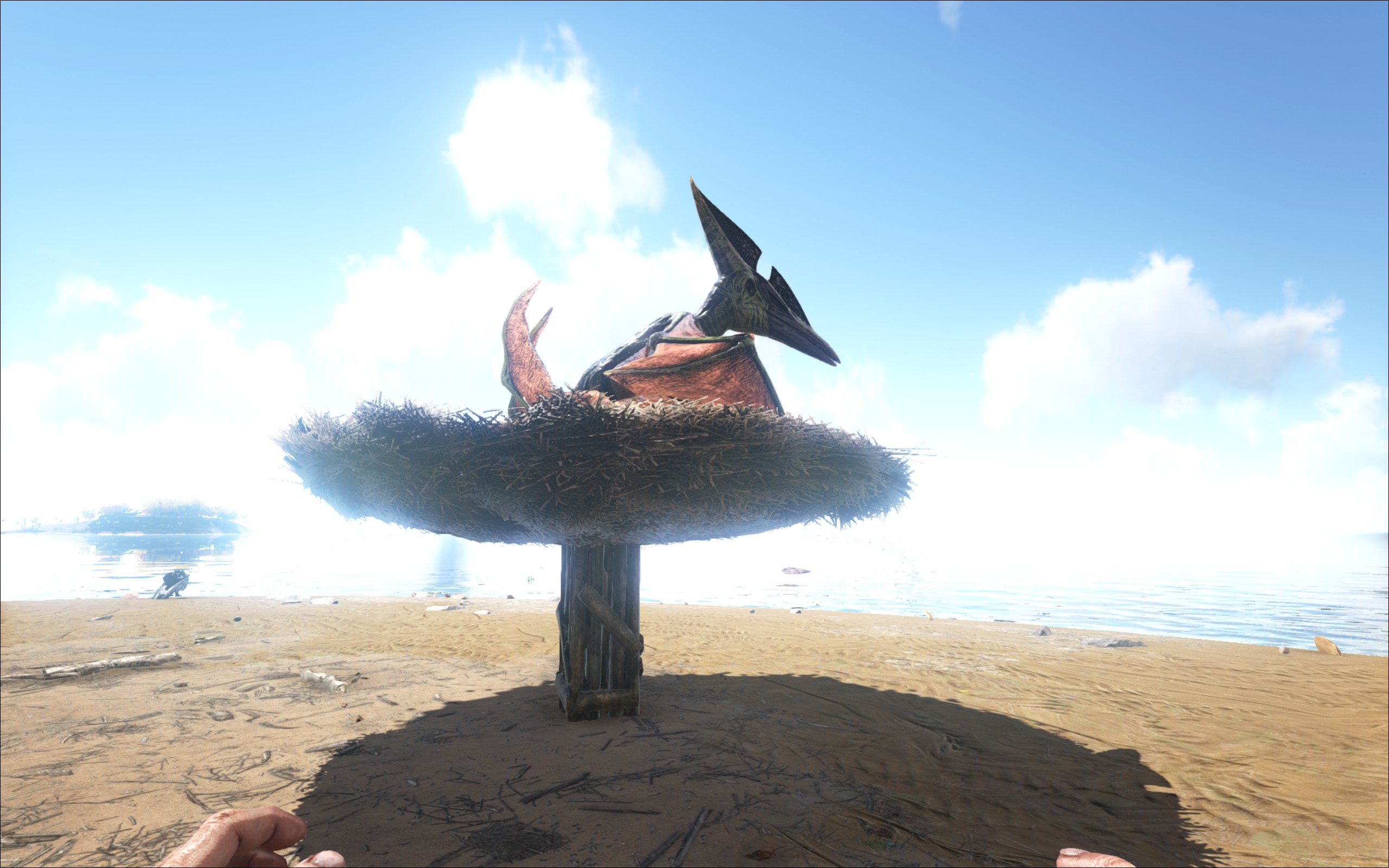

About Kai's Flyer Perches (Discontinued)
From Steam WorkshopAdds 2 small perches, 2 medium perches, and 1 large perch to your game. Perches constructed in your inventory. Also adds a general rally point, monkey/jerboa perch, dodo coop, bird cage, and wolf den…
Adds 2 small perches, 2 medium perches, and 1 large perch to your game. Perches constructed in your inventory. Also adds a general rally point, monkey/jerboa perch, dodo coop, bird cage, and wolf den - warning: wolves do sometimes get stuck trying to get situated in their den.
If you would like any of your dinos to ignore a perch or nest, craft a shiny bauble for them to play with and pop it in their inventory. It will keep them from using their perch/nest/whatever until it’s removed from their inventory.
Mod ID: 781204544
Flyers that are not currently following you will fly to a nearby perch. This depends on the AI sorting out a flight path so it can take a minute for flyers to find their perch. Make sure you leave space around the perches so flyers don't get stuck on their way.
I also added a little signpost that will work with any land-based creature. You need to put the dino’s name on the sign to get it to work. Don't expect miracles. The turning radius on the big dinos in particular is abysmal. But it should help if someone whistles follow all by mistake, especially if you have a nice, open base. The critter perch works for monkeys and jerboas, wolf den works for wolves, and the dodo coop works for (you guessed it!) dodos.
For best results stop them 15 meters or more away. If you give the dino/flyer some ground in between themself and the perch, coop, den, etc they'll have a much easier time getting to their home successfully.
The bird cage works with any dinos that you can pick up. Just throw them at the cage (FF on your keyboard while you're holding the dino) and they'll go inside of it in single player. In multiplayer, you’ll need to put them near it and then use the cage and they’ll get sucked inside. It's a hanging cage. It will snap to the bottom of a ceiling (if it's snapping halfway into the ceiling, step back a few paces and you should find the lower snap point) or you can put it on the ground or on a table.
Small perches will function for flyers up to vulture size and can hold up to 5 flyers. The wooden version will line the flyers up nicely but requires a bit more patience while they get themselves in position. The front of the wooden perch (the direction flyers will face) is the side that the nest hangs off slightly.
The regular medium nest will hold two mid-size flyers. The medium wooden perch holds one and will only work with an Argent by default.
The large perch will function for a Quetz or Wyvern.
Perches can be completely disabled. If you're going on a resource run, try to remember to disable your perch before you leave or give them a bauble to play with, or your flier might run off back to the perch when you go to unload. Flyers on a perch can be set to follow from the perch UI.
All perches can be set to a particular flyer (or group of flyers) by using "Set Flyer" in the radial menu. It will look for the name you enter at the start of the name, so on the small perches if you designate them to "Killer", Killer Jeff, Killer Joe, and Killer Bob can all use that perch. Set to "public" to make any flyers use it again. You can also select the classes of flyers that will use the perch by using the “Set Type” function.
Default detection distance is 10000 (100 meters). Perch detection distance and whether the mod affects wandering dinos can be set in your gameusersettings.ini -
[FlyerPerchSettings] DetectionDistance=10000.0 AffectWandering=false
Highlights
From source dataFootprint
Rated a light load on a server.
Last update
Its author last shipped an update 10 yr ago.
Kai's Flyer Perches (Discontinued) on Nxeon
From our catalogue- One-click install
- Supported on Nxeon ARK: Survival Evolved servers. We download it from Steam Workshop, place it, and restart the server.
- Server load
- light
- Smallest plan we suggest
- ARK — 8 GB (8 GB RAM). This follows our own load rating above, not a benchmark.
- Latest build
- 2017-04-06, released 2017-04-06
Game versions by loader
| Loader | Game versions | Newest |
|---|---|---|
| Workshop |
From 1 recorded build of Kai's Flyer Perches (Discontinued).
Run Kai's Flyer Perches (Discontinued) on a ARK: Survival Evolved server
Pick a server or deploy a new one above; it is installed in one click.
What kind of mod it is
From the catalogQuality of life & UI
Small conveniences, tweaks and interface improvements players notice straight away.
Compatibility
- Game
- ARK: Survival Evolved
Verified at the source
- ✓Steam WorkshopOfficial listing, checked 2026-11-01Open ↗
- ✓AuthorTony, as published on Steam Workshop
- ✓LicenseNot published by the sourceFree














