






About Level Cap & Engram Increase Dinos and Players
From Steam WorkshopPLEASE READ! IMPORTANT MOD WILL NOT WORK WITHOUT FOLLOWING THESE INSTRUCTIONS This mod will change the level cap for players to 150, the level cap for tamed dinos (How much they can increase when…
PLEASE READ! IMPORTANT MOD WILL NOT WORK WITHOUT FOLLOWING THESE INSTRUCTIONS
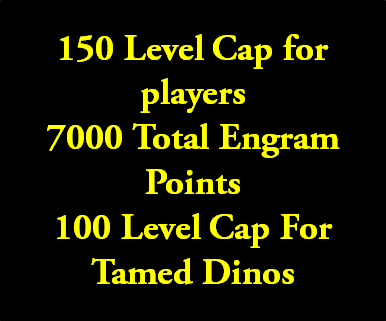
This mod will change the level cap for players to 150, the level cap for tamed dinos (How much they can increase when tamed) to 100 and change engram points to way over 5000 which is enough to purchase everything.
1. Subscribe to the mod
2. Open up "Steam\SteamApps\workshop\content\346110"
3. Find folder marked "498435029"
4. Open up filezilla or other FTP program or open up file manager on hosting server
5. On the server you need to copy the folder to "ShooterGame/Content/mods/" If there is no mods folder, then create one.
6. In the end your server directory should look like this ShooterGame/Content/mods/498435029 with that folder with all of the mod files
7. Now you need to add the mod id to your command line. The mod code is "GameModIds=496769958" make sure there is no comma next to the last mod id or if you have more than one mod then add a comma after the first ID but make sure there is not a comma at the end of the last mod id.
8. You need to edit the .ini (gameusersettings.ini) so open this up using configuration editor or using FTP / File manager
9. Under server settings you need to add the two following server commands
OverrideMaxExperiencePointsPlayer=2000000 OverrideMaxExperiencePointsDino=10000000
This changes the max XP amount you can earn on your server, just copy and paste the code into the gameusersettings.ini under the heading [ServerSettings]
10. Now you need to open the other .ini file called game.ini and paste into it this whole script
http://pastebin.com/y3BkVWGv
Open that link, select all, copy and paste into your game.ini under the [/script/shootergame.shootergamemode] heading (Create this if it is not already there)
11. Restart your server
12. Rate this mod positive and favourite this mod
13. Done!
Server running this mod:
http://ark-servers.net/server/31171/ (Visit that link and click the blue "Connect" button)
Taming Speed: 25x XP Amount: 10x Harvest: 25x PVP, No rules!
Highlights
From source dataFootprint
Rated a light load on a server.
Last update
Its author last shipped an update 11 yr ago.
Level Cap & Engram Increase Dinos and Players on Nxeon
From our catalogue- One-click install
- Supported on Nxeon ARK: Survival Evolved servers. We download it from Steam Workshop, place it, and restart the server.
- Server load
- light
- Smallest plan we suggest
- ARK — 8 GB (8 GB RAM). This follows our own load rating above, not a benchmark.
- Latest build
- 2015-08-12, released 2015-08-12
Game versions by loader
| Loader | Game versions | Newest |
|---|---|---|
| Workshop |
From 1 recorded build of Level Cap & Engram Increase Dinos and Players.
Run Level Cap & Engram Increase Dinos and Players on a ARK: Survival Evolved server
Pick a server or deploy a new one above; it is installed in one click.
What kind of mod it is
From the catalogCreatures & NPCs
Adds or changes creatures, NPCs and how they behave.
Compatibility
- Game
- ARK: Survival Evolved
Verified at the source
- ✓Steam WorkshopOfficial listing, checked 2026-11-01Open ↗
- ✓AuthorMichael, as published on Steam Workshop
- ✓LicenseNot published by the sourceFree














