







About Useful Tools
From Steam WorkshopMod ID: 1995303438 Release Date: Feb 11 2020 Mod Summary This mod adds paint removal tools, a Selector to quickly swap weapons and tools, a tool to copy/paste/cycle structure variants, and several…
Mod ID:
1995303438
Release Date:
Feb 11 2020
Mod Summary
This mod adds paint removal tools, a Selector to quickly swap weapons and tools, a tool to copy/paste/cycle structure variants, and several tools based on the old S+ tools. Many of those tools have been enhanced in some way.
There is no crafting station at this time. All items are crafted on the player.
There are no known conflicts running my mod alongside S+ or SuperStructures.
List of Tools:
See the discussions section for detailed descriptions of each tool and their controls.
Selector - Place on your hotbar and use it to access a quick-selection menu for any tool or weapon in your inventory, up to a max of 25. It will also show basic consumables like cooked meat, soups, and brews.
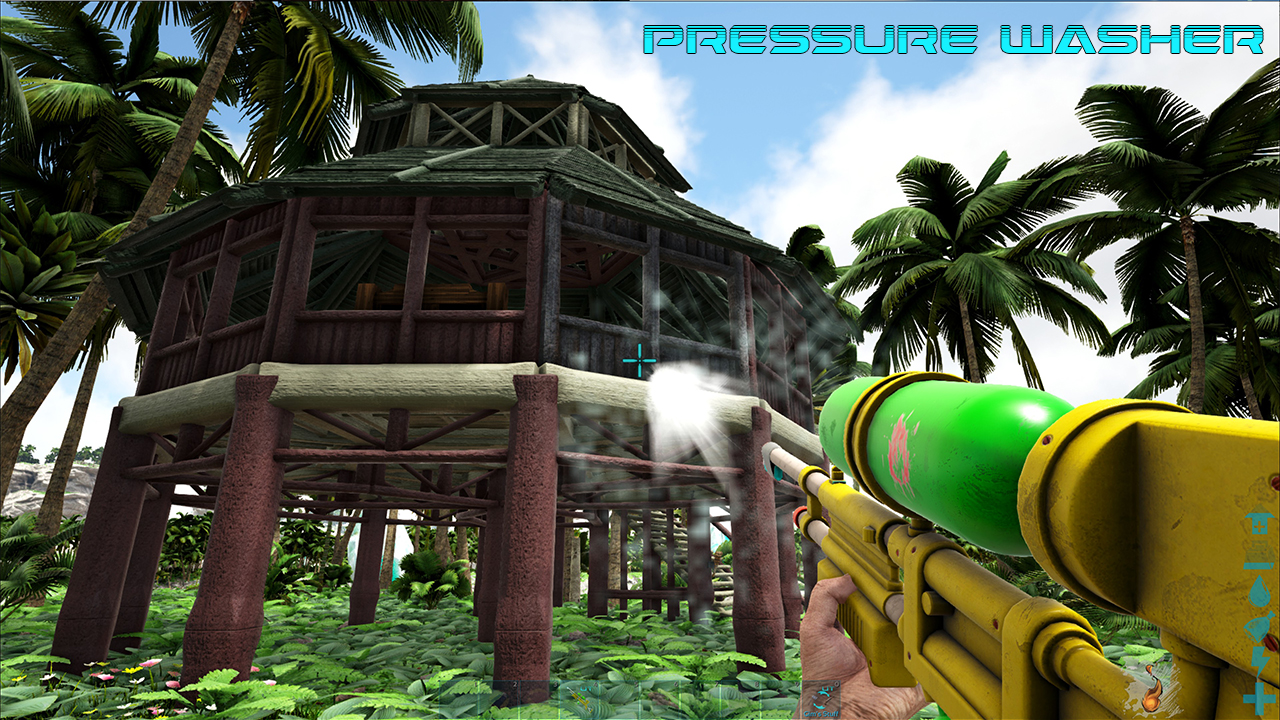
Pressure Washer - A ranged tool to remove paint from any structure at a distance. Just point and shoot. Alt-G will cycle through 2 Batch Cleaning Modes, which will remove paint from all connected structures of same type, or all types. Must be enabled first in the INI.
Paint Scraper - A melee paint removal tool for low level players. Remove paint from any structure by equipping it and attacking a structure at close range.
Paint Sprayer - Based on the S+ Spray Painter. Now includes a dye menu to quickly equip dyes. Left click the Dyes to equip them, Right click the dyes to spawn 10 in your inventory. Alt-G will cycle through 2 Batch Paint modes that paint all connected structures of the same type, or all types. Must be enabled in INI first.
Paintbrush - Functions like the Paint Sprayer, but limited to the same range as the vanilla paintbrush. Good for lower level players or RP servers that don't allow paint guns. Lacks the spawn dye option.
Euthanasia Gun - Works like the original S+ Euthanasia gun. New visuals.
Remote Control - Similar to original S+ Remote Tool, with expanded functionality. Instead of cycling between modes, press R to open a menu which will let you set 8 different structure settings. Note: I really wanted to add Pin Code setting and Structure Naming, but the Devkit does not seem to allow modders to set either.
Repair Tool - Works like the original S+ Repair Tool. New visuals.
Transfer Gun - Works like the original S+ Transfer Gun. New visuals.
Transfer Tool - Works like the original S+ Transfer Tool.
Inventory Assistant - Works like the original S+ Inventory Assistant.
Command Tool - Similar to original S+ Command Gun, with expanded functionality. Set many dino settings from a menu and then "shoot" the dino to apply the settings all at once. Create up to five presets. You can deactivate each dino setting to prevent changing those settings. You can name dinos with the tool. Tribe Admins can now also set Ranks on dinos. It now respects Pet Order Rank when applying commands.
Compass - Using it provides a Compass Heading on your HUD. Use it again to disable it. You must keep it in your inventory or on your hotbar to use it. Same engram and crafting requirements as vanilla Compass.
GPS - Same as Compass, but includes Latitude, Longitude, and Elevation. Same engram and crafting requirements as vanilla GPS.
Dino Scanner - Handheld version of the Dino Scanner from the old S+ (or current SuperStructures). It also shows the Elevation of the dinos, which in combination with the GPS makes it easier to find them in more vertical maps or areas.
Structure Gun - Modes include Pickup, Demolish, Delete, and Structure Variant. Delete mode is like Demolish but gives no resources back. Structure Variant mode cycles through any additional appearances on a structure, and can copy/paste the appearances. This gun obeys the same ini settings as the Pickup and Demo guns.
INI settings
[UsefulTools] DisablePickupWhenDamaged=false AllowAdminToDemolishAnyTribe=false RequireDyeInInventory=false TransferRangeInFoundations=(25-100) TransferResourceRemovals= TransferResourceAdditions= AdminOnlyDinoScan=false DisableDinoScanDetails=false DisableDinoScanMap=false DisableElevationOffset=false AdditionalStructurePreventPickup= EnableBatchPaintModes=false
For more details about what each setting does, see the related discussion.
Thanks
Big thanks to ExileAcid for helping me become acquainted with the Ark Devkit, and providing guidance on my very first mod.
Thanks to Orionsun for open-sourcing his mods.
Thanks to the Ark Modding discord, especially Koz, for all the help, advice, tips and troubleshooting.
Check out my other mods
Arkitect A mod to improve the crafting, spawning, and building experience. 
Snap Fixer Plus A mod that adds snap compatibility between mods like S+ and CKF. It can also resize CKF Legacy structure parts to the correct size to fit with official structures (and most other structure mods). Long term plan is to fix old abandoned structure mods and add S+ snaps to them as well. 
Meta Tags ut paint removal remove cleaning clean cleaner soap infinite reusable better pick up pickup demo demolish gun tool ranged just only tools range useful gamepad improved brush spray sprayer ocean platform s+ splus plus + power pressure wash washer multitool multi select selector quick inventory assistant transfer command neuter spay remote control euthanasia repair transfer gun inventory assistant rank ranks compass gps coord coordinates elevation dino scanner hud heading heads up display mass group
Highlights
From source dataFootprint
Rated a light load on a server.
Last update
Its author last shipped an update 5 yr ago.
Useful Tools on Nxeon
From our catalogue- One-click install
- Supported on Nxeon ARK: Survival Evolved servers. We download it from Steam Workshop, place it, and restart the server.
- Server load
- light
- Smallest plan we suggest
- ARK — 8 GB (8 GB RAM). This follows our own load rating above, not a benchmark.
- Latest build
- 2022-02-25, released 2022-02-25
Game versions by loader
| Loader | Game versions | Newest |
|---|---|---|
| Workshop |
From 1 recorded build of Useful Tools.
Run Useful Tools on a ARK: Survival Evolved server
Pick a server or deploy a new one above; it is installed in one click.
What kind of mod it is
From the catalogWeapons, items & crafting
New weapons, gear, items and the recipes to make them.
Compatibility
- Game
- ARK: Survival Evolved
Verified at the source
- ✓Steam WorkshopOfficial listing, checked 2026-11-01Open ↗
- ✓AuthorGimilkhad, as published on Steam Workshop
- ✓LicenseNot published by the sourceFree














