About Keycard Manager
From Steam WorkshopKeycard Manager Current tested Barotrauma version: v1.13.4.0 Requires LuaCsForBarotrauma with C# mods enabled. Installation instructions are included below in the LuaCs / C# Setup section. Keycard…
Keycard Manager
Current tested Barotrauma version: v1.13.4.0
Requires LuaCsForBarotrauma with C# mods enabled. Installation instructions are included below in the LuaCs / C# Setup section.
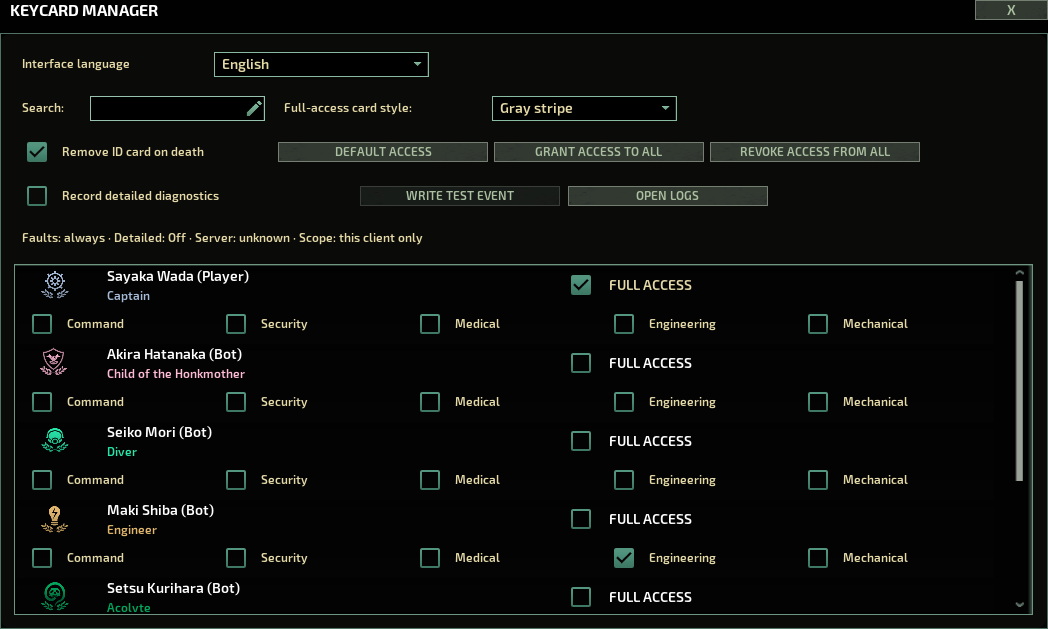
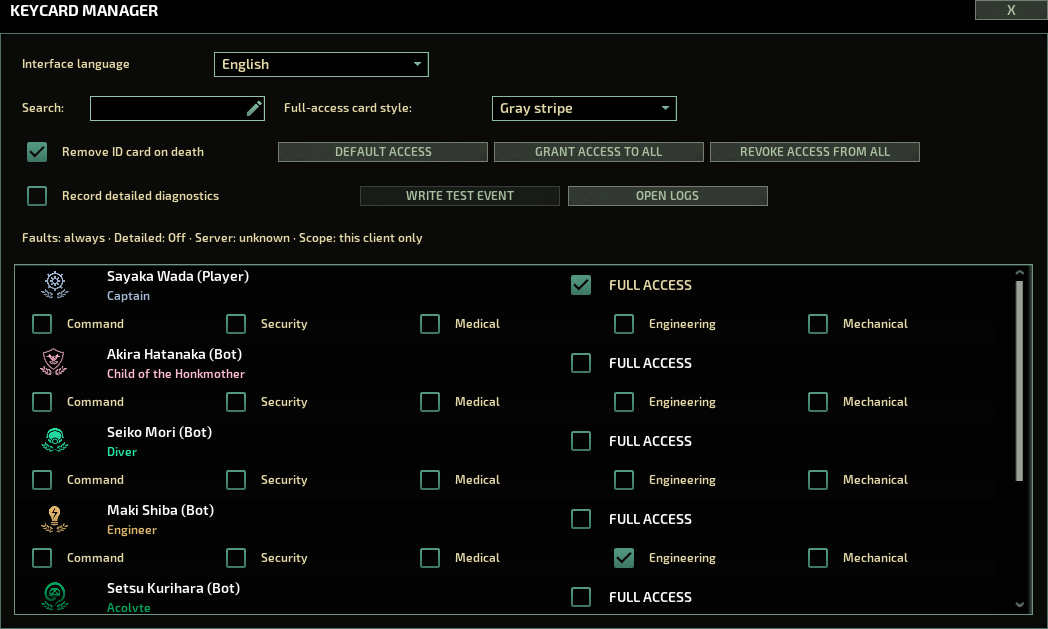
Keycard Manager lets you manage additional access permissions on permanent crew members' personal ID cards. Keycard Manager can be added to or removed from an existing multiplayer campaign.
Grant individual department access or full access, configure defaults for newly spawned crew, and choose how full-access cards look.
Permissions are tied to persistent character identity rather than display name, so renamed characters and crew members with identical names remain separate.
Quick Start
Load into your multiplayer campaign first.
Open Keycard Manager with:
F7
You can also use:
/km[/code]

or the console command:

[code]keycard
Select a crew member and enable the access departments you want to grant.
Features
- Per-character ID card permissions
- Manage Command, Security, Medical, Engineering and Mechanical access independently for each permanent crew member.
- Full access
- Grant all supported department access together with access derived from the submarine's supported waypoint/card tags.
- Server-authoritative permissions
- Permission changes are validated by the server rather than trusted from the client.
- Persistent character identity
- Permissions are linked to the actual character rather than their displayed name. Two crew members with the same name can have different permissions, and renaming a character does not transfer their access to someone else.
- Personal cards only
- Keycard Manager changes only cards it can identify as belonging to that character. Borrowed or ambiguous cards are left untouched.
- Multiple personal cards
- If a character carries several proven personal cards, tracked grants and revocations are applied consistently to all of them.
- Default access for new crew
- Configure automatic permissions for newly spawned players and bots.
- By default, profession-based access is enabled:
- Captain — Full access
- Security Officer — Security
- Medical Doctor — Medical
- Engineer — Engineering
- Mechanic — Mechanical
- You can disable profession-based defaults and configure player/bot defaults manually.
- Full-access card appearance
- Choose between:
- Gold card
- Gray stripe
- Profession-based appearance
- Optional ID removal on death
- When enabled, a confirmed death removes the character's proven personal ID card. A new authorized personal card can be issued when the character respawns.
- Borrowed and unidentified cards are not removed.
- Bulk controls
- Grant full access to all listed permanent crew or revoke Keycard Manager's tracked grants from all of them.
- English, Russian and Simplified Chinese
- Each player can independently choose the Keycard Manager interface language without changing Barotrauma, the server, MCM, or another player's language.
Important — Permissions Are Additional Grants
Keycard Manager adds access to a character's personal card. It does not replace Barotrauma's normal job/card permissions with a deny-list.
An unchecked permission does not necessarily mean that the character cannot open that area.
For example, a captain's normal ID card can still open captain-authorized doors even if every Keycard Manager checkbox is disabled.
Access may also come from:
- The character's native job ID card
- Another carried or borrowed ID card
- Access tags added by another mod
- Old access tags already stored on a physical card
When Keycard Manager revokes a permission, it removes only access grants that it previously recorded as its own.
It deliberately does not erase unknown/native/other-mod tags because their origin cannot be safely determined.
LuaCs / C# Setup
This mod uses C# and will not work with vanilla Barotrauma alone.
You need LuaCsForBarotrauma installed: LuaCsForBarotrauma — installation guide
You can also subscribe to the C# support Workshop item here: Cs For Barotrauma
After installing LuaCs, enable C# mods here: Settings → LuaCs icon → Mod Gameplay Settings → Are C# Mods Allowed → Enabled
Screenshot: How to enable C# mods
Important: C# mod loading is disabled by default in LuaCs.
Classic Install Method (Windows): If you do not want to use Steam launch options, you can use the Classic Install Method from the LuaCsForBarotrauma guide.
In short:
1. Subscribe to LuaCsForBarotrauma. 2. Open the hosting menu. 3. Select LuaCsForBarotrauma as the server executable. 4. Host a server. 5. Open the console with F3. 6. Run:
install_cl_lua[/code]

7. Restart the game.

This method is a quick alternative on Windows if you do not want to modify Steam launch options.

[b]Notes:[/b]
[list]
[*]The Classic Install Method does not support Linux or macOS.
[*]A Barotrauma update or Steam file verification can remove the client-side Classic installation, so you may need to repeat it.
[*]Fully restart the client and server after installing or updating C# mods.
[*]The server and clients should use the same version of Keycard Manager.
[/list]


[h2]Safe to Add or Remove[/h2]

Keycard Manager does not replace Barotrauma's character or campaign saves.

Characters and physical ID cards remain in Barotrauma's native campaign data. The separate Keycard Manager permission file contains optional permission records and settings, not copies of your crew.Highlights
From source dataFootprint
Rated a light load on a server.
Last update
Its author last shipped an update 6d ago.
Keycard Manager on Nxeon
From our catalogue- One-click install
- Not available. One-click install isn't available for this game's mods yet. Download it and upload it to your server in Files.
- Server load
- light
- Smallest plan we suggest
- Barotrauma — 2 GB (2 GB RAM). This follows our own load rating above, not a benchmark.
- Latest build
- 2026-10-11, released 2026-10-11
Game versions by loader
| Loader | Game versions | Newest |
|---|---|---|
| Workshop |
From 1 recorded build of Keycard Manager.
Dependencies
- Required: LuaCsForBarotrauma
Declared by the newest build that lists any. Required ones are installed with it on one-click installs.
Run Keycard Manager on a Barotrauma server
Deploy a server above, then upload the file in Files.
What kind of mod it is
From the catalogQuality of life & UI
Small conveniences, tweaks and interface improvements players notice straight away.
Compatibility
- Game
- Barotrauma
Verified at the source
- ✓Steam WorkshopOfficial listing, checked 2026-10-14Open ↗
- ✓AuthorCP enthusiast, as published on Steam Workshop
- ✓LicenseNot published by the sourceFree