About Edit Appearance v1.2.6
From Steam WorkshopMod ID: 2879367569 Use this mod to edit the appearance of your in-game player character, thralls, and workstation thralls. You can also pose your thralls, add distance triggers to activate emotes.…
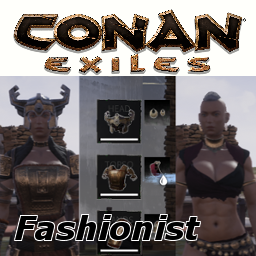
Mod ID: 2879367569 [hr] Use this mod to edit the appearance of your in-game player character, thralls, and workstation thralls. You can also pose your thralls, add distance triggers to activate emotes. Make thrall emotes differently to you, your clanmates, and other players. Turn your thrall into props. (Takes no damage, cannot attack, and cannot be attacked.) See details below.
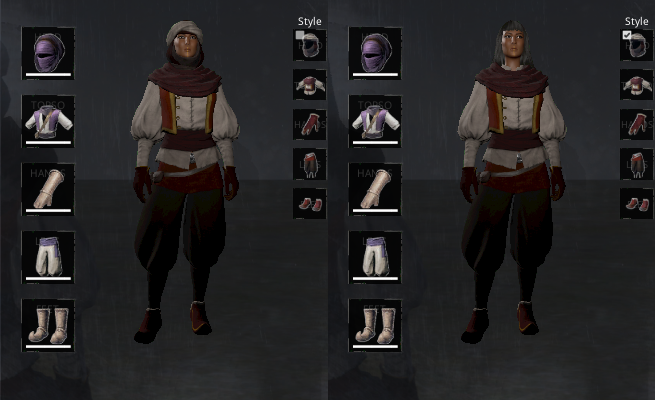
Choose facial features, body features, armors, dyes, gender, voice to whatever you want your thralls to appear in game. Set which armor parts to show, lock them without affecting actual armor being worn. Save your fine tunings to profiles and re-apply them to other thralls.
Pose your thrall on a bed, select 4 different type of sleep emotes and randomly timed them to look like he/she is tossing and turning when sleeping.
Admins can edit all human characters in game, including other players and their thralls. They can also pose other players' thralls.
This mod makes no changes to OG files and should be compatible any other mods and future game updates (fingers-crossed).
[hr]
Features List:
[table noborder=1][tr][td]-[/td][td]Change Gender, Voice[/td][/tr][tr][td]-[/td][td]Edit Facial Features, Body Features, including Colors[/td][/tr][tr][td]-[/td][td]Edit Makeups and Warpaints[/td][/tr] [tr][td]-[/td][td]Edit Armors and Dyes Appearance only, will not change your actual equipment.[/td][/tr][tr][td]-[/td][td]Change Slider Limits, go beyond game norms Accessible with admin privileges.[/td][/tr][tr][td]-[/td][td]Save your Character Changes to Profiles.[/td][/tr][tr][td]-[/td][td]Edit ANY Humanoid Characters. This includes character objects from other mods, see Technical Details below.[/td][/tr][tr][td]-[/td][td]Pose Thralls. Set a list of emotes to play randomly. Select different ways to repeat emotes.[/td][/tr][tr][td]-[/td][td]Sit Thralls. Make use of chair/thrones/stools! Let your thralls sit on them.[/td][/tr][tr][td]-[/td][td]Add Emote Triggers. Triggers let your thralls emote when players get within certain distances.[/td][/tr][tr][td]-[/td][td]Save your Emote Settings to Profiles.[/td][/tr][tr][td]-[/td][td]Turn Thralls into Props. Prop thralls takes no damage, cannot attack and will not be attacked.[/td][/tr][/table]
All changes made are applied to server and replicated in a multi-player game. All profiles are saved locally on player's machine and they are not shared.
[hr]
To Use:
Edit Thralls: Select the Appearance button when you activate the radial menu. (Default: Target Thrall, Hold 'E', Select Appearance Button.)
Edit Artisan Thralls: Target the workstation and activate the radial menu. (Default: Target Workstation, Hold 'E', Select Appearance Button.)
Edit Player Character: Go to vanity mode, press activate. (Default: Press 'V', Hold 'E'.)
Edit ANY Other Humanoid Character/Object: Target, press activate. (Default: Target, Hold 'E'.)
[hr]
Technical Details:
Users with admin rights can edit characters they do not own. This includes other players, their thralls, character-like objects, NPCs, and workstations containing thralls.
To edit humanoid objects from another mod, 'HasCharacterLayout Interface' should be implemented by the mod maker. Interfaces in Unreal Engine allow mods to communicate with each other in game. (Modder's Note: Size3D and VoiceType need to be set as well.)
Without interface implementation, this mod works on a lesser degree. It will 'wrap' the edited visual on to the object, but without access to internal data, actual layout details are untouched. A Remove button is added to remove this 'wrapping'.
Note on NPC editing: Most NPCs in the game are 'non-persistent'. Their appearance will reset every time the game restarts or when they re-spawn. Any changes you made will not be retained. While it is possible to edit the re-spawn table, it would be out of the boundaries and function this mod. After all, it is Edit Appearance, not Edit Spawns.
[hr]
My Other Mods:
[hr] Support this mod, please Donate<-(Preferred) or PayPal.
Thank you and enjoy.
[hr] Mods used for screenshots:
Highlights
From source dataFootprint
A 2 MB download, rated a light load on a server.
Last update
Its author last shipped an update 4 yr ago.
Edit Appearance v1.2.6 on Nxeon
From our catalogue- One-click install
- Not available. One-click install isn't available for this game's mods yet. Download it and upload it to your server in Files.
- Server load
- light
- Smallest plan we suggest
- Conan Exiles — 6 GB (6 GB RAM). This follows our own load rating above, not a benchmark.
- Latest build
- 2023-01-09, released 2023-01-09, 2 MB
Game versions by loader
| Loader | Game versions | Newest |
|---|---|---|
| Workshop |
From 1 recorded build of Edit Appearance v1.2.6.
Run Edit Appearance v1.2.6 on a Conan Exiles server
Deploy a server above, then upload the file in Files.
What kind of mod it is
From the catalogGameplay & overhauls
New mechanics, content and overhauls that change how the game plays.
Compatibility
- Game
- Conan Exiles
- File size
- 2 MB
Verified at the source
- ✓Steam WorkshopOfficial listing, checked 2026-10-10Open ↗
- ✓AuthorIdeaPoet, as published on Steam Workshop
- ✓LicenseNot published by the sourceFree