About [Legacy] Shadows of Skelos Vol. 3 - v1.2.0
From Steam WorkshopLegacy - v.1.2.0 Mod ID: 2744140111 Item-, Recipe- and Feat-Table range from 6561001-6569XXX (not all in use atm) Incompatibilities: + Shani's Stuff --> There might appear irregular crashes when…
Legacy - v.1.2.0 Mod ID: 2744140111 Item-, Recipe- and Feat-Table range from 6561001-6569XXX (not all in use atm)
Incompatibilities: + Shani's Stuff --> There might appear irregular crashes when using Shanis Stuff mod together with SvS Extended regarding to reports. Use both mods together at your own risk..
PHOTOSENSITIVE SEIZURE WARNING:
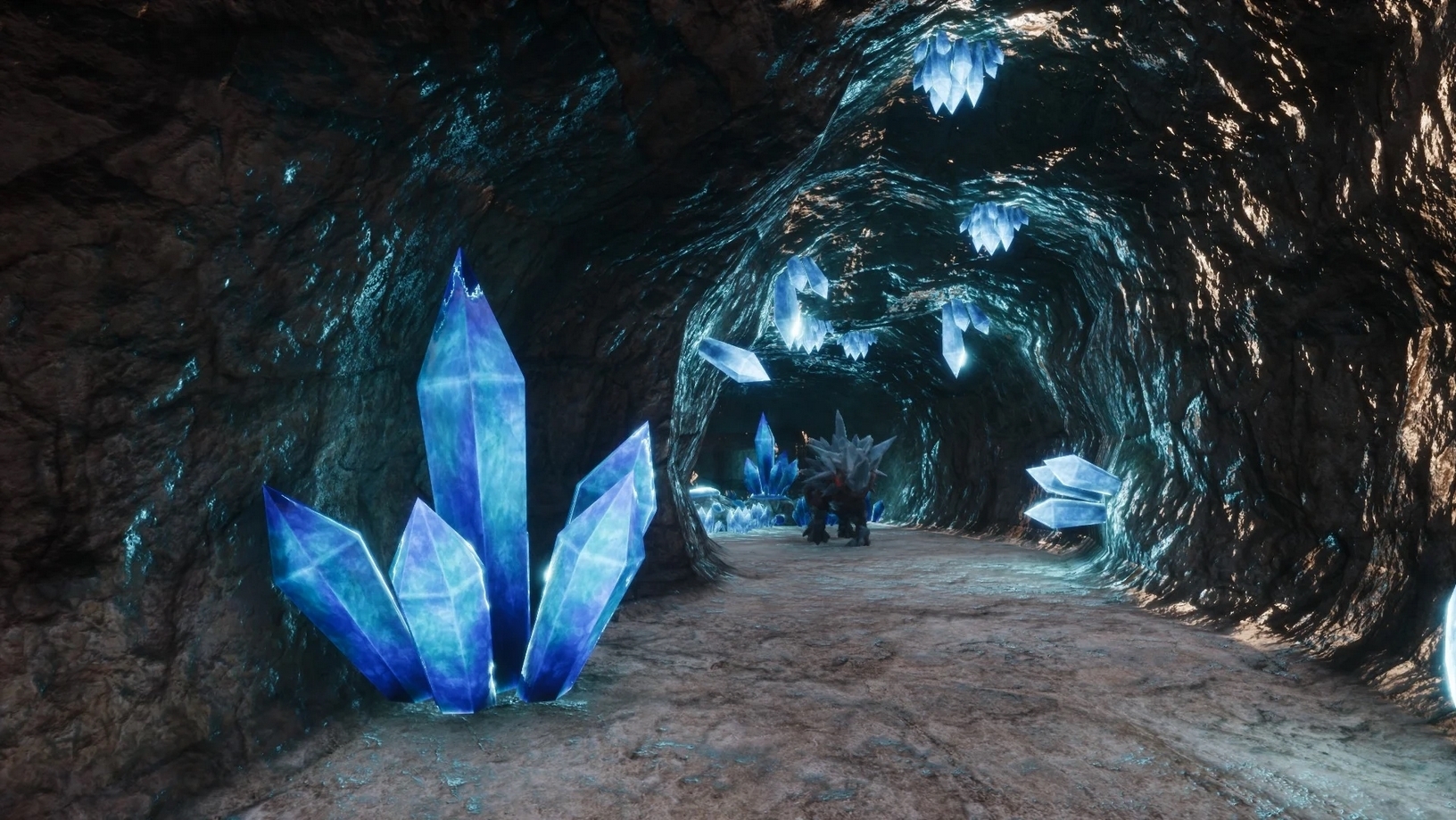
!! In this mod there are some placeables (Mushrooms and Crystals) which have some slow - but whirling, emissive glow-effects. These may cause a photosensitive epileptic seizure. Viewers discretion is advised. !!
 This mod contains a total of 470 items.
All items are admin spawn only.
Features: Cave parts (tunnes, caves) as building parts: + I-Sections + L-Sections + Seam Covers + Entrances + Dead-End Caps + T-Sections + X-Sections + Arches (There is no Arch 07)
IMPORTANT: All tunnels and caverns can NOT be dismantled or returned to inventory using the radial menu. This is working as designed to prevent accidentally pickup/dismantle of decorated caverns. Building parts have 0 stability costs and snap to foundations or ceilings (with columns). They work exactly the same like ceilings. If you remove one inbetween, all parts are removed until the next part stabilized with foundations / ceilings & columns.
You can adapt the color of the cavern parts using the Material Swapper (Mod ID: 2762696414) https://steamcommunity.com/sharedfiles/filedetails/?id=2762696414
Placeables: + 18 Stone Mesa + 52 Rock Columns (and some ceiling versions as Stalagtites) + 50 Stalagmites + 50 Stalagtites + 9 Glowing Mushrooms (Wall, Ceiling, Floor, 8 different colors each, with fitting light, with and without Will'O'Wisps around) + 9 Crystals (Wall, Ceiling, Floor, 8 different colors each, with fitting light, with and without Will'O'Wisps around) + 66 Rocks + 9 Spires + 3 Stone Bridges + 1 Floor + 2 Magical Lamps (sizes 6 and 7 do shrink the lamps) + 2 Wooden Beams + 2 Fluidplanes
All placeables have SAW activated and can at least be used to re-position the placeable. Restriction are lifted for SvS3 SAW Reposition to be within 768 / - 768 instead of 256 / -256 units (as in SvS Extended or SvS Vol. 2)
Admin Tools (Other section of admin menu): + Activate SAW (Aim) + Remove SvS Things (Removes SvS Placeables in a certain radius around you, cavern parts are untouched!) + Clean Up (SvS) -> works like "Remove SvS Things" but will ALSO remove cavern parts! + 9 Emissive Switchers (to change color of material of mushroms and crystals at once in a certain radius around you) + 27 Switcher with rock color scheme
+NEW DataCmd In Admin Console type DataCmd SvS3_Placement_Fix status -> get current status of Placement Fix DataCmd SvS3_Placement_Fix true -> set Placement Fix to be active DataCmd SvS3_Placement_Fix false -> set Placement Fix to be inactive
Default: SvS3_Placement_Fix = false SvS3_Placement_Fix will toggle the placement improval for SvS3 items (e.g. to better place wall items on not vertical enough surfaces)
If used together with Shadows of Skelos - Extended there is a similar DataCmd since patch 1.6.1. Please check the corresponding patch notes of SvS Ext!
 Here are things good to know:
Naming scheme C = Cave I = I Section = 2 opposite openings L = L Section = 2 openings in 90 degrees shift T = T Sectioon = 3 openings, whereas 2 are opposite and 1 in 90 degrees shift X = X Section = 4 openings, every 2 of which are opposite each other D = Heigh difference O = open/no ceiling R = Runthrough (cave) H = Hallway F = some bonus part
Rock Color Scheme 1 Dark Brown 01 2 Dark Brown 02 3 Dark Brown 03 4 Dark Brown 04 5 Dark Red 01 6 Dark Red 02 7 Dark Red 03 8 Dark Red 04 9 Moss Brown 10 Gray 01 11 Gray 02 12 Gray 03 13 Gray 04 14 Gray 05 15 Gray 06 16 Floor 17 Green 01 18 Green 02 19 Green 03 20 Green 04 21 Green 05 22 Light Brown 01 23 Light Brown 02 24 Light Brown 03 25 Light Brown 04 26 Sand 01 27 Sand 02 28 Wall 01 29 Wall 02 30 Dark Red 04 with Moss
Numbers shown here will match the color within SAW (Shadows of Skelos - Appearance Widget).
Emissive Color Scheme: 1 Emissive Lightblue 2 Emissive Darkblue 3 Emissive Green 4 Emissive Pink 5 Emissive Red 6 Emissive Orange 7 Emissive Yellow 8 Emissive White
Light Schemes (Crystals & Mushrooms): 1 Emissive Lightblue - Will'o'Wisps off 2 Emissive Lightblue - Will'o'Wisps on 3 Emissive Darkblue - Will'o'Wisps off 4 Emissive Darkblue - Will'o'Wisps on 3 Emissive Green - Will'o'Wisps off 5 Emissive Green - Will'o'Wisps on 6 Emissive Pink - Will'o'Wisps off 7 Emissive Pink - Will'o'Wisps on 8 Emissive Red - Will'o'Wisps off 9 Emissive Red - Will'o'Wisps on 10 Emissive Orange - Will'o'Wisps off 11 Emissive Orange - Will'o'Wisps on 12 Emissive Yellow - Will'o'Wisps off 13 Emissive Yellow - Will'o'Wisps on 14 Emissive White - Will'o'Wisps off 15 Emissive White - Will'o'Wisps on
Sizes of Rectangular Fluidplane 1 => 1x1 2 => 25 x 25 3 => 45 x 20 4 => 20 x 45 5 => 40 x 70 (shifted in X axis) 6 => 45 x 45 7 => 70 x 70 8 => 80 x 80 9 => 90 x 90 10 => 100 x 100
 For SUPPORT join my Mod-Discord: https://discord.gg/tzq8Ccn
 If you want to support me to buy new assets in the Unreal Marketplace or simply leave a small "Thank you", feel free to donate: Donate via Ko-fi
 Funcom, it's logos and emblems and trade dress are registered and unregistered trademarks of Funcom or it's subsidiaries, joint ventures or associates.
Highlights
From source dataFootprint
A 610 MB download, rated a light load on a server.
Last update
Its author last shipped an update 5 mo ago.
[Legacy] Shadows of Skelos Vol. 3 - v1.2.0 on Nxeon
From our catalogue- One-click install
- Not available. One-click install isn't available for this game's mods yet. Download it and upload it to your server in Files.
- Server load
- light
- Smallest plan we suggest
- Conan Exiles — 6 GB (6 GB RAM). This follows our own load rating above, not a benchmark.
- Latest build
- 2026-05-04, released 2026-05-04, 610 MB
Game versions by loader
| Loader | Game versions | Newest |
|---|---|---|
| Workshop |
From 1 recorded build of [Legacy] Shadows of Skelos Vol. 3 - v1.2.0.
Dependencies
- Required: [Legacy] Material Swapper v1.1.1
Declared by the newest build that lists any. Required ones are installed with it on one-click installs.
Run [Legacy] Shadows of Skelos Vol. 3 - v1.2.0 on a Conan Exiles server
Deploy a server above, then upload the file in Files.
What kind of mod it is
From the catalogBuilding & decoration
Blocks, furniture, decorations and building tools.
Compatibility
- Game
- Conan Exiles
- File size
- 610 MB
Verified at the source
- ✓Steam WorkshopOfficial listing, checked 2026-10-10Open ↗
- ✓AuthorSenja, as published on Steam Workshop
- ✓LicenseNot published by the sourceFree