About PackRat Helper
From Steam WorkshopThe main function of this mod is move any stackables in player's inventory to nearby chests, crafting stations and any other containers with a hotkey ( Shift+L by default). All you need to do is to…
The main function of this mod is move any stackables in player's inventory to nearby chests, crafting stations and any other containers with a hotkey (Shift+L by default). All you need to do is to put some items in containers you want them to be in.
Mod Steam Id
2596031352[/code]

[h2]Default hotkeys summary:[/h2]
[h3]Shift+L[/h3] move items out of backpack to containers; if mouse hovered over recipe/damaged item (tooltip shown) - pull ingredients into backpack/crafting station; if in build mode - pull ingrediens required to build one selected piece into backpack.
[h3]Ctrl+L[/h3] if mouse hovered over recipe (tooltip shown) - amount dialog appears, on "Ok" - pull ingredients for that many crafts into backpack/crafting station; if in build mode - pull ingrediens required to build entered amount of selected piece into backpack.
[h3]Shift+=[/h3] open "Retrieve dialog" - pull selected ingredients into backpack/crafting station

[h2]Detailed description:[/h2]
When you press hotkey, any item which is in player's inventory will be moved into nearby container/station which has the same item. If several containers have such item - first found will be used (usually it will be the nearest to player). If there is no space in container- next one will be used and so on.
If there is no container with such item - item will be left in player's inventory.
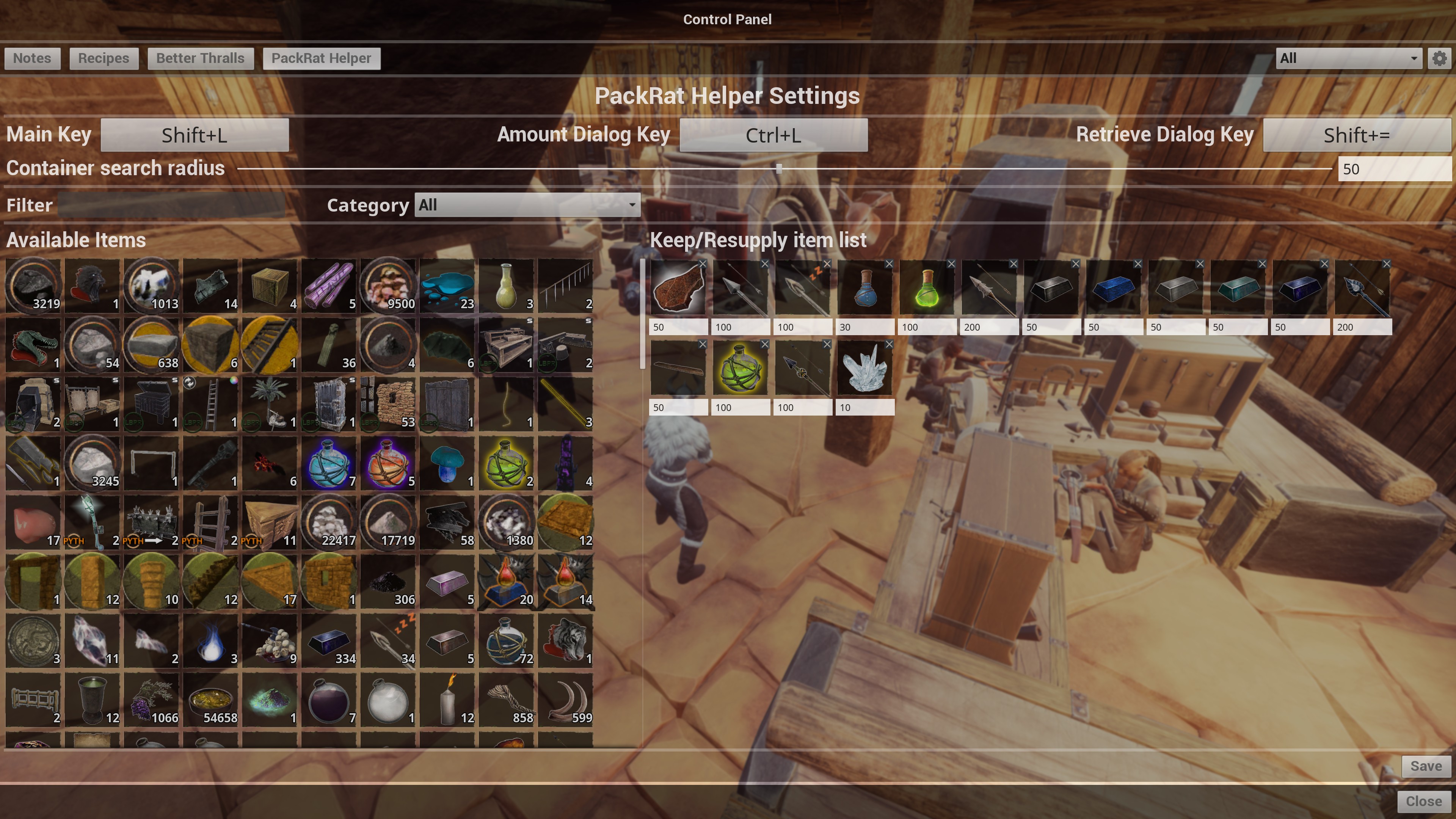
By default, mod will move [b]ANY[/b] stackable items from player's inventory (including ammo, food and medicine), but you can create a "Keep List" of items you wish to keep in you inventory. If such list exists an you have less item count, than specified in list, then mod wil try to resupply player's inventory to specified amount.

Another function - gather ingredients, needed for crafting a recipe/repairing damaged item/build a piece, from nearby containers. All you need to do is to hover over recipe/item and, while tooltip is shown, press hotkey - all needed ingredients will be put in player's inventory, if you hovered over recipe in "Character Inventory" screen, or directly in crafting station inventory. Ingridients for repairing a damaged item will be put in inventory/container where item currently is. If item is equipped - ingridients will be put in owners backpack. If you want to get ingrediens for a build item (wall, foundation, e.t.c.) you need to be in building mode and item you want to build must be selected for placing.
[b]Shift+L[/b] hotkey will move ingredients for one craft, [b]Ctrl+L[/b] will let you choose for how many crafts you request ingredients. Holding shift, while pressing Ok in amount dialog, will retrieve items, ignoring existing amounts in destination container.

You can pull any items from nearby containers by calling "Retrieve dialog" ([b]Shift+=[/b], by default). Items will be put into player's backpack or to container/workstation, player currently interacting with. [b]NOTE[/b] - amount entered is [b]NOT[/b] retrieve amount, but a final amount in destination conatiner/inventory. For example, if there were 10 iron bars in player's inventory and you entered 100 - you will end up with 100 iron bars in player's inventory, not 110. If you wish to retrieve enered amount, regardless how many such items in destination container - press Shift while clicking on 'Get'.

To display mod's settings menu, type in console [code]DataCmd PRMenu
If you have ModControlPanel installed, mod's settings menu will be available under "PackRat" section.
To add an item to "Keep" list, just drag it (or shift+click/doubleclick on it) from "Available items" section to "Keep/Ressuply" section. To remove item from "Keep" list - click on [x] buton on item's icon in "Keep/Resupply" list. Don't forget to click "Save" button.
Resupply and ingredients collect functions will leave at least one unit of resource in container, for further autosorting operations.
If you want a container/workstation be ignored when unloading your backpack - add *noput* marker to the name of container/workstation. If you don't want items to be pulled from a container/workstation - add *nopull* marker to the name. If you add both - container/workstation will be completely ignored. Note asteriscs in markers.
All hotkeys are configurable via Settings menu.
If you like my mods and wish to support me, use this
[url=https://www.paypal.com/donate/?token=lI2znDp3SetkJuXd8ezf_ikdAloxNMOYTaabLOoLNh4dEN47tMraTMcYyfWR6iQD5FZkdth3FwjlYeJz&locale.x=US][img]https://i.imgur.com/sYr61dY.gif[/img][/url][/code]

No asset was changed. Should be compatible with anything.

This mod was inspired  by [url=https://www.nexusmods.com/conanexiles/mods/53?tab=description]Put Them Away[/url] mod. But since it was not updated long ago and author could not be contacted, I desided to create my own with extended features I wanted.

Check my other mods:
[url=https://steamcommunity.com/sharedfiles/filedetails/?id=2589566272]Rhino WarMount[/url]
[url=https://steamcommunity.com/sharedfiles/filedetails/?id=2591174199]Spare Named[/url]
[url=https://steamcommunity.com/sharedfiles/filedetails/?id=2598028953]Backpack Fridge[/url]
[url=https://steamcommunity.com/sharedfiles/filedetails/?id=2604131595]Pull To Surface[/url]
[url=https://steamcommunity.com/sharedfiles/filedetails/?id=2606315241]Catch and Carry[/url]Highlights
From source dataFootprint
A 1 MB download, rated a light load on a server.
Last update
Its author last shipped an update 25d ago.
PackRat Helper on Nxeon
From our catalogue- One-click install
- Not available. One-click install isn't available for this game's mods yet. Download it and upload it to your server in Files.
- Server load
- light
- Smallest plan we suggest
- Conan Exiles — 6 GB (6 GB RAM). This follows our own load rating above, not a benchmark.
- Latest build
- 2026-09-21, released 2026-09-21, 1 MB
Game versions by loader
| Loader | Game versions | Newest |
|---|---|---|
| Workshop |
From 1 recorded build of PackRat Helper.
Run PackRat Helper on a Conan Exiles server
Deploy a server above, then upload the file in Files.
What kind of mod it is
From the catalogWeapons, items & crafting
New weapons, gear, items and the recipes to make them.
Compatibility
- Game
- Conan Exiles
- File size
- 1 MB
Verified at the source
- ✓Steam WorkshopOfficial listing, checked 2026-10-10Open ↗
- ✓Authorthelich, as published on Steam Workshop
- ✓LicenseNot published by the sourceFree