About SlaverMod2
From Steam WorkshopSlaverMod2 Furniture 2026 v2.1.3 The idea was to have interactive items not just static art pieces. I wanted the players to be able to animate when they wanted to or just hold a position. I wanted…
SlaverMod2 Furniture 2026 v2.1.3
The idea was to have interactive items not just static art pieces. I wanted the players to be able to animate when they wanted to or just hold a position. I wanted the ability to sit on a nice cuddle rug looking at the amazing Exile Lands after a hard day of slaying. I wanted sex that worked as part of a Hyborian world. Rough raw uncensored. But then nice cuddles also. After care is after all, important. This mod is absolutly free and always will be. I have worked many hours to do the best I can to bring the player a great experience. It is far from perfect but it is what it is. I want to thank all those who have commented ( good and bad ) as it has helped build the mod into something better. starchildmoon
This is SlaverMod 2.0 Mod ID 3722487188 -- RECOOKED for Unreal 5.6.1 Conan Exiles Enhanced. This Mod adds couples animations and some solo dances. The couples animations are built into furniture you sit on. Thralls may be forced to sit with you if they are following. Only one thrall will sit. Other players may sit with you and animate as couples. This mod includes adult animations.
*One caution is to not wear or remove armor after sitting*
Quick tips: - When sitting on an item press Spacebar to bring up the radial menu. - The green button on the radial menu stands you up from the furniture. - Only one thrall can be following you if you wish to interact with them on the item. - There is an Adjustment menu to scoot you around to line up the animations. It's not perfect but helps. Access it by pressing M while sitting.It auto closes after 60 seconds but the X on the upper right closes it also. - If you click where it says "Adjusting Player" and you are sitting or dancing with a thrall then the menu turns purple and allows you to adjust your thrall instead. The small thumb up and down buttons allow you to adjust your thralls dick. - In most cases the left and right keyboard arrows increase and decrease speed. If you get on and not moving then click that right arrow. - The solo dances are activated by shift hyphen. By that I mean that dash next to the zero on your main keyboard. - There is a bukkake animation but the particles won't show yet because I have not figured out how they work in Unreal 5 in the devkit. I will add them back when I do. - I have other couples dances I will bring into the couples rug soon. - Note that other mods may add things to the radial menu. - You can swap positions with another player or thrall with the Swap icon on the radial menu. - The Thrall icon will seat any thrall that is currently following you. They stand when you do. - Yes there is an Obsidian bed with 3somes but it was never finished. It's in there but won't work well so it's hidden. Admins may see it. Normal players can not build it. I will try to finish that and have 3 and 4 somes this August. - There is a bug where my items once built can not be returned to inventory. I got around this by moving them to the construction hammer. Construction hammer items do not return - they dismantle and give you back the materials.
What's Included: *All Items Crafted with Construction Hammer*
With the Construction hammer in hand look under Decorations. Remember the FEATS must be unlocked in the Knowledge before you can build them
Under Decorations - Beds 1 Kajira Pillow - Feat is Kajira Pillow Maker
Under Decorations - Carpets 3 Master's Rugs - Feat is Master Rug Maker 1 Couples Dance - Feat is Couples Dance Rug Maker
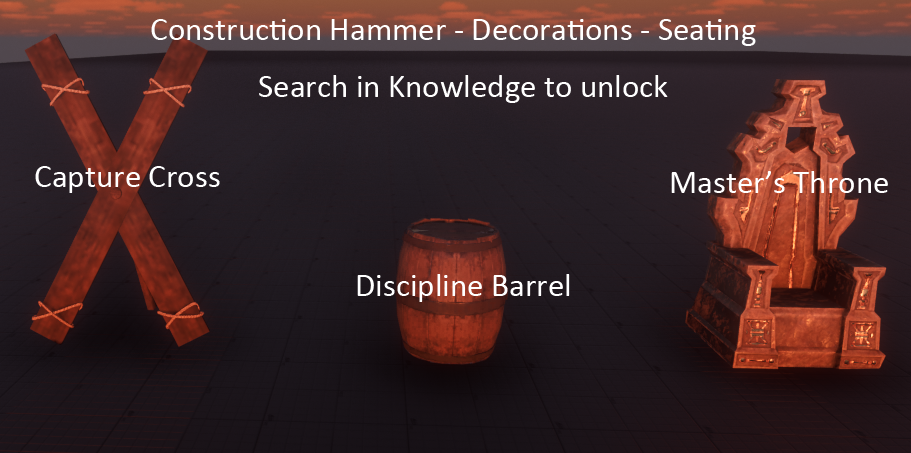
Under Decorations - Seating 1 Discipline Barrel - Feat is Discipline Barrel Maker 1 Capture Cross - Feat is Cross Maker 1 Master's Throne - Feat is Master's Throne Maker
12 Solo Dances - Not Crafted - Shift hyphen on your keyboard ( next to the number 0 )
How to sit on an item and stand: Use E key when looking at an item to sit. Use SPACE BAR while sitting to bring up a radial menu. Use the GREEN button on the radial menu to stand. Any Thrall following you can be made to sit with you by selecting the Thall button on the radial menu.
Adjusting your avatars position: When you sit on SlaverMod furniture, press the M key while sitting on an item to open Adjustment Menu. NOTE: This only brings up this menu while sitting on a SlaverMod item. After you stand up ( Green Button on radial menu ) The M key is released and can be used to show the Map again.
Dancing with yourself: Dancing solo is a special case as you do not sit on anything. Just use SHIFT - and select a number. Use GREEN button on menu to stop. "SHIFT -" brings up a radial menu of dances. It also takes control of your avatar and starts you in a normal Conan dance. ( SHIFT - means Left Shift key and the hyphen next to the zero on your keyboard Not numpad). Select any of the numbers to change dances. If you close the menu just press SHIFT - again
As always the GREEN button on the radial menu returns you to normal control
While dancing solo you may use the right arrow key to speed up the dance and the left arrow key to slow it down
Every button used by this mod: SPACE BAR is used to open a menu once you sit on one of the furniture items. Use the SPACE BAR to get a menu after you sit. Click the green key to exit the menu and return to a normal standing position. Left/Right Arrow Keys are used to speed or slow the animation, or on the Barrel and Cross these arrows activate spanks the submissive. M key is used to open an adjustment menu that scoots you around a bit once you sit on an item. This is for positioning. There are 3 buttons to adjust the penis rotational angle up or down, or use the zero option to return to the default angle rotation. The "Adjusting Player" button allows you to adjust the sitting Thrall or other player. The dialog box turns purple when adjusting the other seat. Click X to close this dialog. Note: The M key is restored to opening the map AFTER you get up.
Highlights
From source dataFootprint
A 88 MB download, rated a light load on a server.
Last update
Its author last shipped an update 4 mo ago.
SlaverMod2 on Nxeon
From our catalogue- One-click install
- Not available. One-click install isn't available for this game's mods yet. Download it and upload it to your server in Files.
- Server load
- light
- Smallest plan we suggest
- Conan Exiles — 6 GB (6 GB RAM). This follows our own load rating above, not a benchmark.
- Latest build
- 2026-07-02, released 2026-07-02, 88 MB
Game versions by loader
| Loader | Game versions | Newest |
|---|---|---|
| Workshop |
From 1 recorded build of SlaverMod2.
Run SlaverMod2 on a Conan Exiles server
Deploy a server above, then upload the file in Files.
What kind of mod it is
From the catalogWeapons, items & crafting
New weapons, gear, items and the recipes to make them.
Compatibility
- Game
- Conan Exiles
- File size
- 88 MB
Verified at the source
- ✓Steam WorkshopOfficial listing, checked 2026-10-10Open ↗
- ✓Authorstarchildmoon, as published on Steam Workshop
- ✓LicenseNot published by the sourceFree