About MiItemsLabubuPlushie
From Steam WorkshopMiItemsLabubuPlushie Mod by Mikk This Mod brings new Labubu plushie items to DayZ ! English and Russian localizations! I'm waiting for your comments and suggestions :) Please, do not repack this mod.…
MiItemsLabubuPlushie Mod by Mikk
This Mod brings new Labubu plushie items to DayZ! English and Russian localizations!
I'm waiting for your comments and suggestions :)
Please, do not repack this mod. The actual number of subscribers will keep me motivated for adding and updating my cool (I hope so) and free DayZ mods... :(
[hr][/hr]
HOW TO INSTALL THIS MOD
Standard installation:
- Configure the spawn rate and other settings in the mi_items_labubu_plushie_types.xml
- Copy contents of the ..._types.xml file between the <types> ... </types> tags
- Paste the copied text into the types.xml file into the <types> ... </types> section
Or EVEN BETTER way:
- Configure the spawn rate and other settings in the mi_items_labubu_plushie_types.xml
- Copy the mi_items_labubu_plushie_types.xml file into the db folder
- Find and open the cfgEconomyCore.xml file
- Add (or update) the section below:
<ce folder="db">
    <file name="mi_items_labubu_plushie_types.xml" type="types"/>
</ce>
Adjust random weights:
- Needs to be done using your own rebalance mod through the config.cpp
- You can find a rebalance example in example_rebalance_config.cpp file
- Below is a partial example of a config.cpp rebalance:
class CfgVehicles
{
    class GiftBox_Base;
    class mi_items_labubu_plushie_box : GiftBox_Base
    {
        labubuBrownWeight = 1.0;
        labubuGrayWeight = 0.75;
        labubuGreenWeight = 0.75;
        labubuPinkWeight = 0.25;
        labubuWhiteWeight = 0.15;
        labubuZombieWeight = 0.05;
    }
    class mi_items_labubu_plushie_base;
    class mi_items_labubu_plushie_brown : mi_items_labubu_plushie_base
    {
        hornsChance = 0.15;
        wingsChance = 0.05;
    };
};
[hr][/hr]
HOW TO USE THIS MOD
Plushie:
- Model size is close to the vanilla teddy bear
- Can be attached to the Chemlight, WalkieTalkie and Tool slots
- Inventory size is 2x3 cells
- May randomly have horns instead of ears and/or optional wings
- Zombie face variation, an entire monster and all wings glow a bit in the dark
- Collect them all! Will you be lucky enough to find the rarest variation? =)
Plushie box:
- Type name: mi_items_labubu_plushie_box
- Contains random plushie inside, needs to be unwrapped
- Random plushie is spawned at the same time with the box
[hr][/hr]
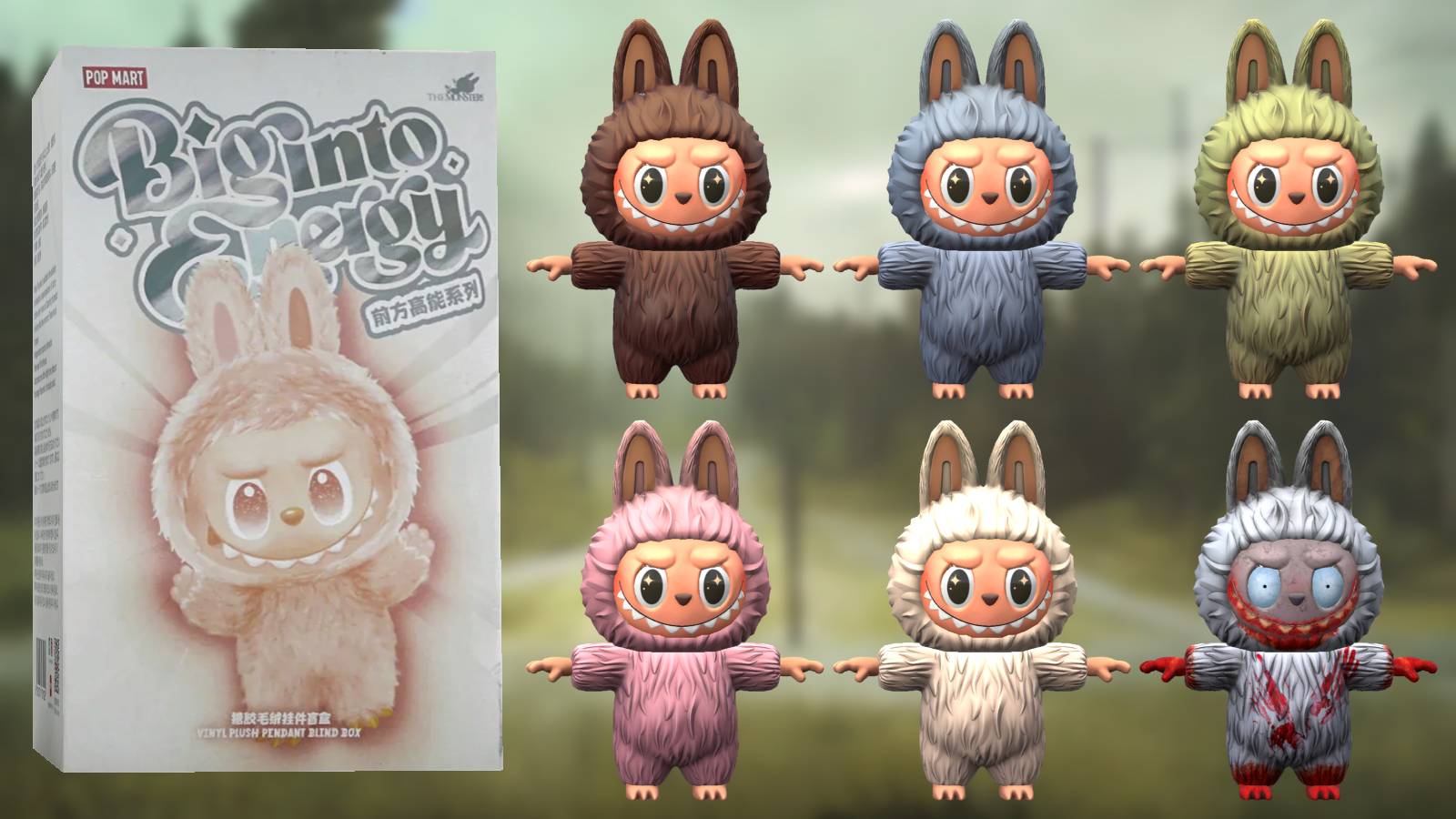
PLUSHIES
- mi_items_labubu_plushie_brown
- mi_items_labubu_plushie_gray
- mi_items_labubu_plushie_green
- mi_items_labubu_plushie_pink
- mi_items_labubu_plushie_white
- mi_items_labubu_plushie_zombie
- mi_items_labubu_plushie_monster
[hr][/hr]
OTHER MODS
Highlights
From source dataFootprint
Rated a light load on a server.
Last update
Its author last shipped an update 15 mo ago.
MiItemsLabubuPlushie on Nxeon
From our catalogue- One-click install
- Not available. One-click install isn't available for this game's mods yet. Download it and upload it to your server in Files.
- Server load
- light
- Smallest plan we suggest
- DayZ — 6 GB (6 GB RAM). This follows our own load rating above, not a benchmark.
- Latest build
- 2025-07-09, released 2025-07-09
Game versions by loader
| Loader | Game versions | Newest |
|---|---|---|
| Workshop |
From 1 recorded build of MiItemsLabubuPlushie.
Run MiItemsLabubuPlushie on a DayZ server
Deploy a server above, then upload the file in Files.
What kind of mod it is
From the catalogQuality of life & UI
Small conveniences, tweaks and interface improvements players notice straight away.
Compatibility
- Game
- DayZ
Verified at the source
- ✓Steam WorkshopOfficial listing, checked 2026-10-10Open ↗
- ✓Author🅼🅸🅺🅺, as published on Steam Workshop
- ✓LicenseNot published by the sourceFree