






About Admin Scoreboard+
From Steam WorkshopClient-side mod that adds command buttons to the scoreboard (TAB key by default) for server admins. You must be an admin on the server and have the ability to execute remote console commands for this…
Client-side mod that adds command buttons to the scoreboard (TAB key by default) for server admins. You must be an admin on the server and have the ability to execute remote console commands for this mod to work.
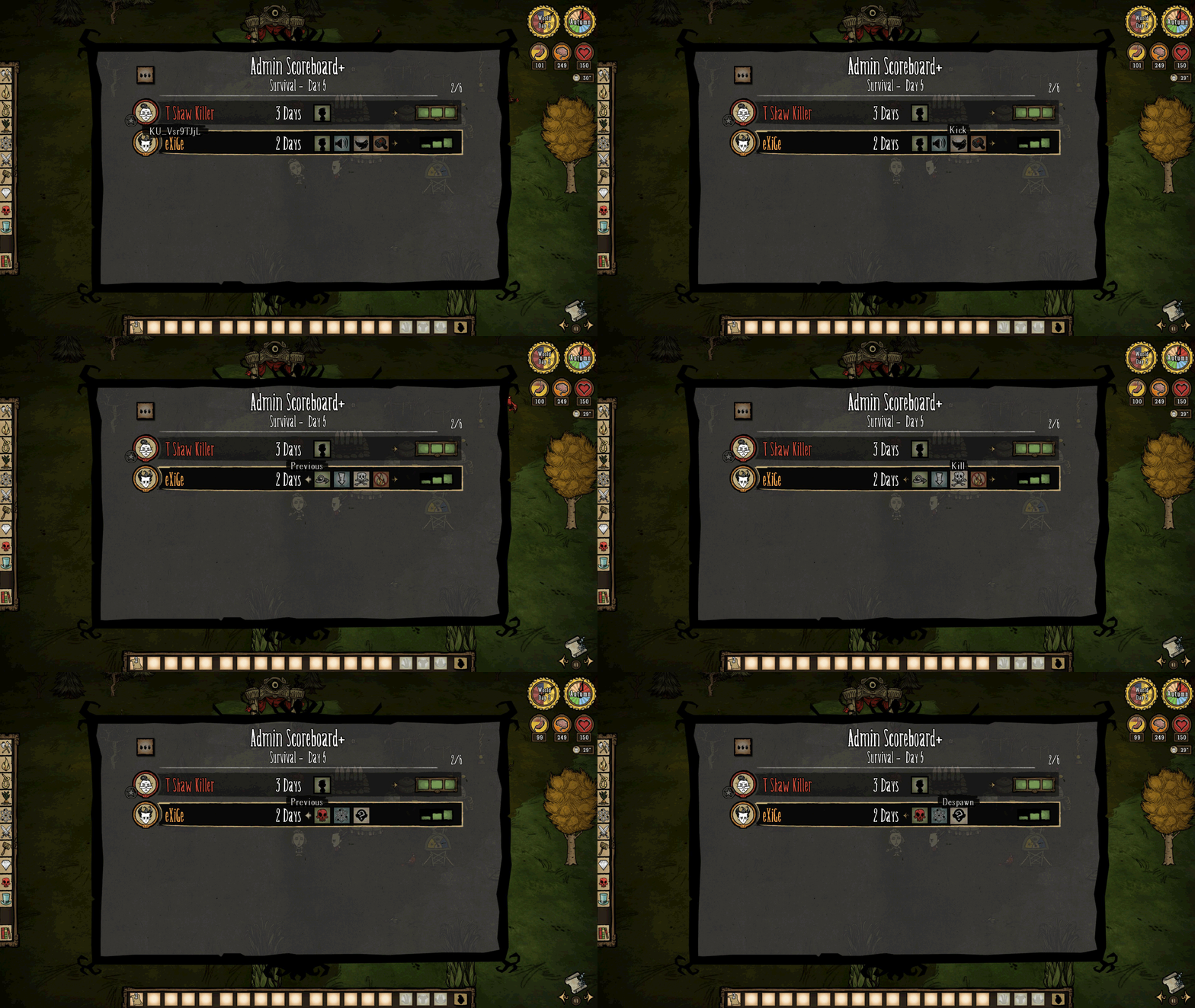
If the target player is on a different shard (surface/caves) than the admin sending the command, then the command will not be executed and the admin will be teleported to the nearest cave entrance/exit.
Commands:
- Goto: Teleports your player to the target player.
- Go Back: Shown instead of Goto button for yourself. It will teleport your player to a previous location where you executed a command that moved your player. Stores up to 3 positions for each surface and caves and saves the data to your player session for that world.
- Drop: Drops all items of the target player. As well, the target player cannot pick up any items on ground for 8 seconds by default (configurable).
- Kill/Revive: Kill/revives target player based on if they are a ghost or not. On revive, the target player's stats are set to full.
- Extinguish: Extinguishes all fires in a 10 tile radius around the target player.
- Toggle Godmode: Toggles godmode for the target player.
- Toggle Creative Mode: Toggles creative mode (all recipes) for the target player.
- Repair Nearby Burnt: Rebuilds nearby burnt structures from the target player. If the structure was skinned, the target player must own the skin or the default prefab will spawn.
- Reroll: Drops the items and then rerolls the target player, functioning the same as offering a Moon Rock Idol to the Celestial Portal (keep recipes, day count, map exploration, and critter). The target player must be on surface.
- Toggle Visibility: Hides your character; hides your character's shadow, indicator, and minimap icon; mutes your character's sounds and examine quotes; removes your character's collision box; makes your character not targetable; and turns on godmode. Limitations: Must be alive to toggle, ingame teleportation shows your character and cancels godmode, and light from equipped items (or WX-78 overcharge) will still show. Button available for yourself only.
Additional Commands:
- Gather: Teleports the target player to your player (Right click of Goto button, default is disabled).
- Super God Mode: Enables godmode of the target player and sets their stats to full (Right click of Toggle God Mode Button, default is disabled).
- Despawn: Drops the items and then despawns the target player (Right click of Reroll, always enabled).
All commands are announced to the server (except Goto, Go Back, Gather, and Visibility commands) and are color-coded based on the admin that sent the command; the announcements can be disabled from the configuration options.
The drop, kill/revive, godmode, creative mode, repair nearby burnt, and despawn commands all have a confirm dialog box appear before executing the command; these confirm boxes can be disabled from the configuration options.
After you press the ban button, the target player will drop all items if they are on the same shard.
Hovering over the player names in the scoreboard will display their Klei ID.
Compatible with Global Positions mod. Controller compatible.
Configuration Options:
- Scoreboard Key Is Toggle: The scoreboard key will function like a toggle instead of a hold (Default: off).
- Enable Gather: Adds the Gather command as a right click action for the Goto button (Default: off).
- Enable Super God Mode: Adds the Super God Mode command as a right click action for the God Mode button (Default: off).
- Pickup Cooldown: After sending a drop command, how long (in seconds) is the target player unable to pickup any items (Default: 8 seconds).
- All Confirm Dialog Boxes: Confirm dialog boxes (for commands that use them) can be enabled/disabled.
- All Announcements: The announcement after a command is executed (for commands that are announced) can be enabled/disabled.
Special thanks:
- Artemiy for letting his admins test my mod on his dedicated servers (Strictly Unprofessional).
- Mr. Tarunio and eXiGe for helping me test and debug the mod.
Highlights
From source dataFootprint
Rated a light load on a server.
Last update
Its author last shipped an update 8 yr ago.
Admin Scoreboard+ on Nxeon
From our catalogue- One-click install
- Supported on Nxeon Don't Starve Together servers. We download it from Steam Workshop, place it, and restart the server.
- Server load
- light
- Smallest plan we suggest
- Don't Starve Together — 2 GB (2 GB RAM). This follows our own load rating above, not a benchmark.
- Latest build
- 2019-02-14, released 2019-02-14
Game versions by loader
| Loader | Game versions | Newest |
|---|---|---|
| Workshop |
From 1 recorded build of Admin Scoreboard+.
Run Admin Scoreboard+ on a Don't Starve Together server
Pick a server or deploy a new one above; it is installed in one click.
What kind of mod it is
From the catalogAdmin & protection
Permissions, moderation, anti-cheat and land protection for the people running the server.
Compatibility
- Game
- Don't Starve Together
Verified at the source
- ✓Steam WorkshopOfficial listing, checked 2026-11-01Open ↗
- ✓AuthorT Shaw Killer, as published on Steam Workshop
- ✓LicenseNot published by the sourceFree














