






About Alignment Plus
From Steam WorkshopAlignment Plus Arrange structures, plants, dropped items, and carried statues on an adjustable placement grid. Features Press G to toggle alignment. Scroll up to increase spacing or scroll down to…
Alignment Plus
Arrange structures, plants, dropped items, and carried statues on an adjustable placement grid.
Features
- Press G to toggle alignment.
- Scroll up to increase spacing or scroll down to decrease it while an aligned placement preview is active.
- Choose from 1×1 to 8×8 grid cells per turf tile for broad spacing or precise layouts.
- Keep the same spacing across item categories during your session.
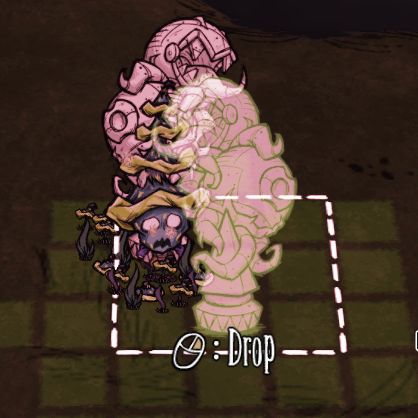
- See a translucent placement preview for carried chesspiece statues. Right-click a valid position to walk there and drop the statue. Movement keys or a left click cancel.
- Configure the starting grid size and rebind the toggle and spacing controls.
Highlights
From source dataFootprint
Rated a light load on a server.
Last update
Its author last shipped an update 13d ago.
Alignment Plus on Nxeon
From our catalogue- One-click install
- Supported on Nxeon Don't Starve Together servers. We download it from Steam Workshop, place it, and restart the server.
- Server load
- light
- Smallest plan we suggest
- Don't Starve Together — 2 GB (2 GB RAM). This follows our own load rating above, not a benchmark.
- Latest build
- 2026-10-22, released 2026-10-22
Game versions by loader
| Loader | Game versions | Newest |
|---|---|---|
| Workshop |
From 1 recorded build of Alignment Plus.
Run Alignment Plus on a Don't Starve Together server
Pick a server or deploy a new one above; it is installed in one click.
What kind of mod it is
From the catalogListed on Steam Workshop as “Workshop”
Weapons, items & crafting
New weapons, gear, items and the recipes to make them.
Compatibility
- Game
- Don't Starve Together
Verified at the source
- ✓Steam WorkshopOfficial listing, checked 2026-10-24Open ↗
- ✓Author2Door, as published on Steam Workshop
- ✓LicenseNot published by the sourceFree














