
About Auto Sort Inventory/Bags/Chests
From Steam WorkshopThe algorithm of item sorting copied from:[url=https://steamcommunity.com/sharedfiles/filedetails/?id=3223103565&searchtext=%E6%95%B4%E7%90%86] This Mod Theoretically compatible with any other…
The algorithm of item sorting copied from: This Mod
Theoretically compatible with any other container extension mod. For example: Upgradeable Chest
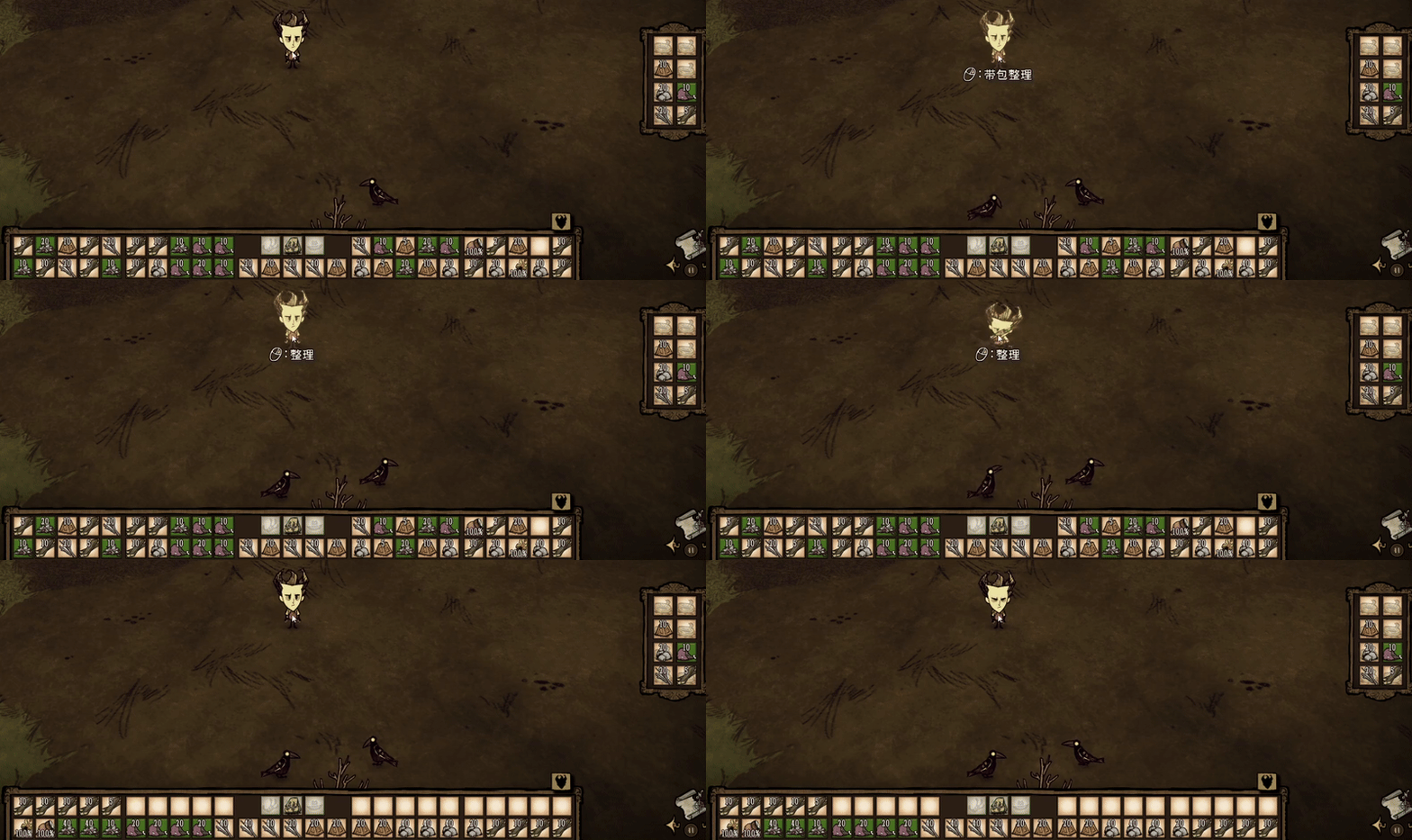
[h2]Keyboard & Mouse Mode Usage:[/h2] - 1. Hover your mouse over any container (inventory, chest, yourself, or even your teammate), hold the Sort trigger key (default: CTRL), and a sort prompt will appear. - 2. Follow the prompt and click the left or right mouse button to sort it. - 3. When the target is a player, you can also hold the Union Sort trigger key (default: ALT) to perform a union sort (sorting the inventory and backpack together). - 4. Hover your mouse over a player's inventory or an open container slot (excluding the backpack slots) and press the Lock Slot key (default: L) to lock the item currently in that slot. Press it again to unlock. - 5. During sorting, locked items will prioritize returning to their originally locked slot. When obtaining a locked item A, if its locked slot is occupied by item B, item B will be swapped out (item B will be placed in another empty slot, stacked with other identical items, held in hand if no space, or dropped on the ground if still no space). When obtaining a non-locked item, it will prioritize going into a non-locked slot, unless they are all full.
[h2]Controller Mode Usage:[/h2] - 1. Hold the B button to display the sort prompt on the current target, and a lock prompt on the selected item. - 2. Follow the prompts and press the D-pad or A button to lock or sort. - 3. Hold B and then press RT to sort yourself (Controller mode only has Union Sort). - 4. The sorting details are consistent with the Keyboard & Mouse mode.
[h2]In-Game Settings Panel:[/h2] - 1. An button to open the panel has been added to the ESC menu. Click it to open the settings panel. - 2. In Keyboard & Mouse mode, the keys and the Lock icon Opacity can be configured in the in-game settings (Controller mode buttons are fixed). - 3. These settings are saved with the game save, so you need to reconfigure them for each new game, otherwise the default values are used.
[h2]Server Settings:[/h2] - 1. Whether allowing sorting others' inventories. - 2. The speed of the sorting action can be set, with a total of 4 levels: Slow, Medium, Fast, Instant.
Making the sort order configurable is under development. Feel free to leave any suggestions. Version 3.0 added the container lock function and a significant amount of code, so there might be bugs. If you encounter any issues, please leave feedback. Thank you.
Highlights
From source dataFootprint
Rated a light load on a server.
Last update
Its author last shipped an update 12 mo ago.
Auto Sort Inventory/Bags/Chests on Nxeon
From our catalogue- One-click install
- Supported on Nxeon Don't Starve Together servers. We download it from Steam Workshop, place it, and restart the server.
- Server load
- light
- Smallest plan we suggest
- Don't Starve Together — 2 GB (2 GB RAM). This follows our own load rating above, not a benchmark.
- Latest build
- 2025-11-15, released 2025-11-15
Game versions by loader
| Loader | Game versions | Newest |
|---|---|---|
| Workshop |
From 1 recorded build of Auto Sort Inventory/Bags/Chests.
Run Auto Sort Inventory/Bags/Chests on a Don't Starve Together server
Pick a server or deploy a new one above; it is installed in one click.
What kind of mod it is
From the catalogQuality of life & UI
Small conveniences, tweaks and interface improvements players notice straight away.
Compatibility
- Game
- Don't Starve Together
Verified at the source
- ✓Steam WorkshopOfficial listing, checked 2026-11-01Open ↗
- ✓AuthorPaul, as published on Steam Workshop
- ✓LicenseNot published by the sourceFree