






About [client] Planting Helper
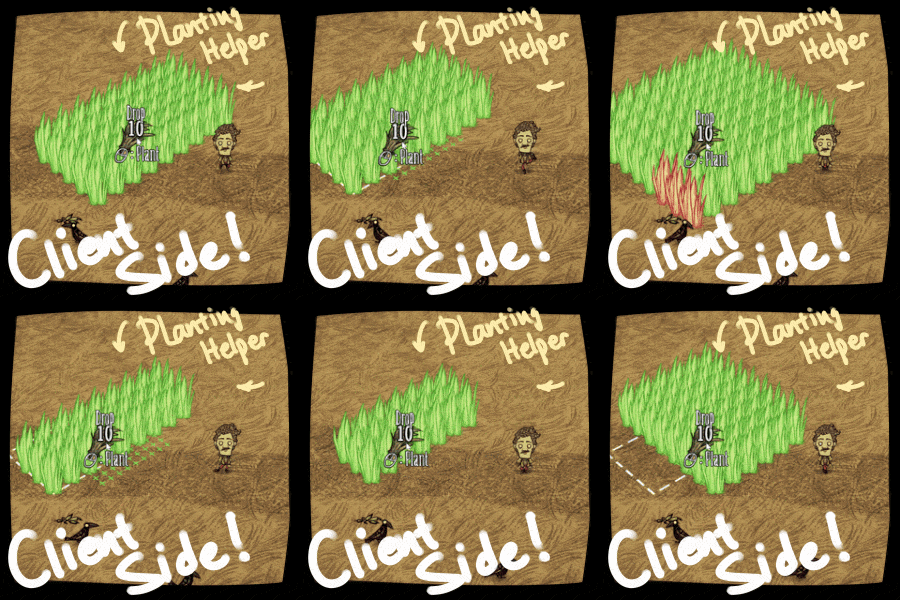
From Steam WorkshopPlanting Helper A client-side batch-planting tool. Plants grass, saplings, bushes and trees in grid How to use Hold any plantable item (grass tuft, sapling, berry bush, etc.). A grid preview appears…
Planting Helper
A client-side batch-planting tool. Plants grass, saplings, bushes and trees in grid
[hr][/hr]
How to use
[olist] [*]Hold any plantable item (grass tuft, sapling, berry bush, etc.). A grid preview appears at your cursor — green = plantable, red = blocked. The current size (e.g. 3x4) is shown right below the preview. [*]Ctrl + Mouse Wheel — change the number of rows (Y). [*]Alt + Mouse Wheel — change the number of columns (X). [*]Right-click — plant the entire field at once. [/olist]
Smart planting
- Automatically uses matching plants from your hands, inventory and backpack.
- snake style pathing, then retries and fills any gaps (such as the tile you happened to be standing on).
- While planting, the grid locks in place and shows live progress: the current tile is highlighted and finished tiles clear out.
- Stops when the field is done — or when you run out of stuff to plant.
- Want out? Just press a movement key — the batch cancels instantly.
Indicator light & settings
- A small wooden tab appears beside the crafting button while you hold a plantable. Its light shows the status: yellow (ready), fast yellow (resizing the grid), green (planting), solid green (done), red (can't plant here). fast red (interrupted, really cant, stop asking).
- Click the tab to open the settings window:
- [list]
- Grid Snapping — on / off (lock plants to a fixed world grid).
- Spacing — 1 to 5 (gap between plants).
[*]Your settings are saved and restored between sessions. [*]Grid size is remembered as well — and after (5,10,20,NEVER) minutes without planting it quietly resets to 1x1, so picking up a plant never flashes a huge preview in your face. [/list]
Notes
- Compatible with Geometric Placement — it sync with GP setting and uses the same world grid (square grid only, for now)
- Client-side only
- Works on plantable plants, trees, twigs and bushes. Structures and other deployables are intentionally ignored.
Why this exists
Draw upon To Do Chores and ActionQueue RB3+, blended with my own UI design cuz im sick of press so many buttons and those menu overlap on eachother i dont know how to close them
[hr][/hr]
Do u like stuff i made? Help me go further with Ko-fi! 
Highlights
From source dataFootprint
Rated a light load on a server.
Last update
Its author last shipped an update 4 mo ago.
[client] Planting Helper on Nxeon
From our catalogue- One-click install
- Supported on Nxeon Don't Starve Together servers. We download it from Steam Workshop, place it, and restart the server.
- Server load
- light
- Smallest plan we suggest
- Don't Starve Together — 2 GB (2 GB RAM). This follows our own load rating above, not a benchmark.
- Latest build
- 2026-07-06, released 2026-07-06
Game versions by loader
| Loader | Game versions | Newest |
|---|---|---|
| Workshop |
From 1 recorded build of [client] Planting Helper.
Run [client] Planting Helper on a Don't Starve Together server
Pick a server or deploy a new one above; it is installed in one click.
What kind of mod it is
From the catalogWeapons, items & crafting
New weapons, gear, items and the recipes to make them.
Compatibility
- Game
- Don't Starve Together
Verified at the source
- ✓Steam WorkshopOfficial listing, checked 2026-11-01Open ↗
- ✓AuthorN0US, as published on Steam Workshop
- ✓LicenseNot published by the sourceFree














