






About Item Hotkeys
From Steam WorkshopEnglish Bind keys to items , not slots: press the key and the item is used wherever it is in your inventory or backpack. How to use Bind: hover an item in your inventory or backpack (or hold it on…
English
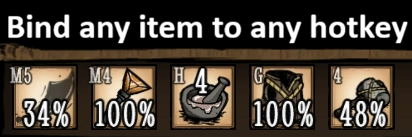
Bind keys to items, not slots: press the key and the item is used wherever it is in your inventory or backpack.
How to use
- Bind: hover an item in your inventory or backpack (or hold it on the cursor) and press Alt + key. The modifier can be Alt, Ctrl or Shift.
- Unbind: press Alt + key again on the same item. Doing it over another item rebinds the key. To free a key whose item you no longer have, bind it to any item and unbind.
- Use: press the key. Weapons and armor get equipped, food gets eaten, other items get used.
Features
- Several copies of an item? The most worn or spoiled one is used first, so you finish one spear before starting the next. Can be switched to the freshest or the first found. Copies on cooldown (like Wanda's pocket watches) are skipped while another one is ready.
- Bound keys are shown in the corner of matching slots (inventory, backpack, equipment, chests). The corner can be changed, or the labels turned off.
- Keys: 0–9, A–Z, F1–F12, numpad, side mouse buttons (M4, M5).
- Separate binds for each character (can be turned off).
- Your character says what was bound or what is missing (can be turned off).
- Settings in 10 languages: English, Chinese (Simplified and Traditional), Russian, Portuguese, Spanish, German, French, Korean, Polish.
- Client-only: works on any server, the host does not need the mod.
Good to know
- Bound keys still do their normal job. If you bind digits, unbind the default slot keys in Options > Controls. Binding WASD or other game keys triggers both actions.
- Pressing the key of an equipped item switches to a spare copy. With no spare, the key unequips the item (a setting can make it do nothing instead).
- Alt + key with no item under the cursor works like the key itself, with Alt held as in the game. For Maxwell, this opens the Magician's Top Hat.
- Keyboard and mouse only, no controller support.
简体中文
- 绑定:将鼠标悬停在物品上(或用鼠标拿起它),按 Alt + 按键。修饰键可改为 Ctrl 或 Shift。
- 解绑:对同一物品再按一次 Alt + 按键。若物品已不在身上,可先把按键绑定到任意物品,再解绑。
- 鼠标下没有物品时,Alt + 按键等同于按住 Alt 使用该物品。麦斯威尔可借此打开魔术师高礼帽。
- 使用:按下该按键。武器和护甲会被装备,食物会被吃掉,其他物品会被使用。
- 有多个同种物品时,优先使用耐久或新鲜度最低的(可在设置中更改)。正在冷却的物品(如旺达的怀表)会排在最后。
- 物品已装备且没有备用时,按键会卸下它(可在设置中改为无操作)。
- 已绑定的按键会显示在对应格子的角落。支持 0–9、A–Z、F1–F12、小键盘、鼠标侧键(M4、M5)。
- 每个角色的绑定分别保存(可关闭)。
- 仅客户端模组:可在任何服务器上使用。
提示:绑定的按键仍保留原有功能。如果绑定数字键,建议在 选项 > 控制 中取消默认的物品栏快捷键。
Русский
- Бинд: наведите курсор на предмет (или возьмите его на курсор) и нажмите Alt + клавиша. Вместо Alt можно Ctrl или Shift.
- Снять: ещё раз Alt + клавиша на том же предмете. Если предмета уже нет, привяжите клавишу к любому предмету и снимите.
- Alt + клавиша без предмета под курсором работает как сама клавиша, но с зажатым Alt, как в игре. Так Максвелл открывает цилиндр фокусника.
- Использовать: нажмите клавишу. Оружие и броня экипируются, еда съедается, остальное используется.
- Если одинаковых предметов несколько, сначала берётся самый изношенный или испорченный (настраивается). Предметы на перезарядке (например, часы Ванды) берутся последними.
- Если предмет уже надет и запасного нет, клавиша снимает его (в настройках можно отключить).
- Назначенные клавиши показываются в углу слотов. Клавиши: 0–9, A–Z, F1–F12, нумпад, боковые кнопки мыши (M4, M5).
- Отдельные бинды для каждого персонажа (можно выключить).
- Только клиент: работает на любом сервере.
Совет: клавиша с биндом продолжает выполнять своё обычное действие. Если назначаете цифры, отключите стандартные клавиши слотов в Настройки > Управление.
Português
- Vincular: passe o cursor sobre um item (ou segure-o no cursor) e pressione Alt + tecla. O modificador pode ser Ctrl ou Shift.
- Desvincular: pressione Alt + tecla de novo no mesmo item. Se não tiver mais o item, vincule a tecla a qualquer item e desvincule.
- Alt + tecla sem item sob o cursor funciona como a própria tecla, mas com Alt pressionado, como no jogo. Assim o Maxwell abre a Cartola do Mago.
- Usar: pressione a tecla. Armas e armaduras são equipadas, comida é consumida, o resto é usado.
- Com várias cópias do item, a mais gasta ou estragada é usada primeiro (configurável). Itens em recarga (como os relógios da Wanda) ficam por último.
- Se o item já estiver equipado e não houver outra cópia, a tecla o desequipa (pode ser desligado nas opções).
- As teclas vinculadas aparecem no canto dos espaços. Teclas: 0–9, A–Z, F1–F12, teclado numérico, botões laterais do mouse (M4, M5).
- Vínculos separados para cada personagem (pode ser desligado).
- Somente cliente: funciona em qualquer servidor.
Dica: a tecla vinculada continua com sua função normal. Se vincular números, desative as teclas padrão dos espaços em Opções > Controles.
Highlights
From source dataFootprint
Rated a light load on a server.
Last update
Its author last shipped an update 28d ago.
Item Hotkeys on Nxeon
From our catalogue- One-click install
- Supported on Nxeon Don't Starve Together servers. We download it from Steam Workshop, place it, and restart the server.
- Server load
- light
- Smallest plan we suggest
- Don't Starve Together — 2 GB (2 GB RAM). This follows our own load rating above, not a benchmark.
- Latest build
- 2026-10-08, released 2026-10-08
Game versions by loader
| Loader | Game versions | Newest |
|---|---|---|
| Workshop |
From 4 recorded builds of Item Hotkeys.
Recent builds
| Build | Released | Game versions | Loaders |
|---|---|---|---|
| 2026-10-08 | 2026-10-08 | n/a | Workshop |
| 2026-10-06 | 2026-10-06 | n/a | Workshop |
| 2026-10-05 | 2026-10-05 | n/a | Workshop |
| 2026-10-04 | 2026-10-04 | n/a | Workshop |
Run Item Hotkeys on a Don't Starve Together server
Pick a server or deploy a new one above; it is installed in one click.
What kind of mod it is
From the catalogWeapons, items & crafting
New weapons, gear, items and the recipes to make them.
Compatibility
- Game
- Don't Starve Together
Verified at the source
- ✓Steam WorkshopOfficial listing, checked 2026-10-12Open ↗
- ✓AuthorJ. Reznik, as published on Steam Workshop
- ✓LicenseNot published by the sourceFree














