






About [JEI] What Is This
From Steam WorkshopWhat Is This — DST Recipe Lookup Tool Hover any item and press R to see its sources, or U to see its uses. A JEI-like recipe browser fully adapted for Don't Starve Together. Inspired by Minecraft's…
[JEI] What Is This — DST Recipe Lookup Tool
Hover any item and press R to see its sources, or U to see its uses. A JEI-like recipe browser fully adapted for Don't Starve Together.
Inspired by Minecraft's JEI (Just Enough Items), this mod deeply integrates with DST's crafting system, cooking mechanics, tech trees, and creature loot tables.
Found an unfamiliar item and have no idea what it does? Standing at a cook pot wondering what recipes your ingredients can make? Browsing the crafting menu and need to check a recipe's materials? Just press a key and get all the information you need.
Features
- R/U Key Lookup — Hover any item and press R to see all sources (crafting recipes, cooking recipes, loot drops), or U to see all uses (as a material or ingredient)
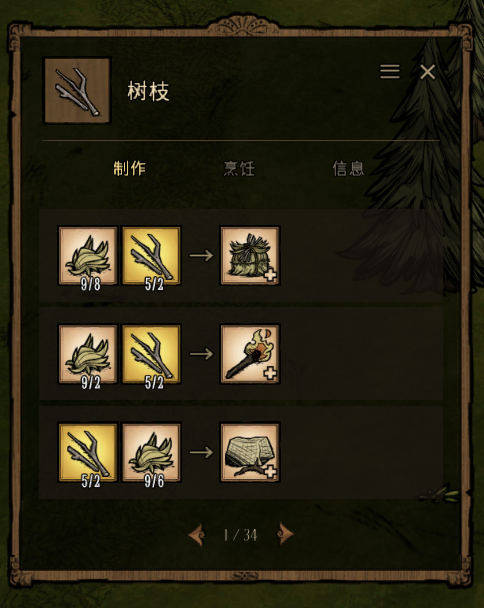
- Unified Popup with Six Tabs — Source and usage information merged into a single popup: Sources, Craft From, Cook From, Craft Use, Cook Use, and Info
- World Entity Query — R/U works on any in-game world entity (items on the ground, plants, minerals, creatures)
- Scrapbook R/U Query — Use R/U directly in the scrapbook screen
- Full Info Panel — Covers food stats (hunger/sanity/health), combat (damage/armor), equipment (durability/insulation), tools (efficiency), and more
- Cooking Conditions — Exact tag requirements displayed for every dish (Meat > 1, Monster = 0, No Veggies, etc.)
- Crafting Menu Integration — Product and ingredient icons in the crafting detail panel support left/right click + hover R/U queries
- Entity Drop Sources — Shows every non-crafting acquisition method: loot drops, mining, chopping, picking, digging, hammer returns, with exact quantities
- Station & Blueprint Info — Recipe cards show required crafting stations (with 3D models), character exclusivity, blueprint/prototype indicators
- Cross-Navigation — Click any ingredient or product icon to drill deeper — left-click for source, right-click for usage
- Crafting Panel / Cook Pot Jump — Jump directly to a recipe in the crafting panel
- Navigation History — Browse forward/backward through your viewing history using mouse side buttons (default); history clears on popup close
- Interactive Key Rebinding — Rebind keys directly from in-game and external config screens, also configurable in the native Controls page
- Single-Player Auto Pause — Optionally pause the world when opening the WIT popup in single-player
How to Use
Hover any item and press R to see where it comes from, or U to see what it can make. The popup has six tabs: Sources, Craft From, Cook From, Craft Use, Cook Use, and Info.
Click any icon to drill deeper — left-click for source, right-click for usage. The craft button on recipe cards jumps to the in-game crafting panel. The fill button on cooking cards auto-fills ingredients into an open cook pot.
Use mouse side buttons (default) to navigate forward/backward through your browsing history within a popup session.
Press R or U again (with nothing under the cursor) to close, or click the × button. All hotkeys and feature toggles can be customized in the Mod Configuration screen (gear icon in the popup's top-right corner).
Changelog
Full history available on the Steam Workshop changelog page: https://steamcommunity.com/sharedfiles/filedetails/changelog/3742011804
Roadmap
This mod is actively developed. Planned features:
- Full item search UI
- Recipe bookmarks
- Better mod compatibility
Feedback & Contributions
GitHub: https://github.com/c3115644151/wit-recipe-revealer
Bug reports, feature suggestions, and pull requests are welcome.
Highlights
From source dataFootprint
Rated a light load on a server.
Last update
Its author last shipped an update 4 mo ago.
[JEI] What Is This on Nxeon
From our catalogue- One-click install
- Supported on Nxeon Don't Starve Together servers. We download it from Steam Workshop, place it, and restart the server.
- Server load
- light
- Smallest plan we suggest
- Don't Starve Together — 2 GB (2 GB RAM). This follows our own load rating above, not a benchmark.
- Latest build
- 2026-07-21, released 2026-07-21
Game versions by loader
| Loader | Game versions | Newest |
|---|---|---|
| Workshop |
From 1 recorded build of [JEI] What Is This.
Run [JEI] What Is This on a Don't Starve Together server
Pick a server or deploy a new one above; it is installed in one click.
What kind of mod it is
From the catalogWeapons, items & crafting
New weapons, gear, items and the recipes to make them.
Compatibility
- Game
- Don't Starve Together
Verified at the source
- ✓Steam WorkshopOfficial listing, checked 2026-11-01Open ↗
- ✓Authordokz6393, as published on Steam Workshop
- ✓LicenseNot published by the sourceFree














