







About Map Helper
From Steam Workshop🗺️ Your Built-in DST Map Wiki Are you still running your legs off trying to find a specific resource? Or feeling completely lost on an unfamiliar map after adding large-scale terrain mods? Try this…
🗺️ Your Built-in DST Map Wiki
Are you still running your legs off trying to find a specific resource? Or feeling completely lost on an unfamiliar map after adding large-scale terrain mods?
Try this ultimate exploration tool — Map Exploration Assistant! Whether you're a newbie looking for resources or a veteran planning your base, it can help you find the most detailed map information (including extra map data modified or added by other mods). Its current features function like a built-in DST map wiki, but more capabilities will be added in the future to make your exploration even easier.
💡 This mod will NOT spoil information that requires actual exploration, so don't worry about ruining your vanilla game experience.
[hr][/hr]
✨ Core Features
After enabling the mod, a dedicated button will appear in the bottom right corner (left of the minimap button). Click it to open the UI. For first-time use, please click the "Refresh" button at the bottom to initialize data. The data will update in real-time based on the base resource variants of the current map.
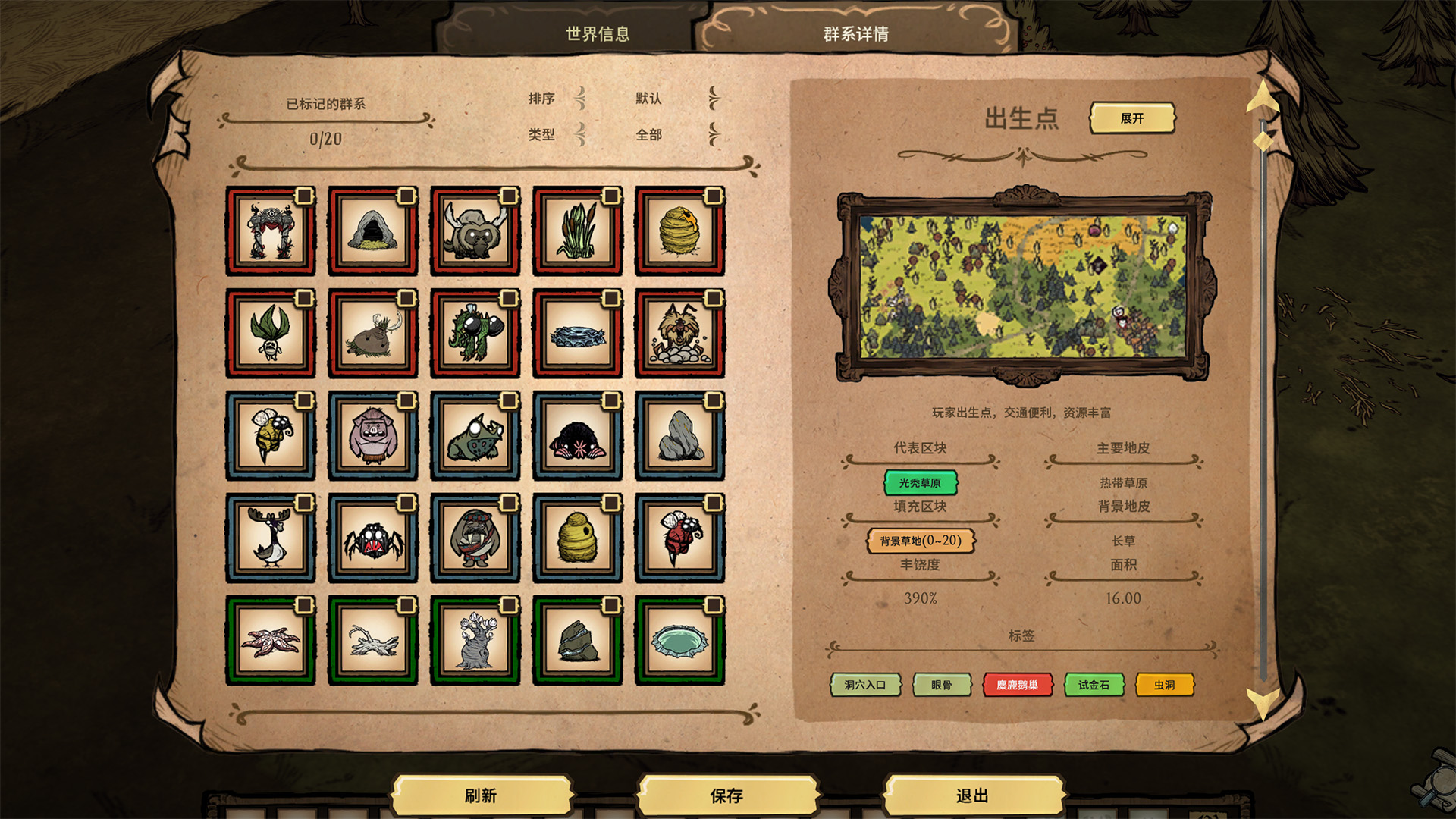
You can switch tabs at the top. The default is "World Info", showing the basic setup of the world. There's also "Biome Details", which displays comprehensive biome information.
📖 Ultra-Detailed "Biome Encyclopedia"
The right panel of Biome Details contains a wealth of info:
- Map Previews: Dozens of manually captured preview images with feature descriptions, helping you visually identify biomes at a glance.
- Turf Analysis: Displays "Primary Turfs" (center of the biome) and "Background Turfs" (edges), allowing you to further identify biomes through turfs.
- Tag Tooltips: Hover over a tag to see a detailed explanation of its specific effects.
- Resource Lists: From "Abundance" (total resource volume) and the generation amount of "Random Resources", to the guaranteed "Inherent Resources" and "Inherent Setpieces", giving you total control over resource distribution.
- Node Composition: Biomes are composed of primary nodes, filler nodes, and entrance nodes. All are displayed with their respective quantities (entrance nodes won't show if not set). Additionally, there is a "Representative Node"—a conceptual node that best represents the biome, like the Mandrake House in the Mandrake Forest or the Pig King in the Pig King Deciduous Forest. For biomes without obvious features, the most abundant primary node is chosen.
✅ Exploration Progress Tracker The left panel of Biome Details is the grid area:
- Color Coding: Red borders mean guaranteed main continent biomes; Blue means randomly selected main continent biomes; Green means island biomes.
- Exploration Tags: Every biome grid has a checkbox in the top right corner. Mark found biomes to track your progress at any time (this will play a much bigger role in future updates!).
- Sorting & Filtering: Use the top toolbar to sort and filter, letting you find your target biome instantly.
🧩 Deep Dive into Nodes Want a more precise understanding of resource distribution within a biome? Click on a node within a biome to open the Node Details page! Here you will see a structure similar to biomes, including turfs, abundance, random resources, inherent resources, and setpieces, but simplified. Biomes are built by combining these very nodes. Understanding nodes means understanding every little ecosystem.
[hr][/hr]
💾 Data Saving
Your initialized data and exploration marks can be saved by clicking the "Save" button, so you don't need to refresh every time you enter the game. You can also enable Auto-Save in the mod settings, which saves automatically every time you leave the game. ⚠️ Note: Clicking "Refresh" will clear your existing exploration marks. Generally, you only need to click it once when entering a world for the first time.
[hr][/hr]
📅 Future Update Plans:
- Optimized exploration route calculations (For the theory, see my Bilibili video DST Probability: Efficient Exploration Guide )
- Multi-language support (Currently supports Simplified Chinese and English, will expand to other languages in the future)
- Providing API and adaptation guides for other mods so their biomes can be displayed more naturally (adding biome preview images, customizing localized text for items, etc.)
Highlights
From source dataFootprint
Rated a light load on a server.
Last update
Its author last shipped an update 6 mo ago.
Map Helper on Nxeon
From our catalogue- One-click install
- Supported on Nxeon Don't Starve Together servers. We download it from Steam Workshop, place it, and restart the server.
- Server load
- light
- Smallest plan we suggest
- Don't Starve Together — 2 GB (2 GB RAM). This follows our own load rating above, not a benchmark.
- Latest build
- 2026-05-05, released 2026-05-05
Game versions by loader
| Loader | Game versions | Newest |
|---|---|---|
| Workshop |
From 1 recorded build of Map Helper.
Run Map Helper on a Don't Starve Together server
Pick a server or deploy a new one above; it is installed in one click.
What kind of mod it is
From the catalogMaps & scenarios
Custom maps, arenas and scenarios to play on.
Compatibility
- Game
- Don't Starve Together
Verified at the source
- ✓Steam WorkshopOfficial listing, checked 2026-11-01Open ↗
- ✓AuthorLongFei, as published on Steam Workshop
- ✓LicenseNot published by the sourceFree














