






About Mod Categories(test)
From Steam WorkshopThis is a test build. Feedback and bug reports are welcome in the Shiji Yuan QQ group: 810972548 Overview Too many mods and a messy list? Spending ages scrolling every time you start a world or look…
This is a test build. Feedback and bug reports are welcome in the Shiji Yuan QQ group: 810972548
Overview
Too many mods and a messy list? Spending ages scrolling every time you start a world or look for a mod?
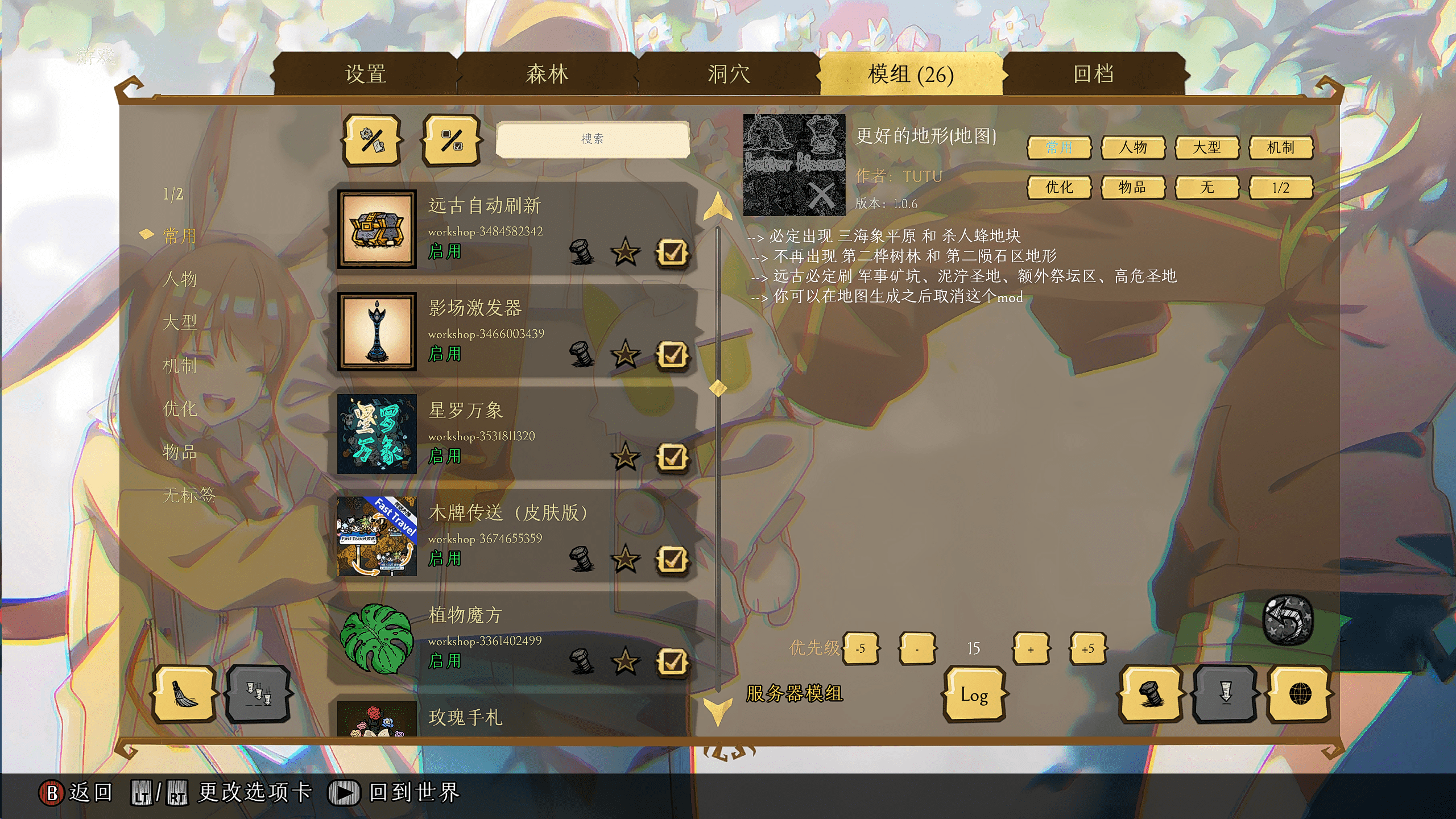
Mod Categories is a tab-based management tool: fast filtering, tagging, bulk enable/disable, update logging, crash recovery, and separate views for client vs server mods. Client-only — subscribe and use.
🌟 Core Features (2.0 Tab Redesign)
- 📂 Custom Categories (12 slots)
- Defaults: Common, Chars, Large, Mechanic, Optim, Items, plus Spare 1–6.
- Rename each category in mod settings (best with Configuration Options).
- Mods can have multiple tags — useful for “server preset” style workflows.
- 📑 Left Category Tabs
- Click a tab to show only mods in that category; click again to clear the filter.
- Two pages of categories; use the page button to switch 1/2.
- The small buttons on the detail panel are only for tagging — they don’t replace the left-side filters.
- 🔀 Client / Server / All
- Client and server mods share one merged list by default.
- Right-click the page button to cycle:
- [list]
- A — All mods
- C — Client-only mods
- S — Server mods + all_clients_require_mod mods
The page button shows the current mode (e.g. “1/2 C”) with color coding — no need to hover.
[*] 🖱️ Right-click Bulk Toggle Right-click any category tab (or “No Tag”) to enable or disable all mods in that category at once. Optional setting: jump to that category after bulk toggle.
[*] 📝 Mod Update Log When enabled, version changes are written to suma_changelog in your save folder. Detail panel Log button:
- Left-click: full log; click an entry to jump to that mod
- Right-click: quick filter for “Needs Update” or “Recent Updates”
[*] 🔕 Exclude Update Hints List workshop IDs in settings to skip update badges and “Update All” for those mods.
[*] 🚑 Crash Recovery If a crash disables most of your mods, with this option on the mod can detect a low enable count in your target category, re-enable those mods, and optionally restart. (Off by default — enable in settings if you want it.)
[*] ⬆️ Priority Sorting Set priority on the detail panel. List order: priority → favorites → name, so important mods stay on top. [/list]
[hr]
📖 Quick Guide
- Tag a mod: select it → use the category buttons on the detail panel.
- Filter: left category tabs; page button switches category page 1/2.
- Client or server only: right-click the page button; watch “A / C / S” on the label.
- Bulk on/off: right-click a category tab.
- Updates: Log button — left-click for the log, right-click for needs/recent updates.
⚙️ Settings Worth Checking
In mod configuration:
- Main Screen Default Category / Server Screen Default Category
- Which category is selected when each screen opens.
- Main Screen Default Type / Server Screen Default Type
- Default filter: All / Client only / Server only.
- Example: Main → Client only, Server creation → Server only.
- Auto-jump after right-click
- Whether bulk toggle also switches to that category.
- Record mod update log
- Write version changes to suma_changelog.
- Exclude Update Workshop IDs
- Numeric workshop IDs (one per line) skipped by update hints and Update All. Works best with Configuration Options.
- Crash recovery / Recovery target category / Auto restart after recovery
- Enable only if you need it; set the target to your core mod set.
- Category 1–12 names
- Custom tab labels.
Log & Data Location
Typically:
Documents/Klei/DoNotStarveTogether/YourSteamID/client_save/[/code]
[list]
[*] [b]suma_changelog[/b] — update history (open with a text editor)
[*] [b]mod_categories[/b] — tag data
[/list]
Usually survives game updates; deleting these files resets tags.

[h1]Credits[/h1]
Custom category names work best with [url=https://steamcommunity.com/sharedfiles/filedetails/?id=3317960157]Configuration Options[/url].

[h1]Notes[/h1]
[list]
[*] Client-only mod; the server does not need it.
[*] 2.0 is a tab-style redesign: the old Edit/Search dual mode and sidebar/grid layout options are gone. Hidden categories were also removed — use “No Tag” or a dedicated category for APIs, translations, etc.
[*] Tags and priorities are stored locally in client_save; back them up if you change PCs.
[*] Bugs and suggestions: leave a comment or join the QQ group.
[/list]

Happy organizing, and have fun!Highlights
From source dataFootprint
Rated a light load on a server.
Last update
Its author last shipped an update 2d ago.
Mod Categories(test) on Nxeon
From our catalogue- One-click install
- Supported on Nxeon Don't Starve Together servers. We download it from Steam Workshop, place it, and restart the server.
- Server load
- light
- Smallest plan we suggest
- Don't Starve Together — 2 GB (2 GB RAM). This follows our own load rating above, not a benchmark.
- Latest build
- 2026-11-03, released 2026-11-03
Game versions by loader
| Loader | Game versions | Newest |
|---|---|---|
| Workshop |
From 1 recorded build of Mod Categories(test).
Run Mod Categories(test) on a Don't Starve Together server
Pick a server or deploy a new one above; it is installed in one click.
What kind of mod it is
From the catalogBuilding & decoration
Blocks, furniture, decorations and building tools.
Compatibility
- Game
- Don't Starve Together
Verified at the source
- ✓Steam WorkshopOfficial listing, checked 2026-11-04Open ↗
- ✓Author韦玉米, as published on Steam Workshop
- ✓LicenseNot published by the sourceFree














