






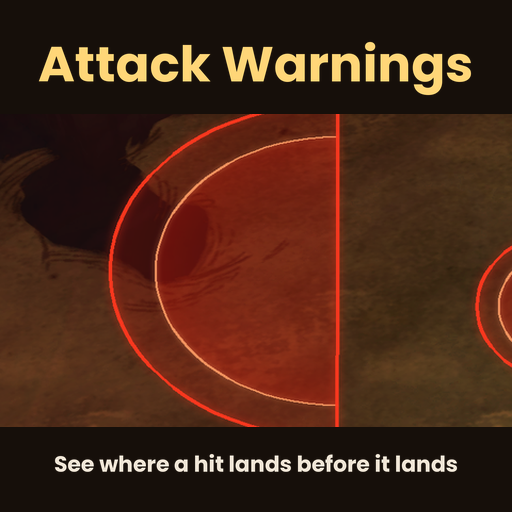
About RoseN Attack Warnings
From Steam WorkshopRoseN Attack Warnings Introduction See where the hit lands before it lands. Enemy attacks are drawn on the ground before they hit: a line sweeps across the area, and when it reaches the edge the hit…
RoseN Attack Warnings
Introduction
See where the hit lands before it lands. Enemy attacks are drawn on the ground before they hit: a line sweeps across the area, and when it reaches the edge the hit lands. Be outside by then. The area turns green once you are out of it.
Attack timing, range, cone angle and ground-pound waves are read from the game's own code, so the warnings match the real hits. Runs on the server; everyone on the server sees the warnings.
Main Features
- Windups: raising a claw, pawing the ground, crouching before a leap. The warning starts on the first frame of the windup
- Random and delayed attacks are drawn at their exact spots as soon as the game picks them: Deerclops ice spikes, Antlion sand spikes, Ancient Fuelweaver cage, Shadow Bishop, Celestial Champion gestalts, trap meteors
- Celestial Champion lasers show from the first moment of the attack and follow you until the target locks
- Charges are drawn as a lane: Eye of Terror and the Twins, Malbatross, Frostjaw, Scrappy Werepig, Scion
- Runs at you (Clockwork Rook, Ancient Guardian, Bearger): a lane that updates live up to where the run will stop
- Spin attacks around the boss, leaps where they will land
- Celestial Champion phase 2 spike walls, Varg fire breath, Toadstool bombs, Antlion sinkholes
- Ranged attackers (Clockwork Bishop, Spitter spiders, MacTusk, Ewecus, mutated birds, Skittersquids): aim line and landing spot
- Cooldown ring: after an enemy attacks, an orange ring and a number under its feet count down to its next attack
- Abigail's damage area shows as a purple circle while she fights
- Your own display: every player picks their colors (including a colorblind friendly set), how strong the filled area is, and whether to see the cooldown ring and Abigail's area
How to Use
- Red area: you are in danger. Green: you are safe. The hit lands when the moving line reaches the edge
Options
- Whose attacks: all enemies, or bosses only (default all)
- Regular enemies: only while attacking a player (default), or always
- Cooldown ring: on or off (default on)
- Drawing: normal, or the game's own range ring for troubleshooting
- Colors (your screen): Red / Green (default), Colorblind (Orange / Blue) or Magenta / Cyan
- Area fill (your screen): 50%, 75%, normal or 150%
- Cooldown ring (your screen): show or hide
- Abigail area (your screen): show or hide
Notes
- Bosses always get warnings, whatever the Regular enemies option says
- The mod is still growing (version 0.x): if a monster's warning looks wrong, please report it with the monster's name
Bug Reports
If something goes wrong, leave a comment with:
- The mod version (shown in the mod list)
- Your logs: Documents\\Klei\\DoNotStarveTogether\\client_log.txt, and for a hosted world also <account number>\\Cluster_X\\Master\\server_log.txt and Caves\\server_log.txt
- What happened, and what you were doing when it happened
- A screenshot if it is something you can see
- Other mods you have enabled
Credits
Made by RoseN. Code and art are original work made for this mod; anything shown from the base game (item art, names) is loaded from your own game files.
[hr][/hr]
RoseN Attack Warnings (Türkçe)
Tanıtım
Darbe inmeden nereye ineceğini görün. Düşman saldırıları vurmadan önce yere çizilir: alanın içinde bir çizgi ilerler, kenara vardığında darbe iner. O ana kadar dışarıda olun. Alanın dışına çıkınca alan yeşile döner.
Saldırı zamanlaması, menzil, yelpaze açısı ve yere vuruş dalgaları oyunun kendi kodundan okunur, yani uyarılar gerçek darbelerle birebir uyar. Sunucuda çalışır, sunucudaki herkes uyarıları görür.
Özellikler
- Hazırlık hareketleri: pençe kaldırma, eşelenme, sıçramadan önce çömelme. Uyarı hazırlığın ilk anında başlar
- Rastgele ve gecikmeli saldırılar oyun yerlerini belirlediği anda tam yerleriyle çizilir: Deerclops buz dikenleri, Antlion kum dikenleri, Ancient Fuelweaver kafesi, Shadow Bishop, Celestial Champion gestalt'ları, tuzak meteorları
- Celestial Champion lazerleri saldırının ilk anından görünür ve hedef kilitlenene kadar sizi takip eder
- Hücumlar şerit olarak çizilir: Eye of Terror ve ikizleri, Malbatross, Frostjaw, Scrappy Werepig, Scion
- Üstünüze koşanlar (Clockwork Rook, Ancient Guardian, Bearger): koşunun duracağı noktaya kadar canlı güncellenen bir şerit
- Dönme saldırıları bossun etrafında, sıçramalar inecekleri yerde
- Celestial Champion 2. faz diken duvarları, Varg alevi, Toadstool bombaları, Antlion çukurları
- Uzaktan saldıranlar (Clockwork Bishop, tükürücü örümcekler, MacTusk, Ewecus, mutasyonlu kuşlar, Skittersquid'ler): nişan çizgisi ve merminin ineceği yer
- Bekleme halkası: düşman saldırdıktan sonra ayağının altındaki turuncu halka ve sayı bir sonraki saldırıya kalan süreyi gösterir
- Abigail savaşırken hasar alanı mor bir daire olarak görünür
- Kendi ekranınız: her oyuncu renkleri (renk körlüğüne uygun set dahil), dolu alanın koyuluğunu ve bekleme halkası ile Abigail alanını görüp görmeyeceğini kendisi seçer
Nasıl Kullanılır
- Kırmızı alan: tehlikedesiniz. Yeşil: güvendesiniz. İlerleyen çizgi kenara vardığında darbe iner
Ayarlar
- Whose attacks: bütün düşmanlar veya sadece bosslar (varsayılan hepsi)
- Regular enemies: sadece oyuncuya saldırırken (varsayılan) veya her zaman
- Cooldown ring: açık veya kapalı (varsayılan açık)
- Drawing: normal veya sorun tespiti için oyunun kendi menzil halkası
Highlights
From source dataFootprint
Rated a light load on a server.
Last update
Its author last shipped an update 13d ago.
RoseN Attack Warnings on Nxeon
From our catalogue- One-click install
- Supported on Nxeon Don't Starve Together servers. We download it from Steam Workshop, place it, and restart the server.
- Server load
- light
- Smallest plan we suggest
- Don't Starve Together — 2 GB (2 GB RAM). This follows our own load rating above, not a benchmark.
- Latest build
- 2026-10-22, released 2026-10-22
Game versions by loader
| Loader | Game versions | Newest |
|---|---|---|
| Workshop |
From 1 recorded build of RoseN Attack Warnings.
Run RoseN Attack Warnings on a Don't Starve Together server
Pick a server or deploy a new one above; it is installed in one click.
What kind of mod it is
From the catalogCreatures & NPCs
Adds or changes creatures, NPCs and how they behave.
Compatibility
- Game
- Don't Starve Together
Verified at the source
- ✓Steam WorkshopOfficial listing, checked 2026-10-24Open ↗
- ✓AuthorRoseN, as published on Steam Workshop
- ✓LicenseNot published by the sourceFree














