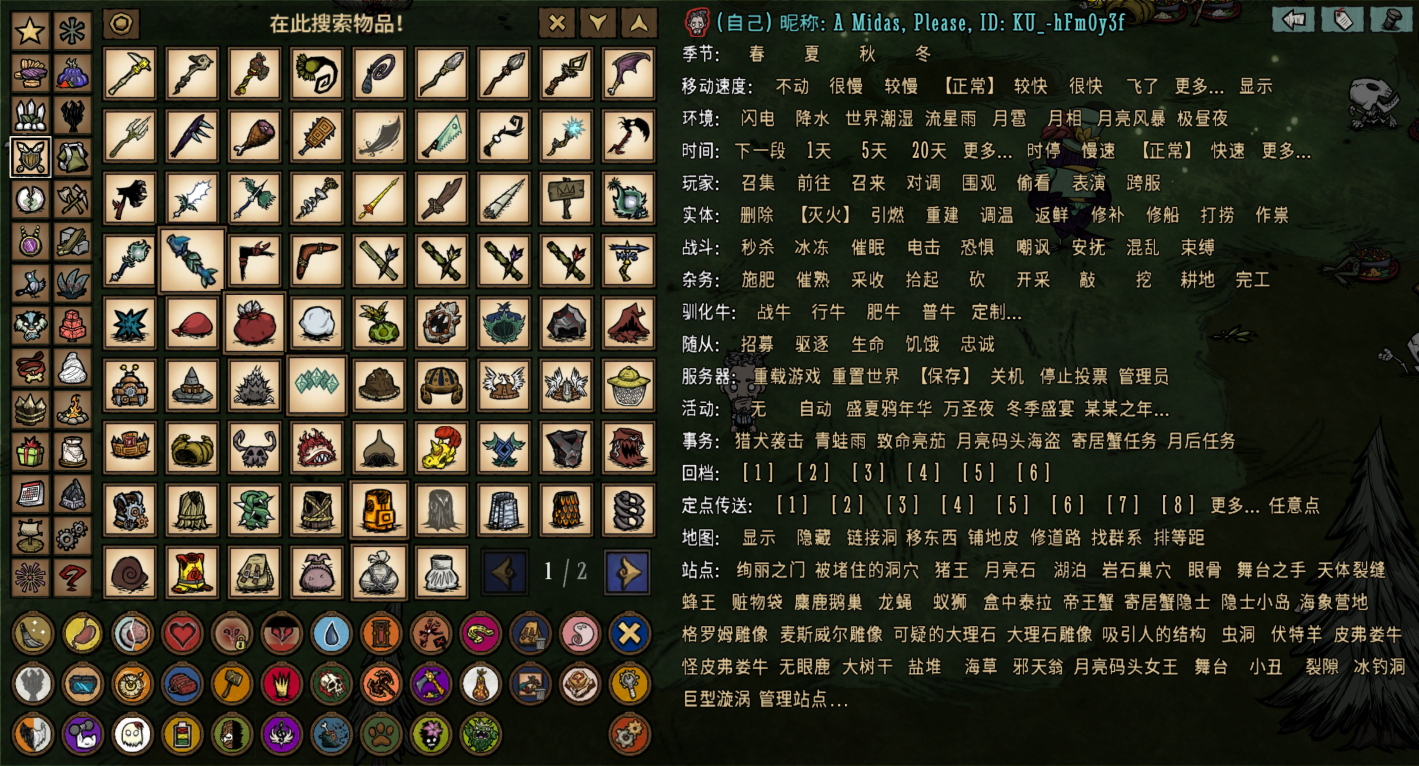

About Too Many Items Rearranged
From Steam Workshophttps://images.steamusercontent.com/ugc/15449758100811645097/C837117D3BA54C2352C76C5B2BF3ED407B0F29DB/?imw=5000&imh=5000&ima=fit&impolicy=Letterbox&imcolor=%23000000&letterbox=false Having issues?…

Having issues?
What's new compared to the original TMI?
- [h3]Feature Optimization:[/h3]
- [list]
- Rearranged item categorization structure
- Added missing items
- Added missing waypoint teleport points
- Improved icon assets and Chinese translations
- Refactored the interaction logic and UI
- [list]
- Graphical interface for adding, deleting, editing and checking teleport points
- One-click search for nearby entities
- Graphical history display and optimized search
- Graphical menu for item special functions, more special actions for items
- Graphical player switching
- Graphical sorting for circular buttons in the bottom-left corner
- Graphical manage unlimited custom teleport with rename
- Graphical range circles for various functions
- Better settings panel; compatible with all kinds of custom fonts
[*] Underlying code refactoring (does not affect usage) [/list] [*][h3]New version features & Debug functions:[/h3]
- Spawn DPS training dummy with planar resistance (in Boss tab)
- Add, delete and search creature spawn points (in Nest tab)
- No cooldown mode for inventory items
- Clear Naughtiness
- Remove monkey curse / toggle monkey form
- Adjust luck value
- Clear Frozen / Drowsy / Burning / Ewecus snot states
- Stealth Mode: Adjust transparency
- Unlock Insights / reset skill tree
- Unlock tech / re-lock tech
- Water walking mode
- AoE attack mode
- Sure-Kill Mode: Freely adjust extra attack multiplier, not limited to one‑hit‑kill
- Critwork Mode: Work efficiency equal to the Mighty stat
- Knockback Immunity Mode: Immune to knockdown, knockback and slip
- Bright eyes mode, night vision, ignore nightmare mist slowdown, sandstorm, ect
- Lock sanity
- Modify sanity maximum
- Lock Enlightened state
- Adjust character-related status values: WX-78's Charge, Woody's curse locker, Clear Warly/Woody's food memory, Woby's Hunger, Abigail's Health and affinity status, Wolfgang's overpower, Merm King's status and equipments
- Set arbitrary exact values for all status stats
- Toggle Lunar Hail and Acid Rain, adjust world wetness, switch endless day/night, trigger earthquake, meteor
- Customize and display character movement speed
- Salvage, Ignite(Smolder), Haunt, Force Pick Up nearby targets
- Chop, mine(destroy pillars), hammer, dig and till nearby objects
- Instant Kill, Hypnotize, Electrocute, Taunt, Chaos, Panic, Pacify, Rooted nearby targets
- Create tamed Beefalo with custom attributes
- Hire Reworked Clockworks
- Force trigger one hound or worm attack, frog rain, brightshade invasion, pirate invasion
- Force skip Hermit Crab tasks and post-celestial tasks
- Displays Hermit Crab Decoration Scores
- Force switch Sanctum rooms and complete puzzles
- Custom teleport markers anywhere on the map
- Partial map display, reveals the minimap tile by tile
- Modify original world roads freely
- Reclaim land & paint turfs freely
- Create and link wormholes or big tentacles
- Find or teleport to any position on the map (including special points: origin point, Atrium Big Tentacle, ect)
- Support dragging and relocating any entities on the map
- Detect biomes on the map
[*][h3]Original Known Issues Fixed:[/h3]
- Inability to weave or unravel skins
- Search bar misalignment, persistent tooltips, and abnormal button descriptions
- Incorrect or missing descriptions for some bottom-left circle buttons
- Abnormal closing behavior in Settings and Help windows
- Abnormal "clear beard" function
- God Mode issues (wetness cannot reset to zero, abnormal effects while dead, unable to walk on water)
- Abnormal player selection indicator updates under certain conditions
- Ripen function not supporting new version crops
- Crash issue when deleting Klei's reworked Bishop
- Crash issue when clearing inventory with monkey curse
- Fixed buildings failing to place for the first time in All‑Craft Mode
[/list]
Instructions
Notes
- This is a Client-only mod. Non-admins cannot see the TMI menu.
- The above functions can be used on other players (within the same world).
- This mod can store world data (can be disabled in options).
- Teleport data is saved independently for different worlds.
- Controller/Gamepad is not supported.
Warning
- In-game console commands can already achieve all these operations; this mod only provides a GUI.
- This may reduce game fun; please use it rationally.
- Some items in the "Other" tab may cause client or server crashes. Use with caution!
How to become an Admin?
- [h3]Using adminlist.txt:[/h3]
- [olist]
- Ensure your friend has joined the game. Go to: `Documents/Klei/Don't Starve Together/client_save` (local host) or the `cluster.ini` directory (dedicated server). Create `adminlist.txt` if it doesn't exist.
- Have your friend send a chat message (Press Y or U).
- Open `Documents/Klei/Don't Starve Together/client_chat_log.txt` and find your friend's ID (e.g., KU_********).
- Copy the ID into `adminlist.txt` (one ID per line) and save.
- Restart the server and have them rejoin.
Highlights
From source dataFootprint
Rated a light load on a server.
Last update
Its author last shipped an update 5d ago.
Too Many Items Rearranged on Nxeon
From our catalogue- One-click install
- Supported on Nxeon Don't Starve Together servers. We download it from Steam Workshop, place it, and restart the server.
- Server load
- light
- Smallest plan we suggest
- Don't Starve Together — 2 GB (2 GB RAM). This follows our own load rating above, not a benchmark.
- Latest build
- 2026-10-31, released 2026-10-31
Game versions by loader
| Loader | Game versions | Newest |
|---|---|---|
| Workshop |
From 5 recorded builds of Too Many Items Rearranged.
Recent builds
| Build | Released | Game versions | Loaders |
|---|---|---|---|
| 2026-10-31 | 2026-10-31 | n/a | Workshop |
| 2026-10-26 | 2026-10-26 | n/a | Workshop |
| 2026-10-24 | 2026-10-24 | n/a | Workshop |
| 2026-10-07 | 2026-10-07 | n/a | Workshop |
| 2026-09-22 | 2026-09-22 | n/a | Workshop |
Run Too Many Items Rearranged on a Don't Starve Together server
Pick a server or deploy a new one above; it is installed in one click.
What kind of mod it is
From the catalogListed on Steam Workshop as “Maps”
Weapons, items & crafting
New weapons, gear, items and the recipes to make them.
Compatibility
- Game
- Don't Starve Together
Verified at the source
- ✓Steam WorkshopOfficial listing, checked 2026-11-02Open ↗
- ✓AuthorA Midas, Please, as published on Steam Workshop
- ✓LicenseNot published by the sourceFree