About Upgradeable Chest
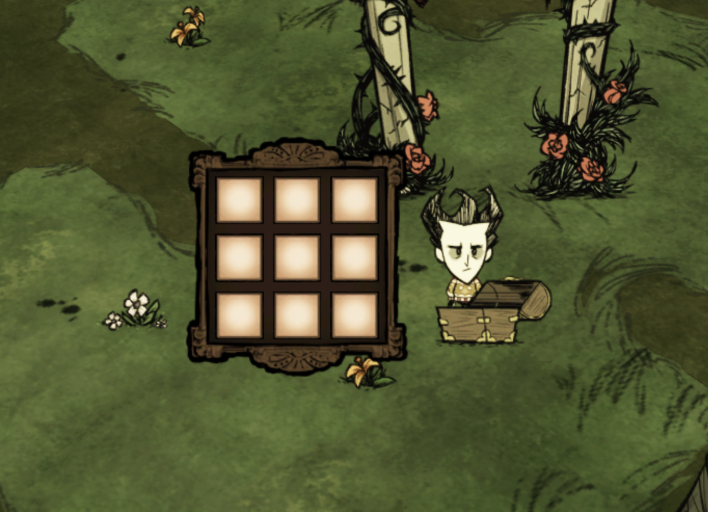
From Steam Workshopupgrade your chest with boards. Larger content, same space. Woddie and Lucy rate this 5 stars. Q&A How Can I Upgrade? 1. Put at least 1 upgrade material in all the outermost slots. 2. Close the…
upgrade your chest with boards.
Larger content, same space.
Woddie and Lucy rate this 5 stars.
[hr][/hr]
Q&A
How Can I Upgrade?
1. Put at least 1 upgrade material in all the outermost slots. 2. Close the container.
Degrade: 1. Clear your chest 2. Put 1 hammer into the chest 3. Close the container 4. It will consume 5 uses, trade for half of the upgrading material
How Large Can The Chest Be?
Here is few options allow you to choose how many times it could update. How large? Check the last option! It is infinite! [spoiler]in fact not but you may never reach the upper limit[spoiler]even you hit the limit, I can easily top up the limit. wanna give it a try?[/spoiler][/spoiler]
Do The Mod Break The Balance?
Certainly not. A normal chest has 9 slots and cost 3 boards. i.e. 3 slots for each boards
With this mod, The 5x5 chest cost a total 11 boards with a total 25 slots, i.e. 25 / 11 = 2.2 slots per boards. The 7x7 chest cost a total 27 boards with a total 49 slots, i.e. 49 / 27 = 1.8 slots per boards.
That means for each upgrade, you have to trade more boards for less slots.
Why there is no option under UI setting?
It is not able to adjust UI setting in worldgen menu. You must visit mod screen in main menu for setting. ie. Main Menu → Mods → Server Mods → Upgradable Chest
I hope UI setting could could be set by each client. All client should follow the setting from server host if I do not make it a client option. For example, if the server host turn the "Ice Box Leftward", all clients are forced on even they don't want to. That's why I make them a client option which each client follow their own setting than server's setting. Making it a client option will hide it from worldgen menu. You can only tune the options from main menu.
Why I cannot upgrade the chest?
Test if it works with no other mods, and with default config. option of the mod. Here are some useful console commands for your test: [table] [tr] [th]spawn a new chest[/th] [th]c_spawn("treasurechest")[/th] [/tr] [tr] [th]give you 10 boards[/th] [th]c_give("boards", 10)[/th] [/tr] [tr] [th]upgrade the nearest chest to 7x7[/th] [th]c_selectnear("treasurechest") c_sel().components.chestupgrade:SetChestLv(7)[/th] [/tr] [/table]
If it fails, comment below. Otherwise, check the following Q&A
Is the mod conflict with other mods? How do I know which mod it is?
If you fail to upgrade the container, check to see if you install these mods. Here are some kind of mods that may not compat with this mod: 1. ALL mods that enlarge chest storage 2. SOME of the mods that add new containers to the game 3. SOME mods that add a new items which can hold/ store/ trade/ delete things in one of its slots
[hr][/hr]
What is needed in other container?
After version 4.0, you can upgrade 4 more containers, i.e. ice box, salt box, dragonfly chest, fish box. Here are the materials needed:
[table] [tr] [th]Ice Box[/th] [th]1 gears in each top-most slots, 1 cut stone in each other outermost slots[/th] [/tr] [tr] [th]Salt Box[/th] [th]1 salt crystal in each outermost slots, and 1 blue gem in the center-most slot[/th] [/tr] [tr] [th]Dragonfly Chest[/th] [th]1 boards in each outermost slots[/th] [/tr] [tr] [th]Fish Box[/th] [th]1 rope in each outermost slots[/th] [/tr] [/table]
Row/Column Upgrading Mode
A new upgrading mode is added in version 7.0. Turn it on in Other Functions: Upgrade Mode Idea From: ♛ EmuLegs [table] [tr][th]Mode[/th][th]Detail[/th][/tr] [tr][th]normal mode[/th][th]The mode what we are using. Refer to the above for more info.[/th][/tr] [tr][th]expensive mode[/th][th]A more expensive and complicated mode. Put the upgrading items to all the right-most slots will extend horizontally. Put them to all the bottom-most slots will extend vertically. The items are listed below[/th][/tr] [tr][th]complex mode[/th][th]Turn both of the above on.[/th][/tr] [tr][th]OTHER NEW MODE[/th][th]Welcome to command below if you want your cool idea installed. I will implant them to the mode if I like the idea.[/th][/tr] [/table]
[table] [tr] [th]Ice Box[/th] [th]1 gears in first position of the targeted slots, 1 cut stone in each other targeted slots[/th] [/tr] [tr] [th]Salt Box[/th] [th]1 blue gem in first position of the targeted slot, 1 salt crystal in each other targeted slots[/th] [/tr] [tr] [th]Dragonfly Chest[/th] [th]1 boards in each targeted slots[/th] [/tr] [tr] [th]Fish Box[/th] [th]1 rope in each targeted slots[/th] [/tr] [/table]
Pageable Upgrade
You may upgrade the chest to make it "pageable". The feature has yet finalized. Welcome to discuss below. The idea is from mod Pageable containers by Potter_Lee. *****Remind: This mod is supposed not compatible with his mod. You may test and tell me if they can work together.
After you have upgraded the container to the MAX levels. Put the upgrading items to ALL the slots in FIRST page. The upgrading items are the most-common-used upgrade item for its normal upgrade. ie. 1 cut stone for all slots in first page, NO gears is needed.
Backpack Upgrade
More or less the same as pageable upgrade. Put the items into first n slots and unequip the backpack. Where n equal to the total number of slots of the non-upgraded backpack. Up to 3 pages [table] [tr][th]pack[/th][th]item[/th][th]slot[/th][/tr] [tr][th]Backpack[/th][th]rope[/th][th]8[/th][/tr] [tr][th]Insulated Pack[/th][th]electrical doodad[/th][th]8[/th][/tr] [tr][th]Spice Pack[/th][th]nitre[/th][th]6[/th][/tr] [tr][th]Piggyback[/th][th]pig skin[/th][th]12[/th][/tr] [tr][th]Krampus Sack[/th][th]rope[/th][th]14[/th][/tr] [/table]
*Special: Krampus Sack is allowed to upgrade 4 extra pages if waxpaper is used.
Highlights
From source dataFootprint
Rated a light load on a server.
Last update
Its author last shipped an update 9 mo ago.
Upgradeable Chest on Nxeon
From our catalogue- One-click install
- Supported on Nxeon Don't Starve Together servers. We download it from Steam Workshop, place it, and restart the server.
- Server load
- light
- Smallest plan we suggest
- Don't Starve Together — 2 GB (2 GB RAM). This follows our own load rating above, not a benchmark.
- Latest build
- 2026-02-23, released 2026-02-23
Game versions by loader
| Loader | Game versions | Newest |
|---|---|---|
| Workshop |
From 1 recorded build of Upgradeable Chest.
Run Upgradeable Chest on a Don't Starve Together server
Pick a server or deploy a new one above; it is installed in one click.
What kind of mod it is
From the catalogQuality of life & UI
Small conveniences, tweaks and interface improvements players notice straight away.
Compatibility
- Game
- Don't Starve Together
Verified at the source
- ✓Steam WorkshopOfficial listing, checked 2026-11-01Open ↗
- ✓AuthorCCappu, as published on Steam Workshop
- ✓LicenseNot published by the sourceFree