







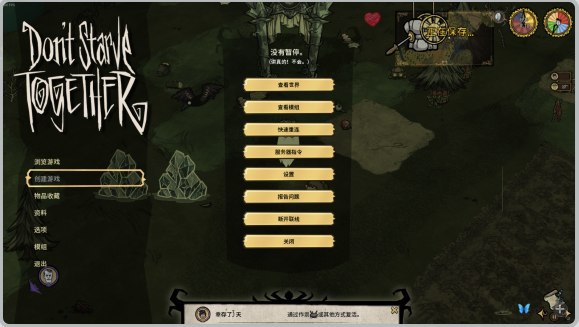
About Use Main Menu In Game[Client]
From Steam WorkshopMain functions 1. Fast goback game without exit when client/server error 2. Pause menu Use main menu in Game (exit will save game) 3. Fast save world/mod change exclude server info change Mod Options…
Main functions
1. Fast goback game without exit when client/server error
2. Pause menu Use main menu in Game (exit will save game)
3. Fast save world/mod change exclude server info change
Mod Options Interface scroll bar add subtitle node
4. Generate virtual mod which officially disable client mods
5. Change and apply world/mod config in game directly(pause menu's main menu host game)
6. View world/mod config in game even in nonself server
7. Remember search box input and option when browse games
8. Fast open your gift box and simulate open all gift box
9. View peoples' skin and open pause menu when select role
10. View your game create time and recent open time
11. View your subcribe mods' version and some other info
12. Temporarily leave game (1 person server will become 0)
13. Research prototyper now show items which lock in game(1.11 add)
14. Change remote world settings if you are the admin. This has replaced the View World screen.
Supplementary description
Dedicated server, this module can only be modified in real time, and relevant clients will not be modified synchronously Therefore, the administrator had better restart in the background to allow the client to reconnect and synchronize Real-time modification+background restart+reset the world, which is equivalent to opening a new file of professional services online
I'm chinese.some kind of error has occurred.I can't use the discussions so i can't reply to message.
@Omega I Do a test,the recovery btn can click in my game though its icon is part override by save change btn.
Highlights
From source dataFootprint
Rated a light load on a server.
Last update
Its author last shipped an update 2 yr ago.
Use Main Menu In Game[Client] on Nxeon
From our catalogue- One-click install
- Supported on Nxeon Don't Starve Together servers. We download it from Steam Workshop, place it, and restart the server.
- Server load
- light
- Smallest plan we suggest
- Don't Starve Together — 2 GB (2 GB RAM). This follows our own load rating above, not a benchmark.
- Latest build
- 2024-06-18, released 2024-06-18
Game versions by loader
| Loader | Game versions | Newest |
|---|---|---|
| Workshop |
From 1 recorded build of Use Main Menu In Game[Client].
Run Use Main Menu In Game[Client] on a Don't Starve Together server
Pick a server or deploy a new one above; it is installed in one click.
What kind of mod it is
From the catalogQuality of life & UI
Small conveniences, tweaks and interface improvements players notice straight away.
Compatibility
- Game
- Don't Starve Together
Verified at the source
- ✓Steam WorkshopOfficial listing, checked 2026-11-01Open ↗
- ✓Author米开langelo, as published on Steam Workshop
- ✓LicenseNot published by the sourceFree














