






About Wormhole Icons (Redux)
From Steam WorkshopWormhole Icons (Redux) Ever get lost trying to remember which wormhole goes where? Wormhole Icons adds clearly colored, numbered markers to your map and in the game world so you never mix up your…
Wormhole Icons (Redux)
Ever get lost trying to remember which wormhole goes where?
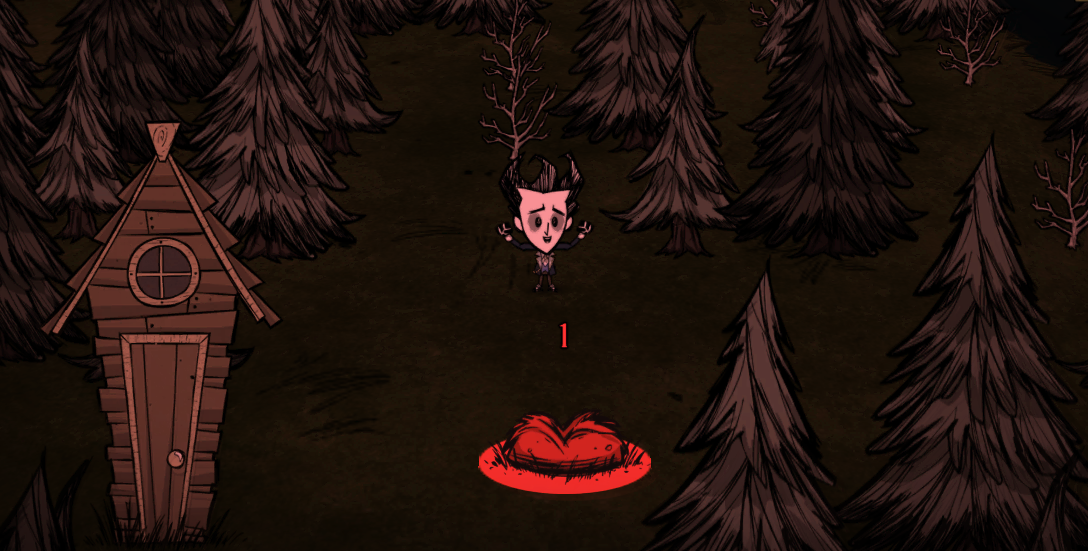
Wormhole Icons adds clearly colored, numbered markers to your map and in the game world so you never mix up your wormhole pairs again. It is completely client-side, so it works on any server without requiring other players to install it.
[hr]
Key Features
- Custom Pair Colors: Choose from 34 different preset colors across 3 palettes (with 2 former developer palettes!). If you have more pairs than colors, they seamlessly cycle back to the start.
- Dual Rendering: See icons on both the full-screen map and floating above the physical wormholes in the world.
- Shard-Safe Saving: Seamlessly handles traveling between the Surface and Caves without wiping your saved map data. Also technically compatible with custom shards (aslong as they contain standard dst wormholes/tentapillars. Custom wormholes like the ones in Island Adventures are not supported, though might be later if this mod gets enough support, use at your own risk for now!).
- Full Support: Works for both standard surface wormholes and cave tentapillars.
[hr]
Advanced Console Commands
For tech-savvy users, this mod includes a few commands to manually manage your icons. (Note: These must be run locally in the client console).
c_removeallwormholeicons()[/code]
Clears all saved wormhole positions for the current world. [i](Requires rejoining or re-opening the map to fully take effect).[/i]

[code]c_removewormholeicon()
Removes the icon of the specific wormhole you are standing next to.
c_setwormholecolor(r, g, b)[/code]
Manually overrides the color of the wormhole you are standing next to using RGB values (0-255). Example: [i]c_setwormholecolor(255, 0, 0)[/i]

[hr]

[h2]Configuration[/h2]
The settings have been streamlined and organized into clean categories.

[h3]Map Icons[/h3]
[list]
[*][b]Show Map Icons:[/b] Master toggle for the map UI. [i](Default: Yes)[/i]
[*][b]Show Map Numbers:[/b] Display the pair number above the map icon. [i](Default: Yes)[/i]
[*][b]Map Icon Size:[/b] Adjust the size of the icons on the map screen. [i](Default: 100%)[/i]
[/list]

[h3]Ground Effects[/h3]
[list]
[*][b]Ground Colors:[/b] Tint the physical wormhole in the world to match the map icon. [i](Default: Yes)[/i]
[*][b]Ground Numbers:[/b] Float a number above the physical wormhole. [i](Default: Yes)[/i]
[*][b]Ground Borders:[/b] Adds a glowing ring around the wormhole on the ground. [i](Default: Yes)[/i]
[/list]

[h3]Wormhole Colors[/h3]
[list]
[*][b]Color 1-15:[/b] Set the exact color for each wormhole pair in order. Set any slot to "Skip" to ignore it and move to the next color in the list. [i](Default: Rainbow colors for 1-10, Skip for 11-15)[/i]
[/list]

[h3]Advanced / Compatibility[/h3]
[list]
[*][b]Wormhole Marks Disable:[/b] Automatically disables this mod if you have the "Wormhole Marks" mod enabled to prevent conflicts. No clue why you'd use Wormhole Marks with this mod, but... to each their own I guess. [i](Default: No)[/i]
[*][b]Disable Minimap HUD Icons:[/b] Turns off the experimental rendering on the minimap widget if it causes issues with your specific mod setup. [i](Default: No)[/i]
[/list]

[hr]

[h2]What's new in this version?[/h2]
This is a partial rewrite of the original mod to fix certain compatability issues and modernize the code to make it easier to maintain, aswell as more performant:
[list]
[*][b]Critical Crash Fix:[/b] Fixed a hard crash that occurred when using Minimap HUD or other map mods due to unknown zoom scales.
[*][b]Code Cleanup:[/b] Merged 6 separate files down into 3. Vastly improved efficiency, removed global variable pollution, and eliminated redundant update loops.
[/list]

[b]Credits:[/b] Original mod by [url=https://steamcommunity.com/sharedfiles/filedetails/?id=821143467]Ryuu[/url] -> Fixed by [url=https://steamcommunity.com/sharedfiles/filedetails/?id=1295277999]eXiGe[/url] -> Fixed again by [url=https://steamcommunity.com/sharedfiles/filedetails/?id=2831613121]ZoomZoomBang[/url].Highlights
From source dataFootprint
Rated a light load on a server.
Last update
Its author last shipped an update 6 mo ago.
Wormhole Icons (Redux) on Nxeon
From our catalogue- One-click install
- Supported on Nxeon Don't Starve Together servers. We download it from Steam Workshop, place it, and restart the server.
- Server load
- light
- Smallest plan we suggest
- Don't Starve Together — 2 GB (2 GB RAM). This follows our own load rating above, not a benchmark.
- Latest build
- 2026-05-06, released 2026-05-06
Game versions by loader
| Loader | Game versions | Newest |
|---|---|---|
| Workshop |
From 1 recorded build of Wormhole Icons (Redux).
Run Wormhole Icons (Redux) on a Don't Starve Together server
Pick a server or deploy a new one above; it is installed in one click.
What kind of mod it is
From the catalogMaps & scenarios
Custom maps, arenas and scenarios to play on.
Compatibility
- Game
- Don't Starve Together
Verified at the source
- ✓Steam WorkshopOfficial listing, checked 2026-11-01Open ↗
- ✓Authoroofioznis, as published on Steam Workshop
- ✓LicenseNot published by the sourceFree














