
About Foundry - Eden POI
From Steam WorkshopThe Zirax Foundry POI found on Lava planets in the [url=https://steamcommunity.com/sharedfiles/filedetails/?id=1676375220]Project Eden scenario. A Rados themed Foundry designed to sit on a lava lake.…
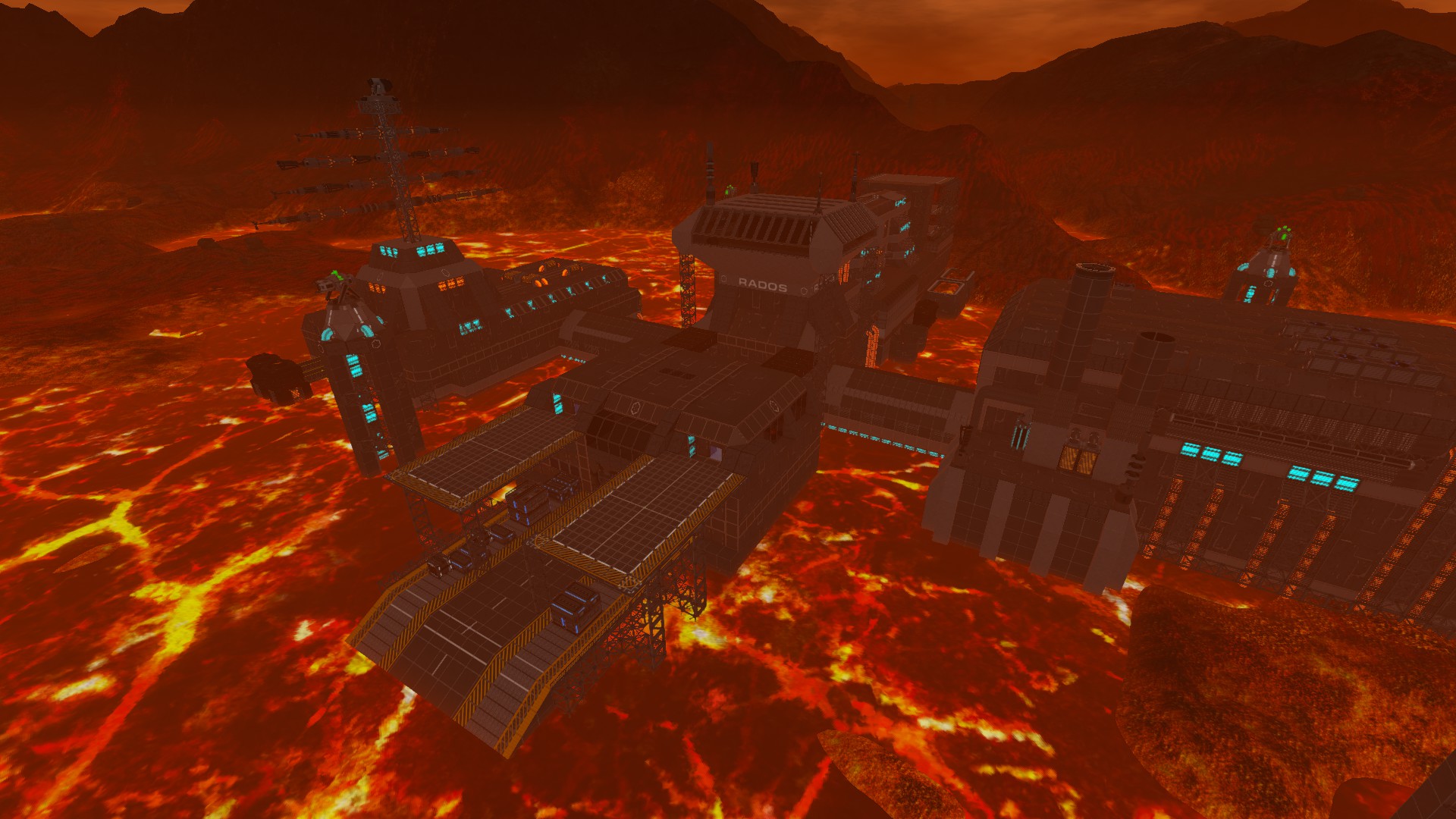
The Zirax Foundry POI found on Lava planets in the Project Eden scenario. A Rados themed Foundry designed to sit on a lava lake. This is a large, non-linear POI. To destroy the core, the player must flip 4 different switches throughout the facility, then head to the control tower and initiate the self destruct. Some rooms are not airtight for added difficulty. Because of this POIs size, it may have an adverse performance impact. Sometimes the game will spawn it too close to shore and parts of the POI will be partially buried under terrain. Creating a deeper lava lake biome and setting it to spawn in that can help with this. The terrain blocks included with the POI will take on the texture of the ground.
Estimated difficulty: Hard Faction: Zirax Recommended planet types: Lava Requires Alpha 10.6
POI is provided as-is since I won't have time to make any updates to it or provide any support. As with all Project Eden POIs, anyone is free to use, modify, and upload modified versions, just give me credit for the original design. :D
The Official Forums or the Empyrion Discord are both excellent sources of information and help on creating custom POIs or scenarios.
When working with POIs:
If the POI includes traps, make sure to turn "Signals" off in the control panel before getting too close to the structure. This lets you work without setting off traps. No need to turn signals back on before saving. Make sure you keep the bottom of your POI flat or with enough support pillars. POIs calculate their structural integrity from the very bottom level of blocks, no matter how deep into the ground the POI is buried. Always save your blueprints with the "Save Damage States" checkbox!
How to use a POI in your scenario
First subscribe to this blueprint in the Workshop.
Now you need to create a local copy of the blueprint using one of the following methods:
Method 1: Spawn it in a creative game. (Search for CustomPOI) If the POI has traps, before entering the structure, open the control panel and turn off "signals". This will prevent traps from activating when you get too close. (There is no need to re-activate signals before saving the blueprint) Make any modifications that you want, if any. Save it as a new blueprint, making sure the "Save Damage States" checkbox is marked. Set whatever name you want, but make sure the name has no spaces in it.
Method 2: Open your Steam workshop folder located here: SteamLibrary\steamapps\workshop\content\383120\ Look at the numbers in the URL for THIS web page. That is the folder you are looking for. Copy the .epb file located in that folder to your Empyrion - Galactic Survival/Saves/Blueprints/YourSteamID folder. When next you start the game, you will find the new local blueprint in your Blueprint library and can then spawn and modify it as you see fit.
Now you need to specify its settings: Find your new blueprint in the blueprint library and double click on it: Set the Blueprint Group Name to whatever you want (do not use spaces). This will be what is referenced in your scenario files to spawn the blueprint on a planet. Set the Blueprint Spawn Name to whatever you want (can include spaces). This will be the name displayed to the player when they see your POI in game. Set the Blueprint Ground Offset to the same one shown in the settings screenshots shown above. Important: It's your responsibility to set the correct height offset otherwise your POI will float or be buried. For floating POIs, set this as a positive value and it will float above ground. Make sure the Blueprint Flattens Ground, Terrain Removal, and Flatten Terrain settings match those in the screenshots.
Now you need to add it to your scenario Copy the .epb file from your blueprints folder into your scenario's prefabs folder. Add it to your playfield_static.yaml or playfield.yaml file using the group name you set. You can use the example provided if using manual editing (make sure to use the group name you set earlier), or use EPD to add the group name.
Example playfield.yaml entry:
              # Rados Foundry =======================================================
        - GroupName: CustomPOI
          Faction: Zirax
       #   BiomesExcluded: [ LavaFolds, LavaEdge, Hotspot ]
          Biome: [ LavaLake ]
          PlaceAt: OnWater
          CountMinMax: [ 1, 1 ]
          IsImportant: True
          DroneProb: 1
          DronesMinMax: [ 3, 5 ]
          Properties:
            - Key: RegenAfter
              Value: 720
If your POI is floating or buried when spawning:
If you correctly set the height offset and your POI is still floating above the ground or buried under it, you might need to fix the pivot point:
Open the console and use the following command:
prefabinfo NameOfBlueprint -clearpivot OR if blueprint name has spaces: prefabinfo 'Name Of Blueprint' -clearpivot
Then spawn your blueprint again, and re-save it overriding. Now your blueprint should function normally. Remember to copy it to your scenario again. Also you'll need to go into your Empyrion - Galactic Suvival/Content/Prefabs folder and delete the copy of your blueprint that it puts there otherwise it will mess up your scenario testing.
Highlights
From source dataFootprint
Rated a light load on a server.
Last update
Its author last shipped an update 7 yr ago.
Foundry - Eden POI on Nxeon
From our catalogue- One-click install
- Supported on Nxeon Empyrion: Galactic Survival servers. We download it from Steam Workshop, place it, and restart the server.
- Server load
- light
- Smallest plan we suggest
- Empyrion — 8 GB (8 GB RAM). This follows our own load rating above, not a benchmark.
- Latest build
- 2019-11-02, released 2019-11-02
Game versions by loader
| Loader | Game versions | Newest |
|---|---|---|
| Workshop |
From 1 recorded build of Foundry - Eden POI.
Run Foundry - Eden POI on a Empyrion: Galactic Survival server
Pick a server or deploy a new one above; it is installed in one click.
What kind of mod it is
From the catalogMaps & scenarios
Custom maps, arenas and scenarios to play on.
Compatibility
- Game
- Empyrion: Galactic Survival
Verified at the source
- ✓Steam WorkshopOfficial listing, checked 2026-11-01Open ↗
- ✓Authorravien_ff, as published on Steam Workshop
- ✓LicenseNot published by the sourceFree