







About Compact Recipe Pins
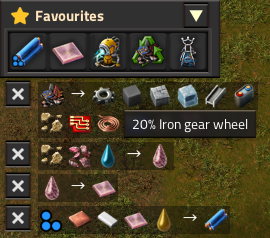
From Factorio Mod PortalPress Z to store recipes and Factoriopedia concepts in a Favourites panel, reminiscent of NEI and The Planet Crafter.
Compact Recipe Pins
A Factoriopedia Favourites panel reminiscent of NEI and The Planet Crafter.
Remind yourself about anything in Factorio with a single key. Inspect the pins and explore their recipes, so you won't forget what you need.
Pins
Press Z (by default) when hovering over any item, any entity in the world, research technology, or any icon found in Factoriopedia. This will create a pin in the top-left corner.
(Z is shared with the standard Drop item key, so make sure your cursor is empty.)
Analogous to Factorio's native map pins, Recipe Pins represent an idea or concept from the game (technically called a prototype).
Left-clickthe pin to open its Factoriopedia page.- Press
Zon the pin to delete it. Ctrl + Left-clicka pin to delete ALL pins.
If you prefer other mods over Factoriopedia, Pins can be configured to open other mod GUIs. Currently, Recipe Book and FNEI are supported.
(NOTE: If you pin something like Water and it has a tooltip of something different like Ice melting (Recipe), this is not a bug. The mod will try to use the first sensible recipe it finds.)
Mini-Recipes
Right-clicking on a pin will show its mini-recipe below the panel, if that pin has a recipe. If you prefer Left-click to do this, mouse controls can be reversed in the Settings.
Left-clickan item in the recipe to open its Factoriopedia page.Right-clickan item to show its own mini-recipe. (You can have lots of them!)- Press
Zto make a proper pin like you would elsewhere. Ctrl-Clickon the Close button to delete all the mini-recipes.
Banish
When the panel is getting in the way, Ctrl-Click on the Collapse button or the title bar to Banish it out of sight. It will come back when you add a new Pin.
There is also a shortcut button which does this, and an associated keybind which you can assign. (I recommend setting Ctrl-H.)
Pipette
Pins and Mini-recipes can be Pipette'd too (default Q). It's a good place to put something if you're out of room on the quickbar.
Or store things like signals which can't go on the quickbar.
If Mini-recipes are configured to show machines, they will Pipette into an appropriate blueprint.
Copy / Paste
Recipes can be copied from a Pin or any item on a Mini-recipe into assembling machines.
Shift + Right-clickto copy from a pinShift + Left-clickto set the machine recipe
It also works on requester chests, and on the player character, which will create a new logistic group for the recipe.
(These are the same keybinds as Copy/Paste in regular Factorio.)
NEW in 0.4.1: Quick Recipe Copy lets you copy a recipe straight from the vanilla GUI without having to make a Pin first.
Quick Craft
Press Ctrl-Q on a pin or mini-recipe item to handcraft a bunch of them (default 5, configurable), just like in Cursor Enhancements.
If you have Cursor Enhancements installed as well, it will use the settings from that mod.
Record Pins
Press Z when holding a record from the Blueprint Library to pin it. The pin will refer to the Library, but accessing it will always create a copy, so you should treat them as read-only.
(Blueprint items do not work, including ones that are retrieved from pinned Blueprint books.)
Left-clickor Pipette the record pin to put it on the cursor.Right-clicka blueprint or planner to edit a temporary copy, and it will go to the cursor when you're finished editing.Right-clicka blueprint book to browse its contents. (The book is an item at this point, so you can't pin the blueprints inside.)
Factoriopedia-alternative mods
These mods can be set as the prototype reference when you Left-click a pin. Factoriopedia will still be used as a fallback for anything they can't handle.
- FNEI (or Kuxynator's fork): Has a similar Favourites panel to CRP, so you'll want to access FNEI's Settings in its GUI and turn off "Enable hotbar". Then you can open the FNEI Home screen with
Ctrl-E. - Recipe Book: I haven't used this enough to appreciate the difference, but I'm sure many of you do. :)
Recommended companion mods
- No Remote View Border: Recover a bit of HUD space when using Remote View.
- Cursor Enhancements: For full Quick-craft functionality.
- Cycle Quality on Clipboard: Useful to change the quality of the blueprints given by recipe machines.
- Filter Helper: Adds an item panel to a lot of entity GUIs which allows you to set filters. Useful in a lot of places where Pins are helpful.
- Picker Extended Reborn: Not directly related. Lots of useful features, notably building on to ghosts when you hover an item over them.
Alternative mods
- Toolbars: A similar mod which lets you add things to a panel and view their recipes.
Troublesome mods
- Ultracube: Deliberately turns off Factoriopedia for most things in the game. Use FNEI alongside it.
- (2.0 only) Any mod which augments Copy/Paste functionality will have unintended interactions with Compact Recipe Pins. You can turn off CRP's Copy/Paste in the Settings.
Credits
- KEY.pics for the key/mouse icons in the cheat sheet.
Highlights
From source dataGame versions
Built for Factorio 2.1.
Footprint
Rated a light load on a server.
License
Published under MIT.
Compact Recipe Pins on Nxeon
From our catalogue- One-click install
- Supported on Nxeon Factorio servers. We download it from Factorio Mod Portal, place it, and restart the server.
- Server side
- Required on the server
- Server load
- light
- Smallest plan we suggest
- Factorio — 2 GB (2 GB RAM). This follows our own load rating above, not a benchmark.
- Latest build
- 0.5.2, released 2026-08-31
Recent builds
| Build | Released | Game versions | Loaders |
|---|---|---|---|
| 0.5.2 | 2026-08-31 | 2.1 | n/a |
| 0.5.1 | 2026-08-30 | 2.1 | n/a |
| 0.5.0 | 2026-08-25 | 2.1 | n/a |
| 0.4.1 | 2026-07-10 | 2.1 | n/a |
| 0.4.0 | 2026-06-26 | 2.1 | n/a |
| 0.3.0 | 2026-04-05 | 2.0 | n/a |
Dependencies
- Optional: Cursor Enhancements
Declared by the newest build that lists any. Required ones are installed with it on one-click installs.
Run Compact Recipe Pins on a Factorio server
Pick a server or deploy a new one above; it is installed in one click.
What kind of mod it is
From the catalogWeapons, items & crafting
New weapons, gear, items and the recipes to make them.
Runs on your server
From source side supportFactorio Mod Portal lists Compact Recipe Pins as required on the server. Check its Factorio Mod Portal page to see whether players need it too.
Compatibility
- Game
- Factorio
- Runs on
- Serverrequired on the server
- Game versions
- 2.1
Verified at the source
- ✓Factorio Mod PortalOfficial listing, checked 2026-10-08Open ↗
- ✓AuthorShemp, as published on Factorio Mod Portal
- ✓LicenseMITFree












