






About Default Train Conditions
From Factorio Mod PortalChange the default conditions a station has when it is added to a train schedule
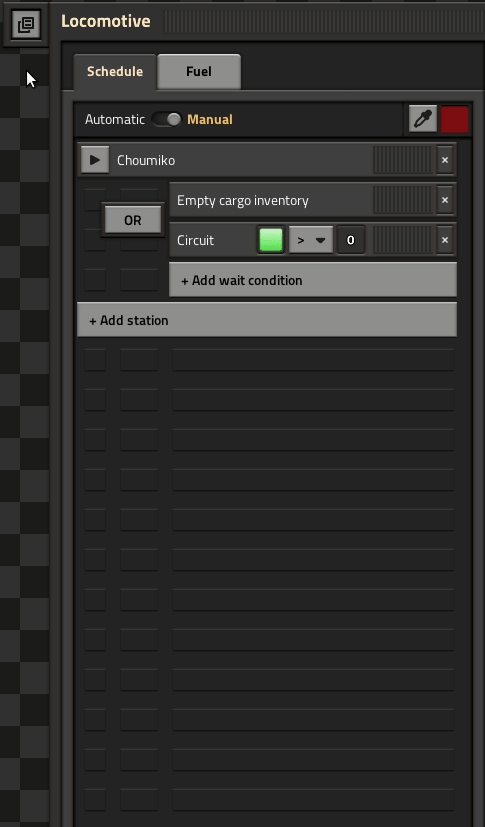
Change the conditions a station has when it is added to a train schedule.

Usage:
- Set the desired conditions on the first station in the schedule
- Click the button next to the locomotive gui
- Any new station added to a train schedule will now have the conditions set automatically. (Only when the train is in manual mode)
- Right clicking the button clears the default condition
Highlights
From source dataGame versions
Built for Factorio 1.1.
Footprint
Rated a light load on a server.
License
Published under MIT.
Default Train Conditions on Nxeon
From our catalogue- One-click install
- Supported on Nxeon Factorio servers. We download it from Factorio Mod Portal, place it, and restart the server.
- Server side
- Required on the server
- Server load
- light
- Smallest plan we suggest
- Factorio — 2 GB (2 GB RAM). This follows our own load rating above, not a benchmark.
- Latest build
- 1.1.0, released 2020-11-29
Dependencies
- Required: Factorio Library
Declared by the newest build that lists any. Required ones are installed with it on one-click installs.
Run Default Train Conditions on a Factorio server
Pick a server or deploy a new one above; it is installed in one click.
What kind of mod it is
From the catalogListed on Factorio Mod Portal as “Mods”
Vehicles & ships
Cars, boats, aircraft, ships and other things to drive or fly.
Runs on your server
From source side supportFactorio Mod Portal lists Default Train Conditions as required on the server. Check its Factorio Mod Portal page to see whether players need it too.
Compatibility
- Game
- Factorio
- Runs on
- Serverrequired on the server
- Game versions
- 1.1
Verified at the source
- ✓Factorio Mod PortalOfficial listing, checked 2026-10-09Open ↗
- ✓AuthorChoumiko, as published on Factorio Mod Portal
- ✓LicenseMITFree












