






About External Remote Link
From Factorio Mod PortalExternal remote view, alert monitoring, and web dashboard for Factorio. Provides RCON commands for game state and remote control. Companion for the External Remote Link middleware + web UI.
External Remote Link
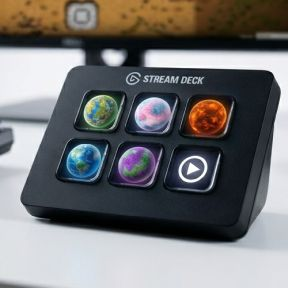
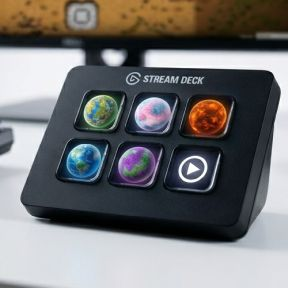
This is the updated Version to SD-Bridge for Factorio 2.1 . You can now use your second screen instead of a StreamDeck device or even an external device like a tablet. It shall also be used with a Factorio server, where you can just not interact, but see all the stats.
Testing is very limited in local game, you are welcome to check and submit bugs. I have some features in my backlog, but wanted to have feedback first.
Factorio Remote View + Stream Deck Integration
A three-component bridge between Factorio and the Elgato Stream Deck. Provides live game-state data (production, alerts, research, circuit networks) and remote-view control directly from your Stream Deck buttons.
> Disclaimer: External Remote Link is an independent, fan-made companion and is not affiliated with, endorsed by, or sponsored by Wube Software. "Factorio" is a trademark of Wube Software.
Architecture
┌─────────────────────────────────────────────────────────────────┐
│  Factorio                        RCON (TCP port 25575)          │
│  ┌──────────────┐    ┌──────────────────────────────────────┐   │
│  │ ext-remote-  │───>│  Middleware (Node.js)                │   │
│  │ link mod     │    │  ws://localhost:8080  (StreamDeck)   │   │
│  │ (control.lua)│    │  http://localhost:8081 (Dashboard)   │   │
│  └──────────────┘    └──────┬───────────────────────────────┘   │
│                             │                                   │
│                             ▼                                   │
│                     Stream Deck Plugin                          │
│                     (TypeScript / Elgato SDK)                   │
│                     9 action buttons                            │
└─────────────────────────────────────────────────────────────────┘
Three components
| Component | Location | Role | |---|---|---| | Factorio Mod | mod/ | Registers 12 RCON commands (/sd-data, /sd-view, /sd-toggle, etc.). Reads game state, controls remote view, handles alerts. | | Middleware | middleware/ | Node.js relay: connects to Factorio via RCON, polls /sd-data every second, broadcasts JSON to WebSocket clients (port 8080) and web dashboard (port 8081). | | Stream Deck Plugin | com.robsomania.ext-remote-link.sdPlugin/ | 9 action buttons that connect to the middleware, render live data on key images, and send commands back through the middleware to Factorio. |
Prerequisites
- Windows 10+
- Node.js 20+ (
npm,npxonPATH) - Factorio (legally owned) — base game required, Space Age DLC recommended
- Elgato Stream Deck (hardware + software)
- PowerShell 5.1+ (ships with Windows)
Quick Start
1. Enable RCON in Factorio
Edit %APPDATA%\Factorio\config\config.ini:
local-rcon-socket=127.0.0.1:25575
local-rcon-password=YourPassword
2. Clone and build
build-and-run.batThis single command:
- Installs npm dependencies for both middleware and plugin
- Compiles TypeScript
- Deploys the plugin to
%APPDATA%\Elgato\StreamDeck\Plugins\ - Generates Factorio-derived graphics (planets, alerts, icons)
- Starts middleware, StreamDeck, and Factorio
3. Configure
Middleware (middleware/.env)
Edit ext-remote-link/middleware/.env to match your RCON setup:
RCON_HOST=127.0.0.1
RCON_PORT=25575
RCON_PASSWORD=YourPassword
WS_PORT=8080
WEB_PORT=8081
READ_ONLY=false
| Field | Default | Description | |---|---|---| | RCON_HOST | 127.0.0.1 | Factorio RCON host (local game = localhost) | | RCON_PORT | 25575 | RCON port (must match config.ini) | | RCON_PASSWORD | — | Must match config.ini → local-rcon-password | | WS_PORT | 8080 | WebSocket port for Stream Deck plugin | | WEB_PORT | 8081 | HTTP port for web dashboard | | READ_ONLY | false | Set to true to disable remote-view control commands |
Stream Deck Actions
In the Stream Deck app, add any of the 9 actions and set:
- RCON host —
127.0.0.1 - RCON port —
25575 - RCON password — your chosen password
- WebSocket port —
8080(default)
Button Reference
All buttons show their current state live on the key image. Short-press and long-press have distinct actions.
Planet Button (Vanilla — com.robsomania.ext-remote-link.planet-button)
| Property | Value | |---|---| | Display | Planet icon, evolution factor, red/yellow alert counts | | Short-press | Switch remote view to the selected planet; cycle alerts (red → yellow → hub/origin) | | Long-press | Jump to planet origin {0,0} |
Configure the planet name in the Property Inspector.
Planet Button (Cycle — com.robsomania.ext-remote-link.generic-planet-button)
| Property | Value | |---|---| | Display | Planet icon, evolution factor, red/yellow alert counts | | Short-press | Cycle alerts on the current planet | | Long-press | Next planet (all discovered planets, including modded) |
No configuration needed — automatically discovers all planets.
Space Station Button (com.robsomania.ext-remote-link.platform-button)
| Property | Value | |---|---| | Display | Platform icon, platform name, alerts, background planet | | Short-press | Jump to the selected platform | | Long-press | Next platform |
Configure the platform index (1-based) in the Property Inspector.
Player Button (com.robsomania.ext-remote-link.player-button)
| Property | Value | |---|---| | Display | Character icon, UPS, player count, playtime, background planet | | Short-press | Jump to the selected player | | Long-press | Next connected player |
Configure player index in the Property Inspector.
Remote Toggle (com.robsomania.ext-remote-link.remote-toggle)
| Property | Value | |---|---|
Highlights
From source dataFootprint
Rated a light load on a server.
License
Published under GPL-3.0.
Last update
Its author last shipped an update 4 mo ago.
External Remote Link on Nxeon
From our catalogue- One-click install
- Supported on Nxeon Factorio servers. We download it from Factorio Mod Portal, place it, and restart the server.
- Server side
- Required on the server
- Server load
- light
- Smallest plan we suggest
- Factorio — 2 GB (2 GB RAM). This follows our own load rating above, not a benchmark.
- Latest build
- 0.1.0, released 2026-07-06
Dependencies
- Optional: [reserved]
Declared by the newest build that lists any. Required ones are installed with it on one-click installs.
Run External Remote Link on a Factorio server
Pick a server or deploy a new one above; it is installed in one click.
What kind of mod it is
From the catalogQuality of life & UI
Small conveniences, tweaks and interface improvements players notice straight away.
Runs on your server
From source side supportFactorio Mod Portal lists External Remote Link as required on the server. Check its Factorio Mod Portal page to see whether players need it too.
Compatibility
- Game
- Factorio
- Runs on
- Serverrequired on the server
Verified at the source
- ✓Factorio Mod PortalOfficial listing, checked 2026-10-08Open ↗
- ✓Authorcooperfreak, as published on Factorio Mod Portal
- ✓LicenseGPL-3.0Free












