







About Followers
From Factorio Mod PortalThis mod adds a variety of followers who can help you manage your base, fight off the enemies, and keep you company. They are quite useful.
Latest Update: Bug fixes, improved Wear and Tear features
FOLLOWERS ==========
DESCRIPTION OF MOD
This mod adds a variety of followers who can help you manage your base, fight off the enemies, and keep you company. They are quite useful.
SKINS
There are currently skins for every kind of enemy, plus a humanoid, robot, fallout 1 power armor and cat skins. I'll be adding to this over time. Each skin has different combat abilities. The robot has speech, which I took from B9 voice clips. (From the old TV series, Lost in Space)
NORMAL GAME PLAY MODE
In normal game play, you receive a follower at the start of the game. This is a robot that is not very good at combat, but can help you harvest, mine, find things for you, keep your equipment stocked and fueled, and do routine maintenance on aging equipment. You can gain more followers by shooting enemies with special ammo, which causes them to join you. There's also a small chance a weakened enemy will randomly join you. If you're lucky you might find some powerful, rare followers with unique skins out in the world.
INVENTORY
Each follower has his own inventory and can be used as pack-mules. You can access a follower's inventory by clicking the icon below his name, or by clicking on the follower. They must be within range to access their inventory.
FOLLOWER ABILITIES
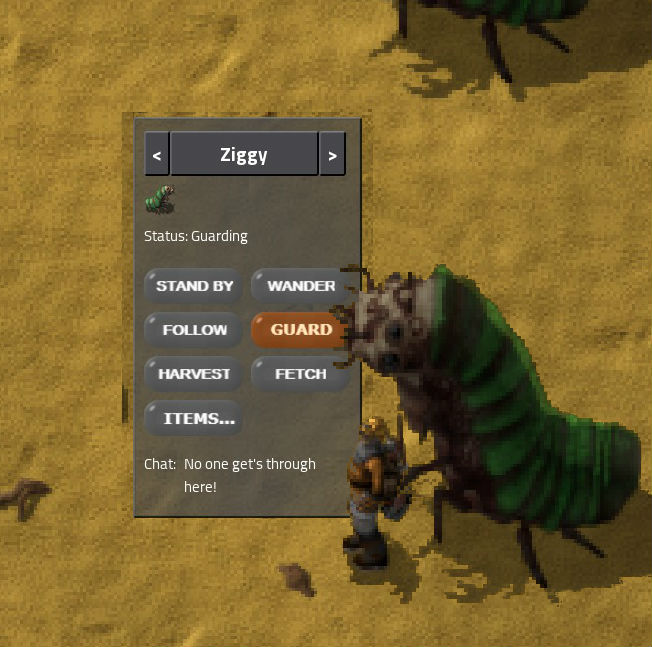
Open the GUI for followers by pressing CTRL + P. You can give a variety of commands to your followers including rename, standby, follow, guard, harvest, mine, fetch and route. You can set up groups and assign followers to different groups. Hold ALT to issue a command to all followers in the same group. Hold CTRL to issue the command to all followers.
GUARDING
Assigns followers to go to their guard post. Hold SHIFT to assign the follower's current position to be his guard post.
ITEMS
This assigns items the follower should remember. When you command to "Fetch", they will try to find the selected items and bring to you. When assigned to "Route", they will pick up any of these items which they find along their assigned route. Both ALT and CONTROL works to assign items to multiple followers at once. Selected items appear in the GUI, deselect an item by clicking the item
FETCH
This works similar to logistics bots. (But not limited to provider chests). It will command your follower to try to find all items on his "Item" list and bring to you. This includes items in his own inventory, plus he will scan all nearby chests, and machine outputs for the assigned items. He will then go retrieve those items and bring them back to you, and then search for more. If he cannot find the items, he will follow you around forever until he finds some. (or you assign a different command)
ROUTE
Assigns followers to a route. Place waypoint signs (in the crafting menu) to build the route. Followers travel to each waypoint and try to perform useful tasks at them, such as refueling, restocking machines, and doing maintenance on aging machines. They will also take any stored items that are on their "Items" list. You can assign waypoints to a specific group by clicking on the waypoint. Then only followers with matching groups will go to those signs. Using the route command, it's possible have all materials in your factory transported with followers and no belts.
COMBAT
Followers will automatically join nearby battle. They will flee when significantly injured and if commanded to "Follow", they will fight their way towards you. If commanded to "Guard" they will periodically try to return to the guard post while fighting. If set to "Wander" they will freely fight anywhere they see an enemy.
CLEANUP
Followers will automatically pick up any nearby loose items they pass by. Using "route" combined with this feature, you can assign followers to "clean up" duty, picking up all the loot dropped by killed enemies along your borders.
WORK ZONES
When you first command a follower to mine or harvest, he will remember where he is at that moment and it becomes his work zone. Any time after this you assign him to harvest or mine, he will return to his assigned work zone and continue working. You can reassign the work zone by commanding him to "FOLLOW", which makes your current location become the new work zone. It works well for having him "FETCH" whatever he's mining/harvesting to you, and then return to his work zone to go back to work.
SANDBOX MODE
Turn sandbox mode on to recieve an army of followers instantly. (cheater)
UNDEAD MODE
This is a special mode you can set in game settings for some fun. With this active, ALL enemies units who are killed by you, or by your minions, will rise from the dead and join your army. As your army grows, it will become useful to use CTRL + click on the GUI commands to give orders to all followers at once.
WEAR AND TEAR FEATURES
If you have my other mod, Wear and Tear, followers will help you maintain aging equipment. Currently they will stop to perform routine maintenance on any equipment found along their route, or nearby when in "follow" mode, which is aging and getting close to becoming "old". Machines that can be maintained emit smoke. This costs repair packs so they need to have a stock of them in their inventory. The amount of packs needed is a function of how "expensive" the machine is. I plan on adding more "Wear and Tear" features later on. Note once a machine advances to the "old" stage, it can no longer be maintained by followers. (but the automation for replacing old machine still works, of course.)
KNOWN ISSUES
Highlights
From source dataFootprint
Rated a light load on a server.
License
Published under MIT.
Last update
Its author last shipped an update 9 yr ago.
Followers on Nxeon
From our catalogue- One-click install
- Supported on Nxeon Factorio servers. We download it from Factorio Mod Portal, place it, and restart the server.
- Server side
- Required on the server
- Server load
- light
- Smallest plan we suggest
- Factorio — 2 GB (2 GB RAM). This follows our own load rating above, not a benchmark.
- Latest build
- 0.1.9, released 2017-10-10
Recent builds
| Build | Released | Game versions | Loaders |
|---|---|---|---|
| 0.1.9 | 2017-10-10 | 0.15 | n/a |
| 0.1.8 | 2017-10-01 | 0.15 | n/a |
| 0.1.7 | 2017-09-29 | 0.15 | n/a |
| 0.1.6 | 2017-09-29 | 0.15 | n/a |
| 0.1.5 | 2017-09-28 | 0.15 | n/a |
| 0.1.4 | 2017-09-27 | 0.15 | n/a |
Run Followers on a Factorio server
Pick a server or deploy a new one above; it is installed in one click.
What kind of mod it is
From the catalogCreatures & NPCs
Adds or changes creatures, NPCs and how they behave.
Runs on your server
From source side supportFactorio Mod Portal lists Followers as required on the server. Check its Factorio Mod Portal page to see whether players need it too.
Compatibility
- Game
- Factorio
- Runs on
- Serverrequired on the server
Verified at the source
- ✓Factorio Mod PortalOfficial listing, checked 2026-10-09Open ↗
- ✓Authorwithers, as published on Factorio Mod Portal
- ✓LicenseMITFree












