






About Modlist UI
From Factorio Mod PortalDisplay and share active mods in-game or on stream in one interface. Search, sort, and pin, plus copy tools to export modpack dependencies.
Modlist UI
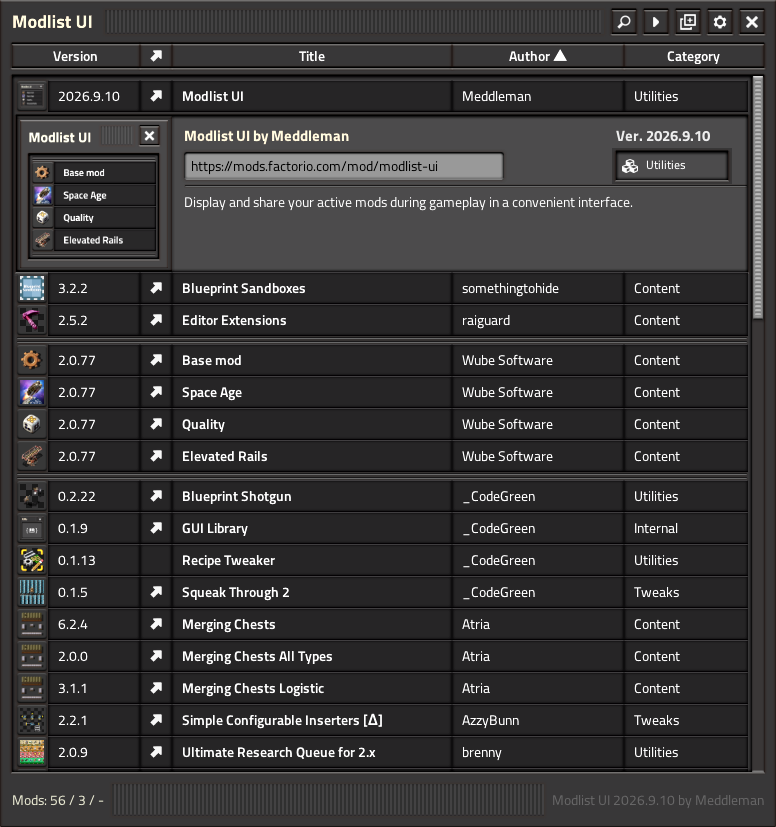
Browse, search, inspect, pin and share your currently active mods directly in-game.
Modlist UI is a compact utility useful during modded gameplay, streaming, troubleshooting, and modpack authoring. An in-game searchable overview lists every currently active mod, along with richer metadata, thumbnails, sorting, and pinning. Several copy tools enable mod-list sharing and dependency-array JSON export.
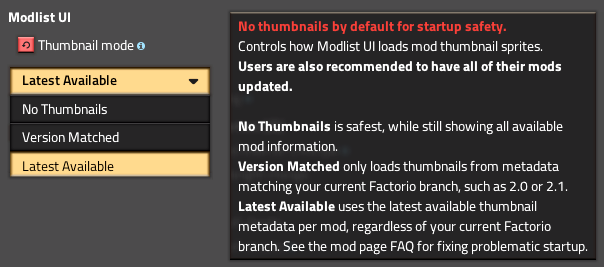
🚫 Modlist UI is set to [No Thumbnails] by default, as a startup failsafe.
First change this in _Settings_ -> _Mod Settings_ -> _Tab: Startup_ -> _Modlist UI: Thumbnail Mode_ to [Version-Matched] or [Latest Available]
⭐ Features
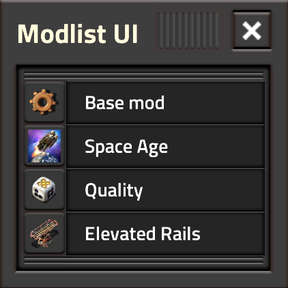
[Search]your active mods across titles, names, authors and other displayed metadata.[Mini Widget]aka. Minilist UI displays one mod-title in a tiny little randomized one-line marquee as you play, great for passive info while streaming to viewers.[Sort]by Version, Title, Author or Category in ascending, descending or default order, with player-defined settings.[Display]richer mod details in expandable entries with descriptions, thumbnails and links.[Pin]and[Reorder]favourite mods so important entries stay at the top regardless of search or sorting.[Copy]your active mod list or modpack dependency for easy sharing or as[info.json]skeleton.[Modes]for thumbnail fallback and version-matching safeguards for large or unusual modpacks.[Per-Player Settings]drawer for ingame non-interruptive live-result Modlist UI adjustment, such as Mini Widget position, default sort/direction, etc.
Hotkeys
[Ctrl+Shift+M]— Open or close Modlist UI.[Ctrl+Shift+Click]on the Copy button — Switch between normal mod-list copying and Dependency Authoring output.[Ctrl+Shift+Click]on a mod thumbnail — Pin or precisely reorder a mod among already-pinned entries.[Ctrl+Shift+Click]on Mini Widget's [▶️] button to reset it's dragged position to default.[Ctrl+Shift+Click]on the Setting's drawer 【Confirm❯ button to apply changes and _keep_ the drawer open.[Ctrl+F]— Focus the search field while Modlist UI is open.[Esc]— Clear/close an active search first; press again or[E]to close Modlist UI.
Useful for
🧱 Large modpacks Quickly find out what is actually active without digging through menus.
📺 Streaming Keep an in-game reference for viewers or quickly answer _"what mod is that?"_
📋 Sharing Copy your active mod list into chat, Twitch, Discord, forum posts or bug reports.
📦 Modpack authoring Generate copy-pastable dependency data and a useful [info.json] starting point.
Roadmap
- 🔍 Mod-UI Inspector. For when you just can't remember what mystery mod created a certain UI overlay.
- 🔣 Want Modlist UI displayed in your native language? Post a
[modlist-ui.cfg]here in this thread.
Credits
- _CodeGreen — for allowing me to modify the shortcut icon from Recipe Tweaker.
- Shemp — for extensive code support, feedback and perspective.
- Therenas — for the co-inspired Click & Drop pinning and element-reordering concept.
- raiguard — for MIT usage of flib's little gear-icon in
[frame-action-icons.png].
FAQ
Highlights
From source dataGame versions
Built for Factorio 2.1.
Footprint
Rated a light load on a server.
License
Published under MIT.
Modlist UI on Nxeon
From our catalogue- One-click install
- Supported on Nxeon Factorio servers. We download it from Factorio Mod Portal, place it, and restart the server.
- Server side
- Required on the server
- Server load
- light
- Smallest plan we suggest
- Factorio — 2 GB (2 GB RAM). This follows our own load rating above, not a benchmark.
- Latest build
- 2026.10.11, released 2026-10-16
Recent builds
| Build | Released | Game versions | Loaders |
|---|---|---|---|
| 2026.10.11 | 2026-10-16 | 2.1 | n/a |
| 2026.10.10 | 2026-10-16 | 2.0 | n/a |
| 2026.09.25 | 2026-09-22 | 2.1 | n/a |
| 2026.09.24 | 2026-09-22 | 2.0 | n/a |
| 2026.09.21 | 2026-09-20 | 2.1 | n/a |
| 2026.09.20 | 2026-09-20 | 2.0 | n/a |
Run Modlist UI on a Factorio server
Pick a server or deploy a new one above; it is installed in one click.
What kind of mod it is
From the catalogQuality of life & UI
Small conveniences, tweaks and interface improvements players notice straight away.
Runs on your server
From source side supportFactorio Mod Portal lists Modlist UI as required on the server. Check its Factorio Mod Portal page to see whether players need it too.
Compatibility
- Game
- Factorio
- Runs on
- Serverrequired on the server
- Game versions
- 2.1
Verified at the source
- ✓Factorio Mod PortalOfficial listing, checked 2026-10-17Open ↗
- ✓AuthorMeddleman, as published on Factorio Mod Portal
- ✓LicenseMITFree












