







About Quick Map Search
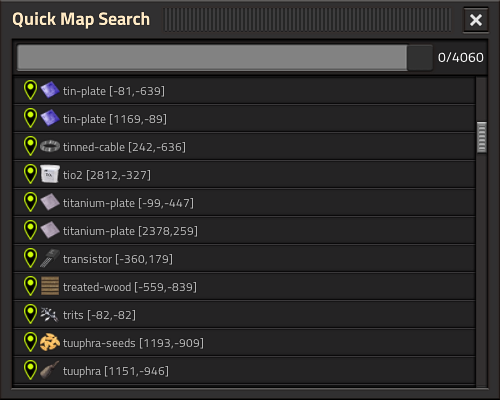
From Factorio Mod PortalSearch quickly for tags and train stops, and instantly jump to their position on the map.
Quick Map Search
Search quickly for tags and train stops, and instantly jump to their position on the map.
Usage
Press CTRL + Q and start typing.

Tips and Tricks
- Search will be performed as contains-operation (not equals).
- Search is case-insensitive.
- Spaces
" "and asterisks"*"will be treated as wildcard symbols. E.g."iro pla"would match"iron-plate"("pla iro"would not match, as the order is relevant). - Press
Enterto jump to the next search result (if search field is focused). - Use the icon selector button (at the end of the search field), if you don't remember the name of the thing you are looking for.
- To better remember the names in future, icons inside Tags and Train Stops will be additionally displayed as "hint" (small gray text) in each line (except virtual ones).
- The internal search term is slightly different than the displayed one to support a better text search and avoiding false-positives:
"map-tag $tag-icon $tag-text [$posX,$posY]" "train-stop $train-stop-name [$posX,$posY]"
- Tags are always prefixed with
"map-tag"and Train-Stops with"train-stop", so they can be included in the search for additional filtering. - Icons are not altered inside the search term and will use the rich text syntax, e.g.
"[item=iron-plate]"or"[fluid=water]". - Recommend to use Map Tag Generator to automatically generate Tags.
- Recommend to use Factory Search to search for other things.
Notice
- ~~Tested only in singleplayer and one surface.~~ Added basic support for both in v1.0.1 / v1.0.2.
- Feedback and suggestions are welcome. Bug Reports not so much.
Other Mods by me
- Inserter Visualizer Lite Visualize drop and pickup positions of an inserter.
Highlights
From source dataGame versions
Built for Factorio 1.1.
Footprint
Rated a light load on a server.
License
Published under MIT.
Quick Map Search on Nxeon
From our catalogue- One-click install
- Supported on Nxeon Factorio servers. We download it from Factorio Mod Portal, place it, and restart the server.
- Server side
- Required on the server
- Server load
- light
- Smallest plan we suggest
- Factorio — 2 GB (2 GB RAM). This follows our own load rating above, not a benchmark.
- Latest build
- 1.0.11, released 2024-06-29
Recent builds
| Build | Released | Game versions | Loaders |
|---|---|---|---|
| 1.0.11 | 2024-06-29 | 1.1 | n/a |
| 1.0.10 | 2024-03-25 | 1.1 | n/a |
| 1.0.9 | 2024-01-04 | 1.1 | n/a |
| 1.0.8 | 2023-12-26 | 1.1 | n/a |
| 1.0.7 | 2023-12-23 | 1.1 | n/a |
| 1.0.6 | 2023-12-22 | 1.1 | n/a |
Run Quick Map Search on a Factorio server
Pick a server or deploy a new one above; it is installed in one click.
What kind of mod it is
From the catalogListed on Factorio Mod Portal as “Mods”
Maps & scenarios
Custom maps, arenas and scenarios to play on.
Runs on your server
From source side supportFactorio Mod Portal lists Quick Map Search as required on the server. Check its Factorio Mod Portal page to see whether players need it too.
Compatibility
- Game
- Factorio
- Runs on
- Serverrequired on the server
- Game versions
- 1.1
Verified at the source
- ✓Factorio Mod PortalOfficial listing, checked 2026-10-09Open ↗
- ✓Authorr3nt5ch3r, as published on Factorio Mod Portal
- ✓LicenseMITFree












