






About Server Select Mod
From Factorio Mod PortalAdds a menu to select servers.
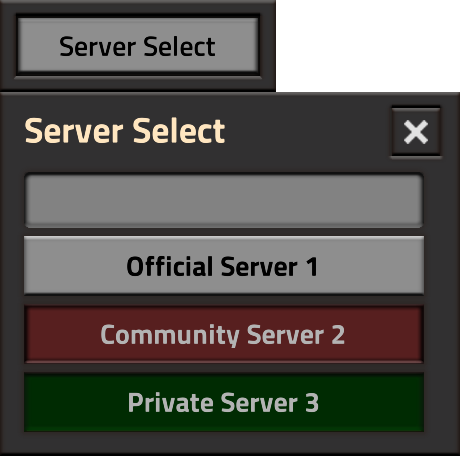
The Server Select Mod enhances your Factorio multiplayer experience by allowing you to switch servers without leaving the game.
Features:
- Server Select Button: A new button labeled "Server Select" appears in the game interface.
- Server List: Clicking the "Server Select" button opens a list of available servers.
- Search Function: A search bar at the top of the server list allows you to quickly find the server you want to join.
- JSON Input: The server list can be manually updated via a command, or it can be managed automatically when hosting the server through third-party software. This software can write to the CLI input (strIn) and execute the command automatically, even as a silent-command.
- Status Indicator: The button indicates the server status: green if you are connected to the server, and red if the server is offline.
With this mod, you can effortlessly navigate between different servers, making your gameplay smoother and more flexible. No more hassle of exiting the game to switch servers!
Example how the JSON looks like:
[
    {
        "Name": "Official Server 1",
        "IP": "192.168.1.1",
        "Status": true,
        "OnServer": false
    },
    {
        "Name": "Community Server 2",
        "IP": "192.168.1.2",
        "Status": false,
        "OnServer": false
    },
    {
        "Name": "Private Server 3",
        "IP": "192.168.1.3",
        "Status": true,
        "OnServer": true
    }
]
And for Ingame as Command you can do:
/set_server_list [{"Name": "Official Server 1", "IP": "192.168.1.1", "Status": true, "OnServer": false}, {"Name": "Community Server 2", "IP": "192.168.1.2", "Status": false, "OnServer": false}, {"Name": "Private Server 3", "IP": "192.168.1.3", "Status": true, "OnServer": true}];Or via remote Call and silent:
/sc local serverList = { {Name = "Official Server 1", IP = "192.168.1.1", Status = true, OnServer = false}, {Name = "Community Server 2", IP = "192.168.1.2", Status = false, OnServer = false}, {Name = "Private Server 3", IP = "192.168.1.3", Status = true, OnServer = true} }; remote.call("server_select_mod", "setServerListRemote", serverList);Highlights
From source dataFootprint
Rated a light load on a server.
License
Published under MIT.
Last update
Its author last shipped an update 2 yr ago.
Server Select Mod on Nxeon
From our catalogue- One-click install
- Supported on Nxeon Factorio servers. We download it from Factorio Mod Portal, place it, and restart the server.
- Server side
- Required on the server
- Server load
- light
- Smallest plan we suggest
- Factorio — 2 GB (2 GB RAM). This follows our own load rating above, not a benchmark.
- Latest build
- 0.1.1, released 2024-07-17
Recent builds
| Build | Released | Game versions | Loaders |
|---|---|---|---|
| 0.1.1 | 2024-07-17 | 1.1 | n/a |
| 0.1.0 | 2024-07-17 | 1.1 | n/a |
Run Server Select Mod on a Factorio server
Pick a server or deploy a new one above; it is installed in one click.
What kind of mod it is
From the catalogQuality of life & UI
Small conveniences, tweaks and interface improvements players notice straight away.
Runs on your server
From source side supportFactorio Mod Portal lists Server Select Mod as required on the server. Check its Factorio Mod Portal page to see whether players need it too.
Compatibility
- Game
- Factorio
- Runs on
- Serverrequired on the server
Verified at the source
- ✓Factorio Mod PortalOfficial listing, checked 2026-10-09Open ↗
- ✓AuthorSkiperTheBoss, as published on Factorio Mod Portal
- ✓LicenseMITFree












