






About Space Together
From Factorio Mod PortalSpace Together is a multiplayer mod in which you do not start on a planet, but stranded on a space platform. You get your resources from asteroids, research technologies, build thrusters and finally fly to your first planet.
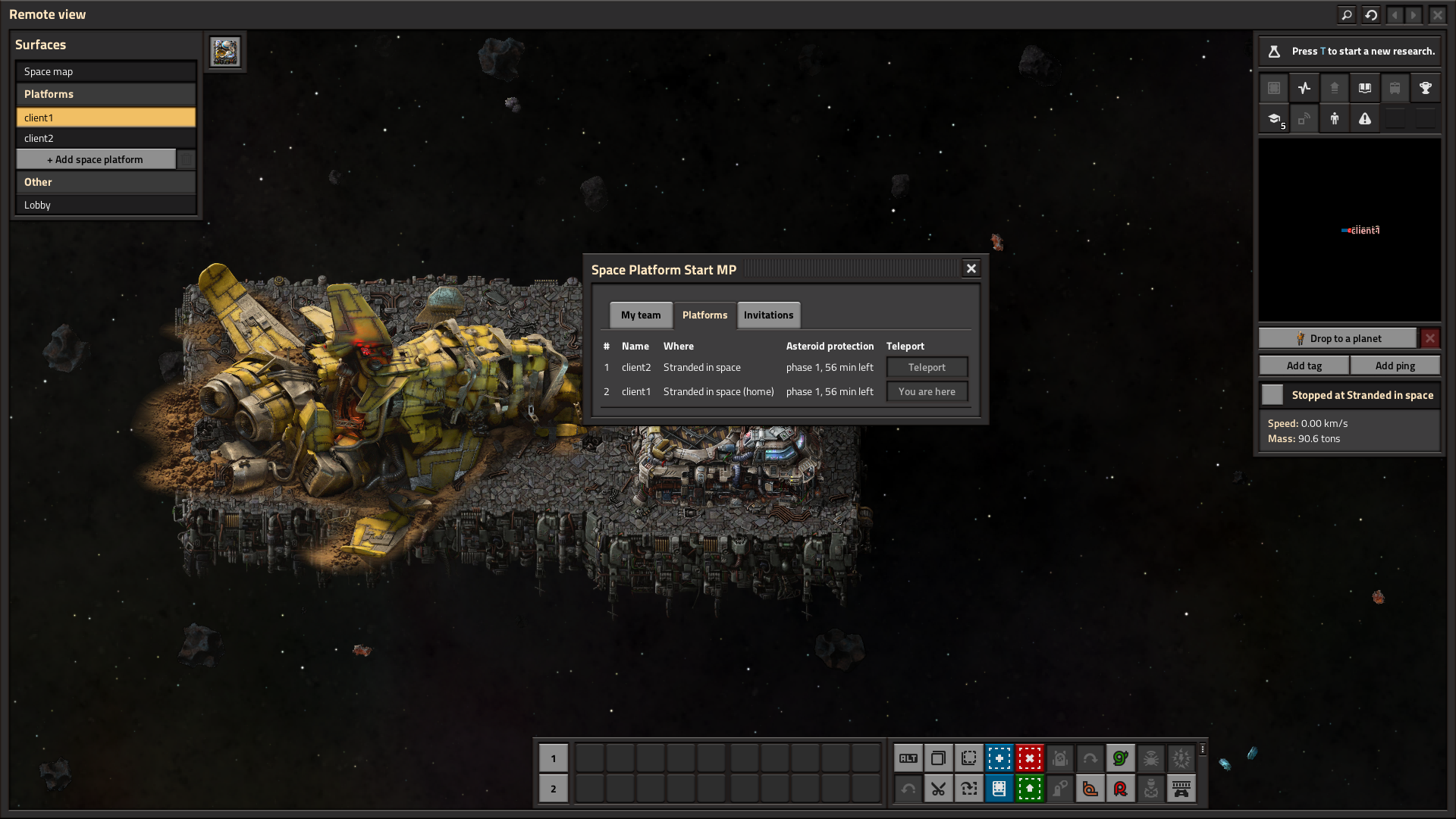
Multiplayer Space Platform Start: every team starts on its own space platform.
- Status: testing
- Requires: Factorio 2.1 with the Space Age expansion
- Based on: Space Platform Start by phiresky
- Community: Factorio Polska
Welcome to Space Together
Space Together is a multiplayer mod in which you do not start on a planet, but stranded on a space platform. You get your resources from asteroids, research technologies, build thrusters and finally fly to your first planet.
Many teams play on one server at the same time. Each has its own platform, its own research and its own base, and players can invite each other and merge teams. The server keeps itself tidy: the platforms of players who left the game are protected from asteroids, and abandoned teams disappear after a while.
The mod builds on Space Platform Start. The rules of the space start, and the technology changes that make it possible to finish the whole game this way, are the same as in the original.
Before you start
- Start a new map with the mod. If you add it to a game in progress, it moves every player to the lobby.
- The mod replaces the original Space Platform Start, so the game will not let you enable both at once.
- Teams that nobody plays in are removed over time. The section "Cleanup of inactive teams" explains the rules.
- This is a test version, so bugs may happen.
Space Together is for you if:
- you play on a server with others and want every new player to be able to start from scratch, even after many days
of play;
- you want to play alongside others, but at your own pace;
- you like the challenge of starting without a planet under your feet;
- you want to be able to join forces with other players at any time.
How the game starts
- When you join the server for the first time, you get your own team and your own space platform, named after you.
- The platform is at the location "Stranded in space": in Vulcanus orbit, but far from the planet. Sunlight and the
kinds of asteroids there are the same as at Vulcanus.
- Next to the space platform hub lies the wreck of your spaceship with the starting items: an asteroid collector,
a crusher, an assembling machine 1, 8 inserters, 4 stone furnaces, 2 solar panels, 6 space platform foundations and 8 firearm magazines.
- Planets have to be discovered with a technology first. That includes Vulcanus, where you start, and Nauvis, which
gets its own discovery technology here.
What makes it a challenge
- You start in the hub and build remotely. Shift+Enter takes you out onto the deck and back into the hub, but the
edge of the platform is as far as you get. From the deck you build and open buildings across the whole platform, while on planets the reach stays normal.
- Every resource comes from asteroids: the collector catches the chunks and crushers break them down.
- Space is expensive: every bit of the platform is a space platform foundation.
- Asteroids can destroy your platform before you set up defenses. The bigger the platform, the more ammunition it
uses.
- You make oil and oil products from coal made out of asteroids. This production chain exists in the base game, but
on a planet hardly anyone uses it.
- Switching crusher recipes automatically with circuit network signals comes in handy.
- To fly away, you have to research and build thrusters, and they need processing units.
- Be careful what you deconstruct: one mistake can cost you valuable items.
Landing on planets
- Every team lands at its own site on a planet, far from the planet's centre. The team's first pod bound for
a planet gets the site; the team sees it in chat as a map marker.
- Around the site the game generates that planet's usual starting area: ores, water, no enemies nearby
(no demolisher on Vulcanus, an island of your own on Fulgora and Aquilo).
- Team members who die on that planet respawn at their landing site.
- Once the team builds a cargo landing pad on the planet, pods land on it, as in the base game.
Teams
- Each team has its own platforms, research, map and buildings. You do not see other teams' platforms.
- Turrets shoot at other teams too, and you cannot use other teams' buildings.
- The chat is shared: you see messages from players in other teams and in the lobby, with the team name next to each
player's name.
- The team's founder is its host. The host takes in new players and can remove a member or hand the host role to
someone else. When the host leaves the team, the role passes to the member who has played the longest for the team, preferring members who are in the game.
Playing together
- Invitations. In the "My team" tab, pick a player from the list and click "Invite". The invited player gets
a popup with "Accept" and "Decline" buttons. An invitation is valid for 10 minutes.
- Joining with your own platform. If you play alone in your own team, accepting an invitation, or the host
accepting your join request, merges both teams. Your platforms and buildings go to the other team, and you move to its platform. If you are on a planet, you stay there. You can teleport back to your old platform. Your research and your explored map are lost, because the game cannot merge them. That is why you have to confirm the merge.
- If your team has other players too, you have to leave it before you can join another team.
- Join requests. A player without a team asks a team to take them in from the lobby window. If you play alone
in your own team, pick a player of the other team from the list in the "My team" tab and click "Ask to join" next to "Invite". The host's yes merges both teams as an invitation does, so you confirm the merge when you send the
Highlights
From source dataFootprint
Rated a light load on a server.
License
Published under GPL-3.0.
Last update
Its author last shipped an update 28d ago.
Space Together on Nxeon
From our catalogue- One-click install
- Supported on Nxeon Factorio servers. We download it from Factorio Mod Portal, place it, and restart the server.
- Server side
- Required on the server
- Server load
- light
- Smallest plan we suggest
- Factorio — 2 GB (2 GB RAM). This follows our own load rating above, not a benchmark.
- Latest build
- 0.30.5, released 2026-10-06
Recent builds
| Build | Released | Game versions | Loaders |
|---|---|---|---|
| 0.30.5 | 2026-10-06 | 2.1 | n/a |
| 0.30.4 | 2026-10-04 | 2.1 | n/a |
| 0.30.3 | 2026-10-03 | 2.1 | n/a |
| 0.30.2 | 2026-10-03 | 2.1 | n/a |
| 0.29.0 | 2026-10-02 | 2.1 | n/a |
| 0.28.0 | 2026-10-01 | 2.1 | n/a |
Dependencies
- Required: [reserved]
- Incompatible with: Space Platform Start
Declared by the newest build that lists any. Required ones are installed with it on one-click installs.
Run Space Together on a Factorio server
Pick a server or deploy a new one above; it is installed in one click.
What kind of mod it is
From the catalogBuilding & decoration
Blocks, furniture, decorations and building tools.
Runs on your server
From source side supportFactorio Mod Portal lists Space Together as required on the server. Check its Factorio Mod Portal page to see whether players need it too.
Compatibility
- Game
- Factorio
- Runs on
- Serverrequired on the server
Verified at the source
- ✓Factorio Mod PortalOfficial listing, checked 2026-10-07Open ↗
- ✓AuthorFrytkownix, as published on Factorio Mod Portal
- ✓LicenseGPL-3.0Free












