






About Space Platform Organizer - Enhanced
From Factorio Mod PortalSort your space platforms into named, color-coded folders in the remote view (M). Subfolders, favorites, search, status filters, auto-grouping, build progress with time estimate, markers for the platform you look at and where your character stands. Create several platforms at once with a ship blueprint book and a live material check. Backup export/import, recycle bin. English, German, French, Spanish, Chinese, Russian. Based on AkitaAttribute/SpacePlatformOrgUI (MIT).
Space Platform Organizer - Enhanced
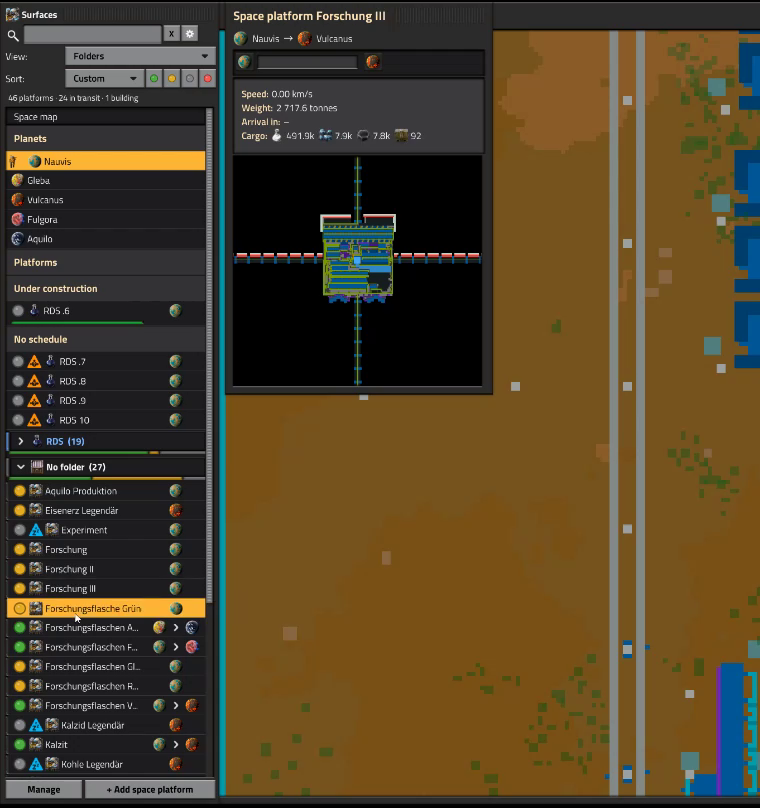
The remote view lists every space platform in one endless row. This mod turns that list into a panel with named, color-coded folders, so you find the right platform in seconds, even with dozens of them.
The five things you will notice first
- Folders and subfolders with colors, icons and notes, plus favorites, "Recently visited" and search
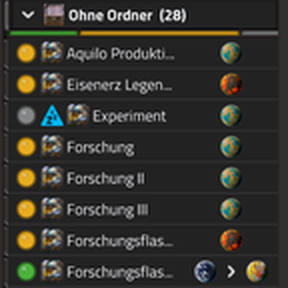
- Status at a glance: colored status dots, filter buttons (in transit / in orbit / paused / no schedule) and a status bar per folder
- Live preview when you hover a platform: route, progress, speed, weight, arrival time and main cargo
- Create several platforms at once with a ship blueprint book and a live material check
- Backup, recycle bin and automatic backup file, so a mistake never costs you your folders
Sorting and organizing
- Folders and one level of subfolders, custom colors, icons and notes, a colored stripe and a status bar per folder
- Favorites, "Recently visited", search, view by folder, by location or by route: ships in flight are grouped by their connection, with little comic spaceships on a track that show how far each one has come
- Sorting A-Z / Z-A with natural numbers and Roman numerals, by build progress, or your own custom order; optionally symbols in names count when sorting
- Auto-grouping by keywords with an editable rules window; new platforms are sorted automatically or offered an assign dialog
- Optional: folders, favorites and a custom order for planets
- An "Other" section for surfaces that are neither planets nor platforms (jump there, rename them; with the planet organizer they sort in with the planets)
- Hide what you do not need: Ctrl+click takes a platform, planet or other surface out of the lists into a collapsed "Hidden" section; Ctrl+Shift+click hides it entirely (it comes back through a button in the Manage window). Counters and warnings still include hidden platforms
- Delete platforms from the Manage window, after a confirmation that lists their names
Status, markers and preview
- Status filter buttons next to the search field, combinable, or as one button that cycles through the filters
- A colored status dot in front of every platform; warning icons for paused platforms and platforms without a schedule (optional)
- Build progress bar with time estimate for platforms under construction; the line below keeps a fixed height and shows "stalled" when nothing has been delivered for a while (can be turned off)
- Show the "Platforms under construction" group at the top, at the bottom, or not at all
- Finished platforms without a schedule get their own group, so you notice them at a glance
- A marker for the platform you are looking at and a player figure for the planet or platform your character stands on
- Preview on hover (can be switched off)
Make it look the way you want
The settings (gear button next to the search field) have three pages for the display:
- Hide the status dot, the location and status column, headings, colored stripes or the scrollbar; or put the status dot at the right end of the row
- Set the indent of subfolders and the row height
- Compact header: view, sorting and filter in one row
- Toolbar (search, view, sorting, filters) can be hidden completely; the gear button moves to the title bar
- Footer with small icon buttons (Manage, +), placed left, in the middle or on the right
- Highlight the whole row or only the button under the mouse (reacts instantly on servers with a higher ping)
- Display templates: save the display options, indent, row height and panel size under a name (Standard, Compact and up to 5 of your own); a small button next to the gear cycles through them
- Hide the panel in remote view when zooming in, like the game's own list
- Hide the panel while another window (for example a locomotive) is open, so it never covers anything
- One button resets all display options; sliders for panel height and width (in percent of the screen)
New platforms
- Extended "Add space platform" dialog: up to 10 platforms at once, consecutive numbering, target folder, ship icon and start planet
- Ship book: up to 20 ship blueprints per savegame (from your hand, a blueprint book, your personal storage or pasted text), reorder, rename, preview the parts per quality level, hand the book out as a real blueprint book and read it in again in other savegames
- Automatic ship blueprint on new platforms as soon as their hub exists
- Live material check: shows whether the logistic network of the chosen planet holds enough material for the selected ship and lists what is missing
- A "Space map" row at the top of the list, like in the original list, and a "To folders" button on the original list
Backup
- Export folders, rules, assignments, favorites, icons, notes and panel settings as text; import with a preview and a choice per section (skip / add / replace)
- Recycle bin for deleted folders (restore with rules and assignments) and an automatic backup file (every 30 minutes, can be turned off)
Good to know
- Requires Space Age. Open the panel with the shortcut bar button, Ctrl+Shift+P or /spo.
- Works with Factorio 2.1. Support for Factorio 2.0 will end soon; new features now come to the 2.1 file first, and the older 2.0 files remain available for download.
- Build progress, time estimate and the material check are approximations; the check only compares with the current stock of the logistic network and does not count items on their way.
Highlights
From source dataFootprint
Rated a light load on a server.
License
Published under MIT.
Last update
Its author last shipped an update today.
Space Platform Organizer - Enhanced on Nxeon
From our catalogue- One-click install
- Supported on Nxeon Factorio servers. We download it from Factorio Mod Portal, place it, and restart the server.
- Server side
- Required on the server
- Server load
- light
- Smallest plan we suggest
- Factorio — 2 GB (2 GB RAM). This follows our own load rating above, not a benchmark.
- Latest build
- 2.1.29, released 2026-11-04
Recent builds
| Build | Released | Game versions | Loaders |
|---|---|---|---|
| 2.1.29 | 2026-11-04 | 2.1 | n/a |
| 2.1.28 | 2026-11-02 | 2.1 | n/a |
| 2.1.27 | 2026-11-01 | 2.1 | n/a |
| 2.1.26 | 2026-10-30 | 2.1 | n/a |
| 2.1.25 | 2026-10-29 | 2.1 | n/a |
| 2.1.24 | 2026-10-29 | 2.0 | n/a |
Dependencies
- Required: [reserved]
Declared by the newest build that lists any. Required ones are installed with it on one-click installs.
Run Space Platform Organizer - Enhanced on a Factorio server
Pick a server or deploy a new one above; it is installed in one click.
What kind of mod it is
From the catalogVehicles & ships
Cars, boats, aircraft, ships and other things to drive or fly.
Runs on your server
From source side supportFactorio Mod Portal lists Space Platform Organizer - Enhanced as required on the server. Check its Factorio Mod Portal page to see whether players need it too.
Compatibility
- Game
- Factorio
- Runs on
- Serverrequired on the server
Verified at the source
- ✓Factorio Mod PortalOfficial listing, checked 2026-11-04Open ↗
- ✓AuthorAmageddon86, as published on Factorio Mod Portal
- ✓LicenseMITFree












