






About Spidertron Hunter
From Factorio Mod PortalTurn Spidertrons into autonomous combat units that search for, attack, retreat from, and eliminate enemy bases without constant micromanagement.
Spidertron Hunter
> Give your Spidertrons a mission.
Spidertron Hunter transforms idle Spidertrons into autonomous combat units that hunt enemy bases, scout unexplored terrain, and return home to repair and restock—all while using vanilla Spidertron autopilot.
Designed to feel like a natural extension of vanilla gameplay, the focus is automation, not stronger Spidertrons.
Highlights
- 🤖 Autonomous Hunter and Scout AI
- 🏠 Automatically returns home to repair and restock
- 🔫 Returns home when ammo runs low (configurable %)
- 🛡️ Tactical retreat with optional re-engage
- 🧭 Scout mode explores and discovers enemy bases
- 👥 Fleet Manager for controlling multiple Spidertrons
- 🗺️ Built-in lake-aware Ctrl+right-click pathing (no other spider mods required)
- 🕷️ Uses vanilla Spidertron autopilot
- 🌐 Multiplayer compatible
- ⚡ UPS-conscious
Gallery
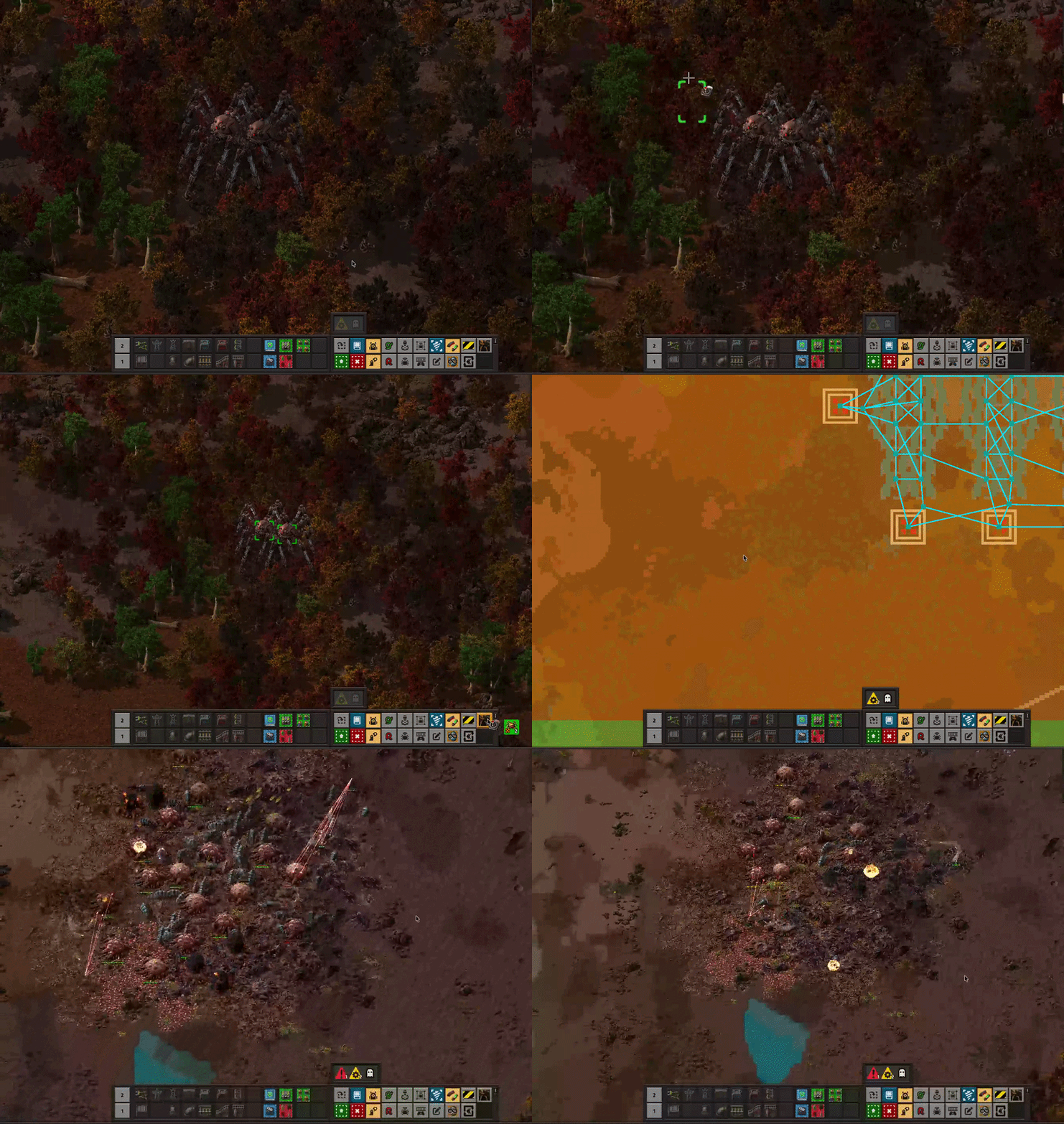
Enable Hunter AI on multiple Spidertrons at once.
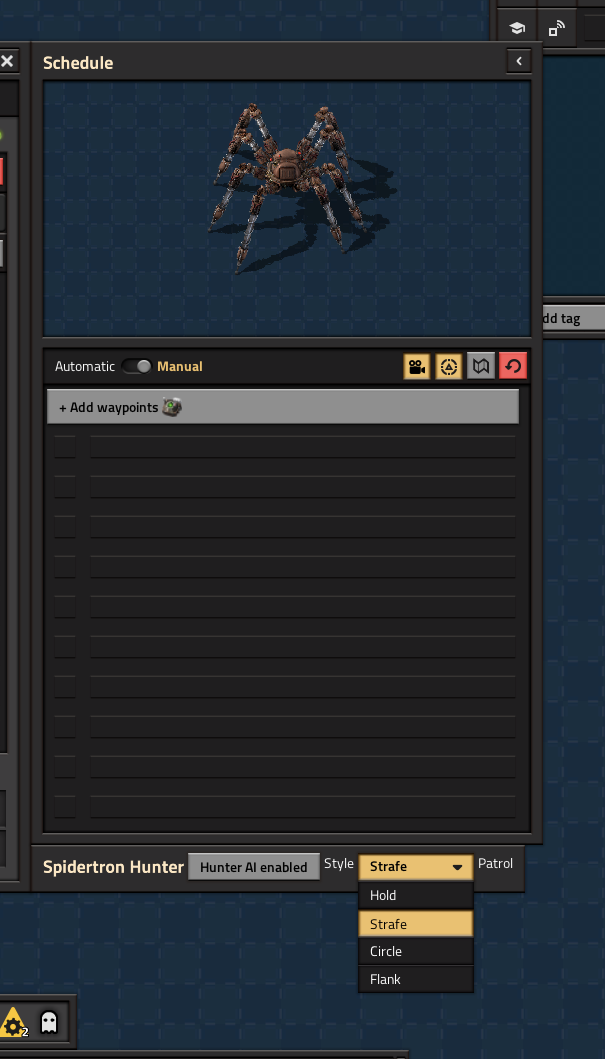
Vertical panel beside the Spidertron inventory: Mode, combat Style (Hold / Strafe / Circle / Flank), Set/Clear home, and AI status.

Scouts automatically explore lakes, coastlines, and unexplored terrain while avoiding combat.

Manage every Spidertron on the current surface from one window — including Ctrl-click Scout enable and Hunter/Scout counts.
Quick Start
- Research Spidertron.
- Select one or more Spidertrons with a Spidertron Remote.
- Set Mode → Hunter or Scout.
- Hunter AI records the Spidertron's current position as Home.
- Sit back and let them work.
Keyboard shortcuts
- Ctrl+Shift+H — Toggle Hunter AI
- Ctrl+Shift+M — Open Fleet Manager
- Alt+Shift+A — Scout Remote
Hunter Mode
Patrol
→ Search
→ Move
→ Attack
→ Linger
→ Return Home
→ Restock
→ Re-engage (optional)
→ Patrol
Hunters automatically:
- Search for nearby enemy bases
- Navigate around lakes using vanilla pathfinding
- Fight using configurable combat styles
- Avoid acid puddles
- Retreat when hull or shields fall below configurable thresholds
- Return home when ammo drops to Restock ammo % of the logistic request (default 20)
- Return home for repairs and logistics
- Optionally return to the previous battle and continue hunting
Hunter remote
Right-click issues a straight vanilla autopilot path (as before).
Ctrl+right-click uses Hunter's built-in lake-aware pathfinder (no other spider mods required; works with AI on or off): ground clicks travel then resume hunting when AI is enabled; enemy clicks path then engage.
Scout Mode
Explore
→ Chart Fog
→ Discover Enemies
→ Return Home
→ Restock
→ Resume
Scouts are dedicated exploration units.
They:
- Never engage enemies
- Chart unexplored terrain
- Discover enemy bases for Hunters
- Maintain standoff distance from biters
- Return home automatically
Scout mode requires:
- No ammunition
- No Personal Laser Defense equipment
If a Scout begins zig-zagging, it is usually avoiding nearby enemies. Send a Hunter group to clear the area.
Fleet Manager
Open with Ctrl+Shift+M.
Spidertrons are grouped by entity label (or prototype name if unlabeled). Each group card shows active Hunter/Scout counts (e.g. 2H, 1S).
Each group provides:
- Follow — Group follows the player
- Remote — Select the group with a Spidertron Remote
- Home — Return home (
Ctrl-click sets current position as Home) - Show Group — Jump to the group using remote view
- Settings — Open one Spidertron's settings
- AI Toggle — Enable Off as Hunter, or disable if all are on.
Ctrl-click enables Off members as Scout (armed spiders are refused) - Pin — Keep the window open while using remotes or Spidertron GUIs
Scout Controls
Vanilla Spidertron Remote
Click the map to choose an exploration focus.
This clears queued waypoints and begins autonomous exploration around the selected area.
Ctrl+right-click uses a lake-aware path when setting focus.
Scout Remote
Use Alt+Shift+A to place Scout waypoints.
Waypoints are completed in order before autonomous exploration resumes.
Ctrl+right-click appends a waypoint with lake-aware pathing.
Available exploration algorithms:
- Frontier
- Lawnmower
- Spiral
Why Spidertron Hunter?
Spidertron Hunter extends vanilla Spidertrons instead of replacing them.
Spidertrons still require:
- Ammunition
- Equipment
- Power
- Repairs
- Logistics
The AI simply gives idle Spidertrons useful jobs without changing their underlying balance.
Compatibility
Requires Factorio 2.1. Going forward, development and releases target 2.1 only (Factorio 2.0 is not supported).
Optional compatibility is included for:
- Spidertron Patrols
- Spidertron Enhancements
- Space Age
Lake-aware Ctrl+right-click is built into Hunter (own pathfinder and building-collision data). You do not need Enhancements or Patrols for pathing.
When Hunter AI is enabled alongside Spidertron Patrols, patrol control is temporarily switched to manual so both mods don't compete for Spidertron autopilot. Previous behavior is restored when Hunter AI is disabled.
Features
- Autonomous Hunter AI
- Autonomous Scout AI
- Fleet Manager
Highlights
From source dataGame versions
Built for Factorio 2.1.
Footprint
Rated a light load on a server.
License
Published under MIT.
Spidertron Hunter on Nxeon
From our catalogue- One-click install
- Supported on Nxeon Factorio servers. We download it from Factorio Mod Portal, place it, and restart the server.
- Server side
- Required on the server
- Server load
- light
- Smallest plan we suggest
- Factorio — 2 GB (2 GB RAM). This follows our own load rating above, not a benchmark.
- Latest build
- 0.2.9, released 2026-08-31
Recent builds
| Build | Released | Game versions | Loaders |
|---|---|---|---|
| 0.2.9 | 2026-08-31 | 2.1 | n/a |
| 0.2.8 | 2026-08-10 | 2.1 | n/a |
| 0.2.7 | 2026-07-28 | 2.0 | n/a |
| 0.2.6 | 2026-07-28 | 2.1 | n/a |
| 0.2.5 | 2026-07-28 | 2.0 | n/a |
| 0.2.4 | 2026-07-28 | 2.1 | n/a |
Dependencies
- Optional: [reserved]
- Optional: Spidertron Patrols
- Optional: Spidertron Enhancements
Declared by the newest build that lists any. Required ones are installed with it on one-click installs.
Run Spidertron Hunter on a Factorio server
Pick a server or deploy a new one above; it is installed in one click.
What kind of mod it is
From the catalogCreatures & NPCs
Adds or changes creatures, NPCs and how they behave.
Runs on your server
From source side supportFactorio Mod Portal lists Spidertron Hunter as required on the server. Check its Factorio Mod Portal page to see whether players need it too.
Compatibility
- Game
- Factorio
- Runs on
- Serverrequired on the server
- Game versions
- 2.1
Verified at the source
- ✓Factorio Mod PortalOfficial listing, checked 2026-10-08Open ↗
- ✓Authorashlesss_, as published on Factorio Mod Portal
- ✓LicenseMITFree












