







About Train Limit Linter
From Factorio Mod PortalDisplays info about train schedules and train limits. Allows the easy creation of new trains.
Train Limit Linter
This is a mod for the game Factorio. It is published on the Factorio mod portal in .zip format. The source code is visible on the Github page. The mod provides an interface which allows a player to easily assess whether they have the proper number of trains with each schedule and deploy new trains quickly.
This uses the concept of the Fundamental Theorem of Train Limits, as posted on Reddit by /u/GBUS_TO_MTV. According to that theorem, in a many-to-many train network, where each station on that network has a train limit set, the number of trains should be equal to the sum of the train limits on all the stations, minus one, i.e. P + R - 1.
This mod is under active development. Features may be added or removed at any time. Screenshots of the GUI and this document might not be fully accurate.
Display
Train Limit Linter provides a GUI, which is opened by default using CONTROL + O (the letter oh). That GUI provides the following functionalities:
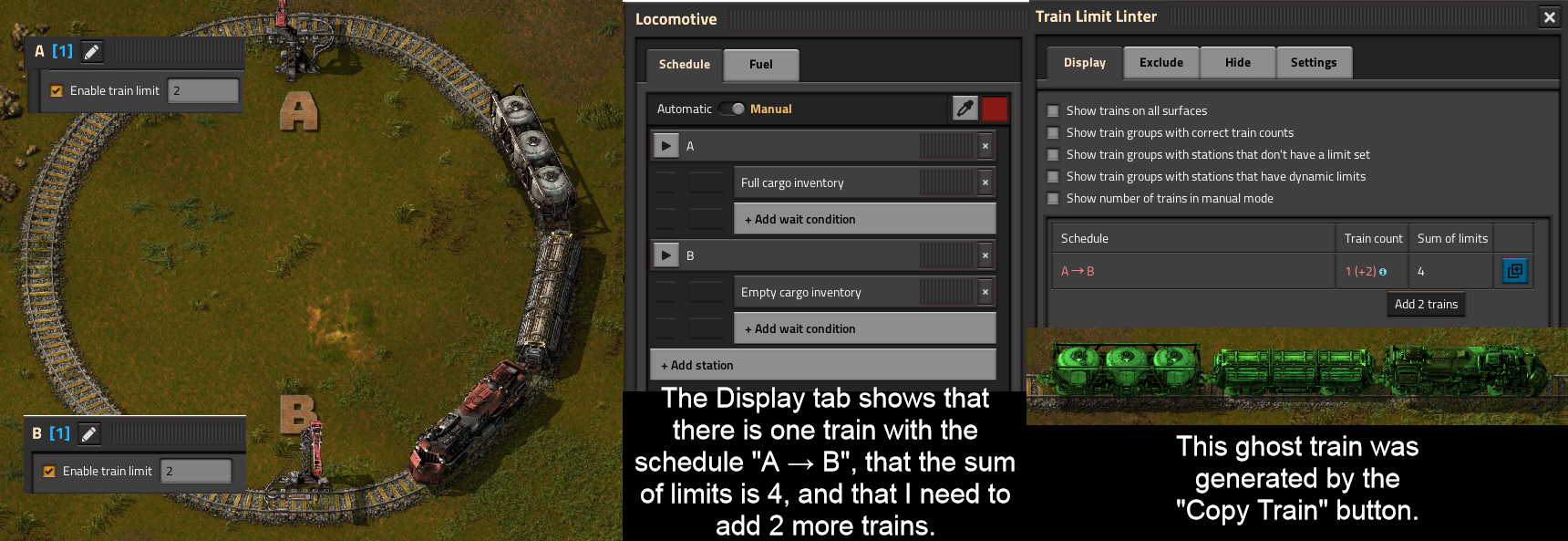
- It displays all train schedules, how many trains have each schedule, and the sum of the train limits for all the stations on each schedule.
- In games with trains on multiple surfaces (for example, with the Space Exploration mod), train schedule groups are divided according to what surface their trains are on.
- Train schedules are color-coded according to whether their train count conforms to P + R - 1. It displays what action would be necessary for each schedule to conform to P + R - 1. For example, it will say "Add 1 train" or "Remove 2 trains".
- Each schedule has a button which places a blueprint containing a copy of a train in the schedule into your cursor. This allows the user to quickly stamp down new trains. Certain aspects of the blueprints this generates can be modified in the Settings tab.
- Schedules can be hidden if they meet any of the following conditions:
- They are not on the player's current surface
- They conform to P + R - 1 (so no action is required)
- They contain a train stop with no limit set
- They contain a train stop with a limit set dynamically using the circuit network
- They only contain one train stop
Keywords
Train Limit Linter allows the creation of lists of keywords which can be excluded or hidden. These keywords affect certain elements of the schedule display table in the Display tab, specifically how train limits are calculated and whether schedules are displayed. Keyword lists can be converted into exchange strings which can be shared between players or save files. Keywords can be enabled or disabled to allow you to quickly toggle their changes to the schedule display table without having to delete them and type them back in. Also, keywords can be toggled between requiring a train station to exactly match the keyword or requiring the keyword to be a substring of the train station to affect the schedule display table.
Keyword exclusion
Train Limit Linter allows some customization of how train limit sums are calculated. It is possible through the Exclude tab to add excluded keywords. Train stations with names matching excluded keywords will not be counted when calculating train limit sums or when determining which trains are part of the same group, and will not cause various warnings to appear, such as warnings for if a train station has no limit set, has a limit set dynamically, or does not exist at the moment.
Excluding keywords is meant to be useful when there may be stops on a train's schedule which are not "really" part of the schedule; for example, other mods may inject stops on a train's schedule where they can resupply with fuel, or a train may have a stop acting as a waypoint which it must travel through but at which the train is not required to stop.
For example, if a train schedule has the stops Iron Ore Load, Fuel Resupply, and Iron Ore Unload, only one of each of those stops exists, and all stops have a train limit of 2, and the keyword Fuel Resupply has been added to the excluded keyword list, then the train limit sum displayed will be 4. If the keyword Fuel Resupply has not been added to the excluded keyword list or has been added and is disabled, the train limit sum displayed will be 6.
Another example: In a situation with the same train stops (Iron Ore Load, Fuel Resupply, and Iron Ore Unload), if one train has a schedule which visits Iron Ore Load and Iron Ore Unload (and does not visit Fuel Resupply), and another train has a schedule which visits Iron Ore Load, Fuel Resupply, and Iron Ore Unload, and the keyword Fuel Resupply has been added to the excluded keyword list and is not disabled, the two trains will be considered to be part of the same group, since their schedules match except for the excluded stop.
Temporary stops are always considered to be excluded.
Keyword hiding
Train Limit Linter allows some customization of which schedules are displayed. It is possible through the Hide tab to add hidden keywords. If any station in a schedule matches a hidden keyword, that schedule will not be displayed in the Display tab.
Settings
Train Limit Linter allows the creation of blueprints using the "Copy" button in the schedule report table in the Display tab. These blueprints contain a copy of a train with the given schedule. These blueprints can be customized in several ways:
- The trains can be oriented in any cardinal or half-cardinal direction by default.
- The blueprints can snap to the grid.
- The blueprints can include copies of train stops that the schedule visits, with the ability to customize what train limits these stops include.
Highlights
From source dataFootprint
Rated a light load on a server.
License
Published under MIT.
Last update
Its author last shipped an update 2 yr ago.
Train Limit Linter on Nxeon
From our catalogue- One-click install
- Supported on Nxeon Factorio servers. We download it from Factorio Mod Portal, place it, and restart the server.
- Server side
- Required on the server
- Server load
- light
- Smallest plan we suggest
- Factorio — 2 GB (2 GB RAM). This follows our own load rating above, not a benchmark.
- Latest build
- 1.0.34, released 2024-07-09
Recent builds
| Build | Released | Game versions | Loaders |
|---|---|---|---|
| 1.0.34 | 2024-07-09 | 1.1 | n/a |
| 1.0.33 | 2024-07-09 | 1.1 | n/a |
| 1.0.32 | 2024-05-31 | 1.1 | n/a |
| 1.0.31 | 2024-05-31 | 1.1 | n/a |
| 1.0.30 | 2024-05-20 | 1.1 | n/a |
| 1.0.29 | 2024-05-20 | 1.1 | n/a |
Dependencies
- Required: Factorio Library
Declared by the newest build that lists any. Required ones are installed with it on one-click installs.
Run Train Limit Linter on a Factorio server
Pick a server or deploy a new one above; it is installed in one click.
What kind of mod it is
From the catalogVehicles & ships
Cars, boats, aircraft, ships and other things to drive or fly.
Runs on your server
From source side supportFactorio Mod Portal lists Train Limit Linter as required on the server. Check its Factorio Mod Portal page to see whether players need it too.
Compatibility
- Game
- Factorio
- Runs on
- Serverrequired on the server
Verified at the source
- ✓Factorio Mod PortalOfficial listing, checked 2026-10-09Open ↗
- ✓Authornotnotnaught, as published on Factorio Mod Portal
- ✓LicenseMITFree












