






About Train Camera Tracker
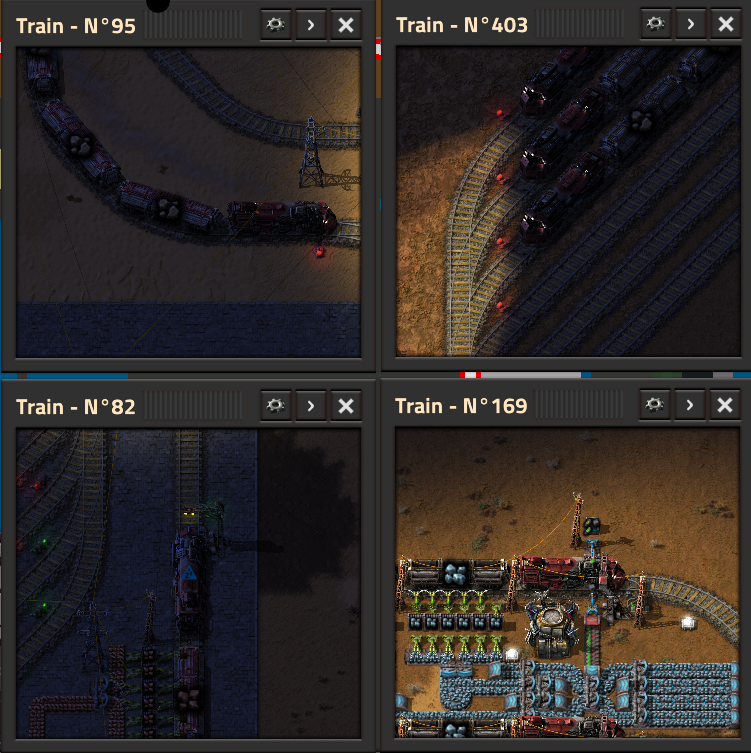
From Factorio Mod PortalAdds a smooth tracking camera allowing you to target and follow a moving train using the /track_train command or a custom shortcut. (default shift+T)
Train Camera Tracker ====================
_Never lose sight of your favorite trains again!_
Train Camera Tracker is a handy utility mod that allows you to easily open smooth, tracking camera windows attached to any moving train in your network.
Features
- Smooth Tracking: The camera fluidly follows your targeted train. You can adjust the tracking speed from a buttery-smooth cinematic delay to an instant lock-on.
- Live Telemetry: A real-time dashboard below the camera displays the train's current speed, next scheduled station, and total distance traveled (odometer).
- Multiple Cameras: Keep an eye on several trains at once! Open as many camera windows as you need.
- Quick Access: Left-click directly on the camera feed to instantly open the train's scheduling interface.
- In-Game Settings Menu: Easily adjust the size, zoom level, and toggle telemetry metrics on the fly via a dedicated settings button (gear icon) on each window.
- Fullscreen Mode: Expand any camera to fullscreen for an immersive view.
How to Use
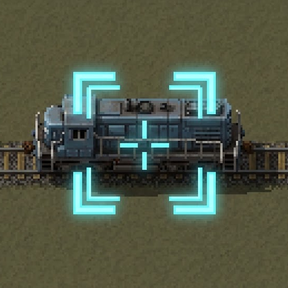
Simply hover your mouse cursor over any locomotive or wagon and do one of the following:
- Press the shortcut SHIFT + T (default).
- Type the command /track\_train in the chat console.
_Utility command:_ Use /close-all-cam to instantly close all your open camera windows and clear your screen.
Configuration
You can deeply customize the mod's behavior in the Mod Settings (Options > Mod settings):
- _Per Player - Default window size & zoom:_ Set the initial size and zoom level of the camera.
- _Per Player - Camera tracking speed:_ Adjust the catch-up speed of the camera (from 0.01 for a heavy delay up to 1.0 for instant, 1:1 tracking).
- _Per Player - Telemetry defaults:_ Choose whether to show the speed, next station, and travel distance by default when opening a new camera.
- _Global - Odometer interval:_ Server administrators can adjust how often the global odometers update. Leave at 0 for an auto-scaling mode that intelligently preserves server performance (UPS) based on your train count.
Highlights
From source dataFootprint
Rated a light load on a server.
License
Published under GPL-3.0.
Last update
Its author last shipped an update 8 mo ago.
Train Camera Tracker on Nxeon
From our catalogue- One-click install
- Supported on Nxeon Factorio servers. We download it from Factorio Mod Portal, place it, and restart the server.
- Server side
- Required on the server
- Server load
- light
- Smallest plan we suggest
- Factorio — 2 GB (2 GB RAM). This follows our own load rating above, not a benchmark.
- Latest build
- 1.1.5, released 2026-02-28
Recent builds
| Build | Released | Game versions | Loaders |
|---|---|---|---|
| 1.1.5 | 2026-02-28 | 2.0 | n/a |
| 1.1.4 | 2026-02-24 | 2.0 | n/a |
| 1.1.3 | 2026-02-23 | 2.0 | n/a |
| 1.1.2 | 2026-02-22 | 2.0 | n/a |
| 1.1.1 | 2026-02-22 | 2.0 | n/a |
| 1.1.0 | 2026-02-22 | 2.0 | n/a |
Run Train Camera Tracker on a Factorio server
Pick a server or deploy a new one above; it is installed in one click.
What kind of mod it is
From the catalogVehicles & ships
Cars, boats, aircraft, ships and other things to drive or fly.
Runs on your server
From source side supportFactorio Mod Portal lists Train Camera Tracker as required on the server. Check its Factorio Mod Portal page to see whether players need it too.
Compatibility
- Game
- Factorio
- Runs on
- Serverrequired on the server
Verified at the source
- ✓Factorio Mod PortalOfficial listing, checked 2026-10-08Open ↗
- ✓Authorocelus_ftnl, as published on Factorio Mod Portal
- ✓LicenseGPL-3.0Free












