






About Train Construction Site Fork - Factorio 2.1 Update
From Factorio Mod PortalA fork of Train Construction Site, updated and ported for Factorio 2.1
Train Construction Site Fork - Factorio 2.1 Update
> This is the Factorio 2.1 fork/update of Train Construction Site. > Original authors: Lovely_santa and Voske_123. Factorio 2.1 update and maintenance by Marcel171297.
1. Introduction
Dear player,
This mod introduces a more realistic way of building trains. The trains are created inside a building instead of manualy placing them down. When the train is build, it will drive off to the depot stop, where you can manualy send them away. You can access trains in the depot from the map view, meaning you don't have to be close by. Copy & pasting a schedule in one of these trains will immediatly let the train do its job.
Here you can find some basic information about the setup and workings of the construction site. The construction site is build around three entities:
- The Traindepot,
- The Trainbuilder,
- The Trainbuilder controller.
You can find this information by opening the ingame manual as well.

If you find any bugs or find anything unclear, feel free to contact us on the mod portal, in the discussion section or make a bug report on github.
Kind regards and have fun playing, Lovely_santa, Voske_123 and Marcel171297
2. Traindepot
2.1 Usability
The depot is used to store freshly made trains. Ofcourse you can also send other trains that are out of use to these stations. 
When you are in need for more trains, they can be taken from the depot and put them to use. You can even do this from the mapview without needing to be close to the depot!
2.2 Depot statistics
When you open the depot entity, you can see some basic information about the depot.
- Depot name: The name this depot has. By pressing the edit button or switching tabs, you can change the depot name to anything you want, similar to how you change the name of a train stop. Ofcourse you can also use the copy paste tool for renaming purposes.
- Available depot spots: The amount of depot spots that are available. This is shown as "available/total" station count. Building more stations with the same name extends the total amount of trains that stay in the depot.
2.3 Depot configuration settings
- Requested amount: In the depot menu you can set the amount of trains you want to have in the depot. When the amount of trains that is present in the depot is lower than the requested amount, the connected builders will create more trains until the request is fullfilled.
- Connected trainbuilders: The trainbuilders that are connected to this depot to fullfill the requests. This also shows a list of all the controllers which you can access from here.
3. Trainbuilder
3.1 Functionality
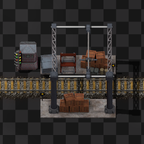
The Trainbuilder will assemble the trainparts together to functional train wagons. You put the ingredients inside the building like you do for an assembling machine. After that, it will start producing finished trains. However, without a traincontroller attached, it won't place the train on the track.
3.2 Building requirements
You can't place trains everywhere, they must be placed on rails. This means the building must also be placed on (straight) rails. This way, the building will assemble the trains onto the tracks directly. 
Trains are 6 tiles wide, with one tile inbetween each train. The building is also 6 tiles wide, the same length of trains themself. In order to link multiple Trainbuilders together, the buildings must be spaced one tile apart.
Assembling a train requires heavy duty tools, so you must provide some power to the building. They are quite power hungry, but they support Efficiency moduless to be put inside. Because of safety reasons we cannot allow Speed modules and obviously Productivity modules make no sense at all.
3.3 Recipe requirements
Each train requires parts to be build. These parts can be made seperatly with the same ingredients as you would make a train without this mod present.
The train needs to be able to drive away, which means the locomotives require fuel. As we didn't want to limit your fuel options, we chose to make a generic fuel item that can be made out of all other fueling items. Modded trains using specific custom fuel require that fuel directly.
The Trainbuilder has a blue arrow, showing the direction of the building. This is usefull when building trains carriages where the orientation matters (for example the Locomotive or Artillery Wagon).  In the picture above, the Trainbuilder will create a train (left to right) that is made of:
- Locomotive facing west
- Cargo wagon facing west (direction doesn't matter)
- Cargo wagon facing west
- Cargo wagon facing east
- Cargo wagon facing east
- Locomotive facing east
For those that like to express trainconfigurations as numbers, this would be a 1-4-1 train (1 locomotive facing the front, 4 carriages, 1 locomotive facing the rear).
4. Trainbuilder controller
4.1 Placement requirements
The controller must be placed in front of the Trainbuilders so it can control them. They are placed the same way as a Train stop:
- On the right side of the track
- In the direction the train will approach it (yellow arrows).

Highlights
From source dataFootprint
Rated a light load on a server.
License
Published under GPL-3.0.
Last update
Its author last shipped an update 46d ago.
Train Construction Site Fork - Factorio 2.1 Update on Nxeon
From our catalogue- One-click install
- Supported on Nxeon Factorio servers. We download it from Factorio Mod Portal, place it, and restart the server.
- Server side
- Required on the server
- Server load
- light
- Smallest plan we suggest
- Factorio — 2 GB (2 GB RAM). This follows our own load rating above, not a benchmark.
- Latest build
- 0.5.8, released 2026-09-20
Recent builds
| Build | Released | Game versions | Loaders |
|---|---|---|---|
| 0.5.8 | 2026-09-20 | 2.1 | n/a |
| 0.5.7 | 2026-06-29 | 2.1 | n/a |
| 0.5.6 | 2026-06-28 | 2.1 | n/a |
| 0.5.5 | 2026-06-27 | 2.1 | n/a |
| 0.5.4 | 2026-06-27 | 2.1 | n/a |
| 0.4.10 | 2026-06-21 | 2.0 | n/a |
Dependencies
- Required: FactoryLib - Modding Utilities
- Optional: Angel's Addons - Mass Transit
- Optional: Electronic Locomotives
- Optional: Space Exploration
- Optional: Schall Overseas Railway
- Optional: Pyanodons High Tech
- Optional: Editor Extensions
- Optional: Multiple Unit Train Control
- Optional: Krastorio 2
- Optional: Armored Train (Turret Wagons)
- Optional: Assembler Pipe Passthrough
- Optional: Bob's Logistics mod
- Optional: Bob's Warfare
- Optional: LTN - Logistic Train Network
- Optional: Hovercrafts
- Optional: Laser Tanks
- Optional: AAI Programmable Vehicles
- Optional: SUPERSONIC High Speed Train & fast large wagon Mod
- Optional: AAI Industry
- Optional: Angel's Bio Processing
- Optional: Angel's Petrochemical Processing
- Optional: Renai Transportation
- Optional: Vehicle Wagon 2
- Optional: Cargo Ships
- Incompatible with: Train construction site
Declared by the newest build that lists any. Required ones are installed with it on one-click installs.
Run Train Construction Site Fork - Factorio 2.1 Update on a Factorio server
Pick a server or deploy a new one above; it is installed in one click.
What kind of mod it is
From the catalogVehicles & ships
Cars, boats, aircraft, ships and other things to drive or fly.
Runs on your server
From source side supportFactorio Mod Portal lists Train Construction Site Fork - Factorio 2.1 Update as required on the server. Check its Factorio Mod Portal page to see whether players need it too.
Compatibility
- Game
- Factorio
- Runs on
- Serverrequired on the server
Verified at the source
- ✓Factorio Mod PortalOfficial listing, checked 2026-10-02Open ↗
- ✓AuthorMarcel171297, as published on Factorio Mod Portal
- ✓LicenseGPL-3.0Free












