







About Transport Drones (Continuous)
From Factorio Mod PortalGround-based logistics: transport drones haul items and fluids between depots. Fork of Transport Drones (Continued)
Fork of Transport Drones (Continued).
Transport Drones (Continuous)
A ground-based logistics system for Factorio 2.1. Transport drones haul items and fluids between depots connected by road networks - a flexible alternative to belts and trains for mid-to-late game logistics.
This is a full rewrite of Klonan's Transport Drones for Factorio 2.1. It adds active provider, storage and dispatcher depots, fluid buffer depots, priority routing, load balancing, channel segregation, a road-graph router, a custom per-depot settings panel, Factorissimo 3 cross-surface support, and built-in support for a number of other mods: see Mod compatibility below for exactly what each one gets.
Graphics by Bubbles from the Factorio discord.
> Playing with Bob's, Pyanodon or SeaBlock? Install DronePatching by Sgamez for recipes and research costs tuned to those overhauls. Since 2.1.1 that tuning lives there; this mod keeps only a Pyanodon science-pack swap on its research and the SeaBlock road recipe.
How it works
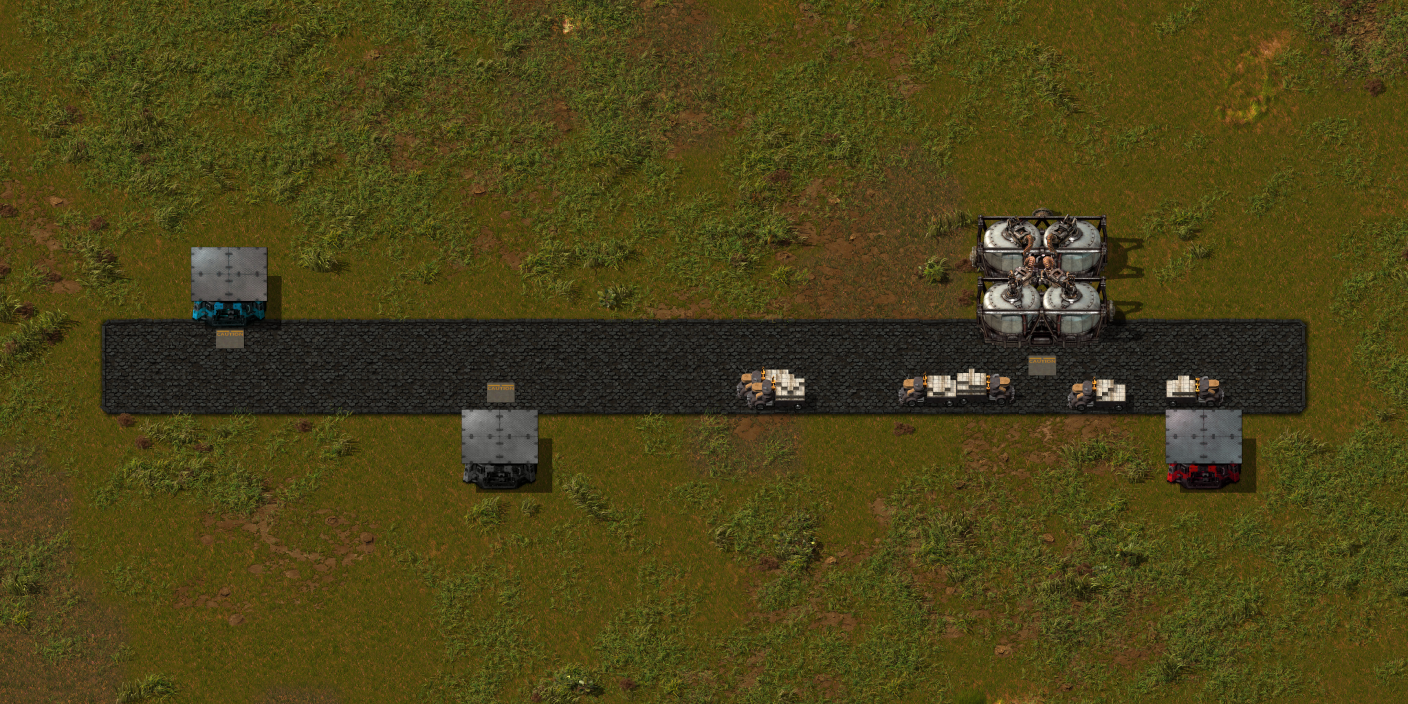
- Build roads to connect your production areas.
- Place depots on the road network: passive provider depots offer items, requester depots collect them. A depot needs road on its marked tile; without it the depot stands unconnected, with a warning badge, until road is laid there. Depots turn with R and flip with H and V.
- Insert transport drones into depots. Drones autonomously pick up items from passive provider depots and deliver them to requester depots.
- Fuel the network with fuel depots - drones consume fuel proportional to travel distance.
Technology tree
Engine
  +-- Basic drone transportation (requires Fluid handling) -> drones, roads, fuel depot, drone dispatcher
        |-- Drone deliveries -> passive provider depot, requester depot
        |   |-- Advanced drone transportation -> buffer depot, active provider depot, storage depot
        |   |-- Faster roads (researched by crafting 1000 roads) -> fast road
        |   +-- Road network reader (requires Circuit network) -> road network reader
        |-- Transport drone speed 1-4 (+15% each)
        |   +-- Speed 5+ (infinite research, +15% per level)
        +-- Transport drone stack capacity 1-4 (+1 stack each)
            +-- Stack capacity 5+ (infinite research, +1 stack per level)
Each depot that carries cargo comes with a fluid version, unlocked by the same research (see Fluid depots).
Roads
- Road - Standard tile. Walking speed bonus: 1.5x.
- Fast Road - Upgraded tile. Walking speed bonus: 2.0x. Drones are ~33% faster on fast roads.
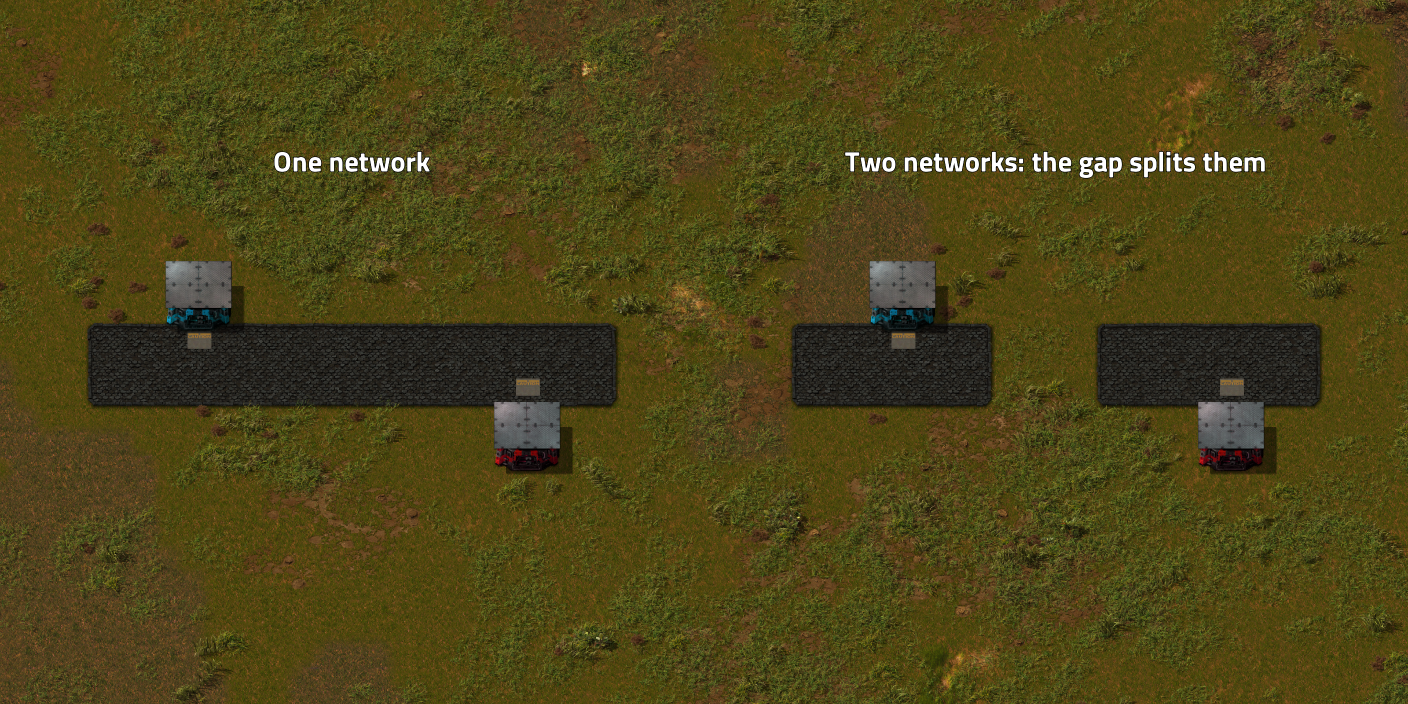
Any connected road tiles form a road network. Disconnected road areas are separate networks.
Diagonal crossing prevention (enabled by default) stops drones from connecting road networks diagonally through non-road corners.
Roads can also be placed on space platform foundations (Space Age).
Depot types
Listed in the order the research unlocks them. Inventory and drone slots grow with the depot's quality; see Quality support.
Fuel depot
Delivers fuel to all depots on the road network. Fuel type is configurable (petroleum gas by default).
- Fuel depot drones are the only way other depots get fuel: pipe raw fuel into a Fuel Depot and it supplies the rest.
- Unlocks with Basic drone transportation.
Drone dispatcher
Holds transport drones and distributes them to other depots on the road network.
- Drone request slider: each depot can request a specific number of drones from the dispatcher.
- Priority-based distribution: higher-priority dispatchers distribute drones first.
- Return slots: locked inventory slots collect excess drones when a depot's slider is reduced. Drones are returned automatically.
- Central dispatch mode: the dispatcher sends its own drones to serve requester, buffer and storage depots that have no idle drones and fuel of their own. It picks up from any depot supplying the item, and moves active provider surplus into storage depots (a passive provider is never drained into storage). Channels must match on both ends. A drone allocation slider (default 50%) caps how many of the dispatcher's drones, in its inventory and out on trips together, can be out on central deliveries at once. Each depot has an "Allow central dispatch" toggle to opt in or out.
- Unlocks with Basic drone transportation.
Passive provider depot
Makes its inventory available to the road network. Other depots dispatch drones to collect from it.
- Unlocks with Drone deliveries.
Requester depot
Dispatches drones to collect a selected item from passive provider depots. The number of drones controls throughput - more drones means more concurrent deliveries.
- Max storage cap, plus two trip controls: a Payload override (type the base stack size to ignore capacity research) and Full loads only.
- Unlocks with Drone deliveries.
Buffer depot
Acts as both a requester and a provider. Use it to collect resources from distant outposts and redistribute them locally.
- The same Max storage, Payload and Full loads only controls as the Requester Depot.
- Unlocks with Advanced drone transportation.
- Can be disabled via startup setting.
Active provider depot
A push-based supplier for mixed item output. Automatically offers whatever items it contains to the network - suits an assembler that makes more than one product.
Highlights
From source dataGame versions
Built for Factorio 2.0.
Footprint
Rated a light load on a server.
License
Published under LGPL-3.0.
Transport Drones (Continuous) on Nxeon
From our catalogue- One-click install
- Supported on Nxeon Factorio servers. We download it from Factorio Mod Portal, place it, and restart the server.
- Server side
- Required on the server
- Server load
- light
- Smallest plan we suggest
- Factorio — 2 GB (2 GB RAM). This follows our own load rating above, not a benchmark.
- Latest build
- 2.1.8, released 2026-11-02
Recent builds
| Build | Released | Game versions | Loaders |
|---|---|---|---|
| 2.1.8 | 2026-11-02 | 2.1 | n/a |
| 2.1.7 | 2026-11-01 | 2.1 | n/a |
| 2.1.6 | 2026-10-31 | 2.1 | n/a |
| 2.1.5 | 2026-10-29 | 2.1 | n/a |
| 2.1.4 | 2026-10-29 | 2.1 | n/a |
| 2.1.3 | 2026-10-29 | 2.1 | n/a |
Dependencies
- Optional: Factorissimo 3
- Optional: Asphalt Roads Patched
- Optional: Dectorio
- Optional: Pyanodons Industry
- Optional: Mining Drones
- Optional: Mining Drones Remastered
- Optional: Space Exploration
- Optional: Space Exploration Postprocess (Required)
- Optional: [reserved]
- Optional: quality (factorio_portal, not in our catalogue)
- Optional: [reserved]
- Optional: Deadlock's Stacking Beltboxes & Compact Loaders
- Optional: Maraxsis
- Optional: Angel's and Bob's Space Age Compatibility & Rebalance
- Optional: Nullius
- Optional: Sea Block Continued
- Incompatible with: Transport Drones
- Incompatible with: Transport Drones (Continued)
- Incompatible with: Transport Drones
Declared by the newest build that lists any. Required ones are installed with it on one-click installs.
Run Transport Drones (Continuous) on a Factorio server
Pick a server or deploy a new one above; it is installed in one click.
What kind of mod it is
From the catalogVehicles & ships
Cars, boats, aircraft, ships and other things to drive or fly.
Runs on your server
From source side supportFactorio Mod Portal lists Transport Drones (Continuous) as required on the server. Check its Factorio Mod Portal page to see whether players need it too.
Compatibility
- Game
- Factorio
- Runs on
- Serverrequired on the server
- Game versions
- 2.0
Verified at the source
- ✓Factorio Mod PortalOfficial listing, checked 2026-11-03Open ↗
- ✓AuthorHellWatcher, as published on Factorio Mod Portal
- ✓LicenseLGPL-3.0Free












