







About Yet another train manager
From Factorio Mod PortalA mod to manage a network of train and station. Some stations provide products (item or fluid) to the network, others stations request products. The mod allocate trains to carry product from provider to requester. This mod is highly inspired from the great mod LTN but with some major enhancements such as train layout filtering, train builder station, multiple pickup delivery, train teleportation, visual display of deliveries
Features
- The mod Yatm (Yet another train manager) manages a network of train based on the principle of provider/requester as the great LTN do.
- It can combine pickup from many different stations for the same delivery (option in requester stations)
- It can manage different drop off with the same pickup using buffer station
- It support partial deliveries from buffered trains
- Train are filtered at each station depending on train composition
- It use the last factorio train API to compute travel distance (with internal caching). No need to set different networks for unconnected rail parts.
- It has Builder station to automatically add / remove train depending on the need of the network
- It has endgame teleport station to help improve traffic flow (require a lot of energy)
General behavior
Some stations publish the items/fluids they produce. Some other stations request some items/fluids. A station can request some items/fluids and provide others. Yatm pick trains from a pool of depot to transport the item/fluid from the producer station to the requester station.
Combinator
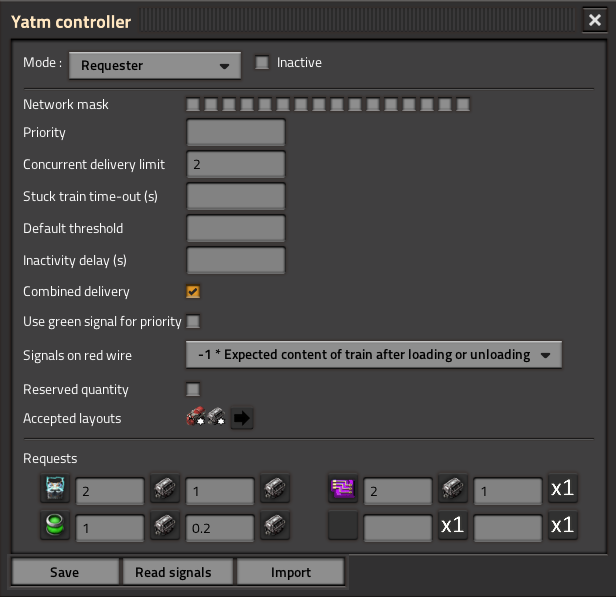
YATM adds a new type of combinator which must be put near a trainstop (2 tiles).
A YATM combinator may work in different modes:
- Depot: a station that keep a train not involved in a delivery
- Provider: a station that provides some items or/and some fluids to other stations of the network
- Requester: a station that requests some items/fluids from the network
- Provider & Requester: a station that provides some items/fluids to the network and also requests other items/fluids
- Buffer: a station that holds a train which can request its contents from the network and performs multiple deliveries aferward. Acts as a provider for requester station.
- Refueler: a station that can automatically refuel locomotives when they becomes low in fuel.
- Builder: a station that can build / dismantle train depending on the need of the network. You have to provide all the items and fuel necessary to build the train in a chest near the Yatm combinator (1 tile).
- Feeder: A provider station that contains a single train that has to be filled by the player. The content of the train is made available to the network.
- Teleporter: A end game station that can teleport a train to another teleport station. Each teleport station has range (default 300 tiles). Any train starting from a start station can automatically use a teleport station in range to another destination teleport station in range of the destination station.
Each mode has its own set of parameters.
Simple setup
- Place a trainstop with a Yatn combinator near. Select depot mode for combinator. Add a train and route it to station.
- Place a trainstop with a Yatn combinator in mode provider. Connect the container with provided items to the input of the combinator with a RED wire. Place some inserter to load items into trains (for automatic train layout).
- Place a trainstop with a Yatn combinator in mode requester. Place some inserter to unload items from trains. In the parameter dialog, select the request item(s), the quantity to request and the minimum quantity for a delivery.
This should work. When hovering the mouse over a combinator, you can see the state of the trains and deliveries.
Layouts
Each station has a train layout that list the trains that are allowed at this station. There are two kinds of layout:
- Generic layout can have only 3 different elements, locomotive, cargo wagon, fluid wagon. Any train entity matching the type of the element will be accepted
- Specific layout contains exact train element class.
Yatn try to find a default layout from the inserter/pump/loader connected to the station. This configuration can be changed in the configuration dialog. Clearing the configuration restores the default layout.
Combinator configuration
The configuration of a combinator can be done either by the configuration dialog or by signals (signals overrides configuration dialog). Specific signal are defined most of the parameters of the combinator.
Any signals from the RED wire with a negative will be recognized as additional request.
Any signals from the GREEN wire with a negative value will be recognized as threshold definition. If the checkbox "Use green signal for priority" is checked, the values are recognized as a priority value by product.
Combinator output on green wire
During a load/unload session, the combinator output the invert value of the content of the train after the session.
So to test the end of the loading of an item/fluid:
Condition: (output of the combinator) + (content of the train) < 0
To test the unloading of an item/fluid:
Condition: (output of the combinator) + (content of the train) > 0
This will work even for partial loading and unloading.
For station that can provide/request item/fluid, there is a signal to contains the type of operation (1 loading , 2 unloading)
Then red wire in output is available to have additional information:
- Same a green wire
- Global stock that contains all items/fluid available in the network (filtered with the network mask)
- Current delivery (partial)
- Current delivery (full)
Combinator colors
- Black: not connected
- Grey: provider, nothing provided
- Green: provider idle
- Yellow: delivery ongoing
- Orange: requester idle
- Red: requester, missing item/fluid
- Blue: depot, train assigned
- Cyan: depot, free
- Pink: inactive station
Buffer station
A buffer station acts as a request station and a provider station at the same time. A train is hired from a depot and the request are processed. Then the content of the train is dispatched to other requester station. The stations should be properly setup to handle partial deliveries.
Highlights
From source dataGame versions
Built for Factorio 2.0.
Footprint
Rated a light load on a server.
License
Published under MIT.
Yet another train manager on Nxeon
From our catalogue- One-click install
- Supported on Nxeon Factorio servers. We download it from Factorio Mod Portal, place it, and restart the server.
- Server side
- Required on the server
- Server load
- light
- Smallest plan we suggest
- Factorio — 2 GB (2 GB RAM). This follows our own load rating above, not a benchmark.
- Latest build
- 1.0.21, released 2026-02-07
Recent builds
| Build | Released | Game versions | Loaders |
|---|---|---|---|
| 1.0.21 | 2026-02-07 | 2.0 | n/a |
| 1.0.20 | 2026-01-04 | 2.0 | n/a |
| 1.0.19 | 2025-12-02 | 2.0 | n/a |
| 1.0.18 | 2025-11-19 | 2.0 | n/a |
| 1.0.17 | 2025-06-21 | 2.0 | n/a |
| 1.0.16 | 2025-06-01 | 2.0 | n/a |
Dependencies
- Required: Factorio Library
- Optional: Transfert controller
- Optional: Nullius
- Optional: Space Exploration
Declared by the newest build that lists any. Required ones are installed with it on one-click installs.
Run Yet another train manager on a Factorio server
Pick a server or deploy a new one above; it is installed in one click.
What kind of mod it is
From the catalogVehicles & ships
Cars, boats, aircraft, ships and other things to drive or fly.
Runs on your server
From source side supportFactorio Mod Portal lists Yet another train manager as required on the server. Check its Factorio Mod Portal page to see whether players need it too.
Compatibility
- Game
- Factorio
- Runs on
- Serverrequired on the server
- Game versions
- 2.0
Verified at the source
- ✓Factorio Mod PortalOfficial listing, checked 2026-10-08Open ↗
- ✓AuthorTelkine2018, as published on Factorio Mod Portal
- ✓LicenseMITFree












