







About Zooming Reinvented
From Factorio Mod PortalThis mod allows to heavily customise the zooming behaviour, in particular it allows to: - change how far you can zoom out (and still see the world) - change how aggressive the zooming is (equivalent to changing mouse wheel sensitivity) - change at what position and zoom level the map opens - zoom in or out instantly with a single key stroke See homepage/mod portal/readme for a full explanation of how this mod works. Please report any bugs and usability issues you find to help make this mod better - your feedback is much appreciated.
Short description
This mod allows to heavily customise the zooming behaviour, in particular it allows to:
- change how far you can zoom out (and still see the world)
- change how aggressive the zooming is (equivalent to changing mouse wheel sensitivity)
- change at what position and zoom level the map opens
- zoom in or out instantly with a single key stroke (or mouse wheel move)
See homepage/mod portal/readme for a full explanation of how this mod works. Please report any bugs and usability issues you find to help make this mod better - your feedback is much appreciated.
How is this mod different from other mods that allow to zoom out farther than the base game?
This mod replaces the base game's zooming behaviour to make the user experience as natural as possible (given the severe restrictions of the modding API). There is no extra GUI buttons, there is no extra keyboard shortcuts, and it doesn't require the map to be closed - there is just the mouse wheel that you are already used to. Also, this mod does much better job at preventing the sudden zoom level changes when using different controls. Finally, this mod adds a lot of customisable settings so you can tailor them to your needs.
Controls

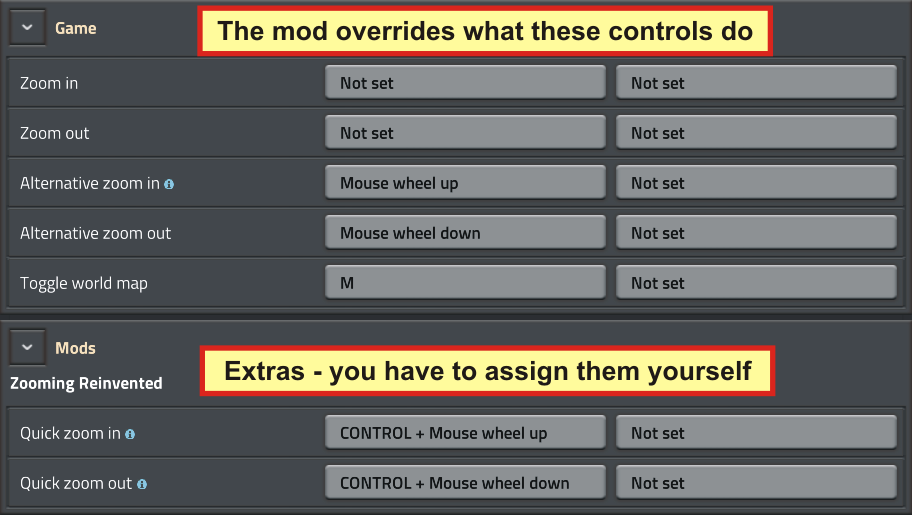
This mod changes the behaviour of the following game controls:
- Zoom in - disabled (using control assigned to it will be ignored)
- Zoom out - disabled (using control assigned to it will be ignored)
- Alternative zoom in - overridden, with the exception of the map view (see known issues below)
- Alternative zoom out - overridden
- Toggle world map - overridden
Furthermore, it adds the following controls:
- Quick zoom in - opens a map in the 'zoom to world' view, fully zoomed out, at the last known map position. This can be used to:
- Zoom back in to the world after you accidentally zoomed out too much and got switched to the map view.
- Reopen a map at the last known map position after you closed it.
- Zoom out fully if you are already in 'zoom to world' view. Additionally, if you select an object in the world by hovering over it, the map will get centered on this object.
- Quick zoom out - opens a map in the map view at the configured zoom level at the centre of the map
Finally, it adds a Binoculars item to allow to quickly zoom in to world from the map. See known issues below for an explanation why this item exists at all.

Customisation

- Zoom sensitivity - defines how big is the change when zooming in or out. Doesn't apply to zooming in on the map (unless in 'zoom to world' view). The current zoom level will be multiplied or divided by this value when you zoom in or out. Base game's value is about 1.1 when the map is closed and about 1.25 when the map is open (regardless of whether it is in the 'zoom to world' view or in the map view).
- Max world zoom out level - defines how far you can zoom out and still see the world. In the player view it defines maximum zoom out, in the map it defines when the 'zoom to world' view switches back to the map view. Base game's value is about 0.4.
- Default map zoom level - defines at what zoom level the map opens. Base game's value is about 0.0313. Note that map labels disappear at zoom level below 0.0157.
- 'Quick zoom out' map zoom level - defines at what zoom level the map opens when using 'Quick zoom out'. Note that map labels disappear at zoom level below 0.0157.
- Binoculars zoom level - defines at what zoom level the map opens when using the Binoculars item.
- Enable Binoculars double-action - if enabled, when using Binoculars in the map view and the labels on the map are not visible, Binoculars will first zoom in only enough to show the map labels. Using them again will zoom in to the configured 'Binoculars zoom level'.
- Disable map zoom out after map move - defines whether to disable map zooming out after the map position has changed (by dragging, using move controls or zooming in). This is to prevent sudden map position changes when zooming out (see known issues for explanation why this happens). If this option is selected, after you move the map, the only way to zoom out is to close and open the map again or use 'Quick zoom out'.
Known Issues
Zooming in while in the map view does not respect 'Zoom sensitivity' and 'Max world zoom out' mod settings
This is due to limitations in the modding API. It is not possible for a script to just zoom in the map in its current position, the only function available is to set it to a specific position and a zoom level. However, it is not possible to get the current map's position. Also, it is not possible to get a position of the mouse pointer, hence the mod is not be able to zoom in towards it. Finally, opening the 'zoom to world' view also requires to provide a position and a zoom level. Therefore, the only reasonable option was to leave the zooming in while in the map as it is in the base game.
As a workaround, you can use the Binoculars item. Note that it can only be used within the artillery range. Although it behaves like an artillery remote, don't worry - artillery will not fire at that location.
After moving the map (in the map view), zooming out causes the map to jump to another location
Highlights
From source dataFootprint
Rated a light load on a server.
License
Published under MIT.
Last update
Its author last shipped an update 8 yr ago.
Zooming Reinvented on Nxeon
From our catalogue- One-click install
- Supported on Nxeon Factorio servers. We download it from Factorio Mod Portal, place it, and restart the server.
- Server side
- Required on the server
- Server load
- light
- Smallest plan we suggest
- Factorio — 2 GB (2 GB RAM). This follows our own load rating above, not a benchmark.
- Latest build
- 1.2.2, released 2019-04-07
Recent builds
| Build | Released | Game versions | Loaders |
|---|---|---|---|
| 1.2.2 | 2019-04-07 | 0.17 | n/a |
| 1.2.1 | 2019-04-07 | 0.17 | n/a |
| 1.2.0 | 2019-04-06 | 0.17 | n/a |
| 1.1.0 | 2019-04-06 | 0.17 | n/a |
| 1.0.0 | 2019-04-05 | 0.17 | n/a |
Run Zooming Reinvented on a Factorio server
Pick a server or deploy a new one above; it is installed in one click.
What kind of mod it is
From the catalogMaps & scenarios
Custom maps, arenas and scenarios to play on.
Runs on your server
From source side supportFactorio Mod Portal lists Zooming Reinvented as required on the server. Check its Factorio Mod Portal page to see whether players need it too.
Compatibility
- Game
- Factorio
- Runs on
- Serverrequired on the server
Verified at the source
- ✓Factorio Mod PortalOfficial listing, checked 2026-10-09Open ↗
- ✓Authorjarcionek, as published on Factorio Mod Portal
- ✓LicenseMITFree












