






About Advanced Material Editor (Tools)
From Steam WorkshopVery Advanced Material Editor is a sophisticated tool which allows users to modify a model's Source/VMT (Vanilla game) or import Blender Principled BSDF usda via NVIDIA Omniverse PBRs (RTX-Remix),…
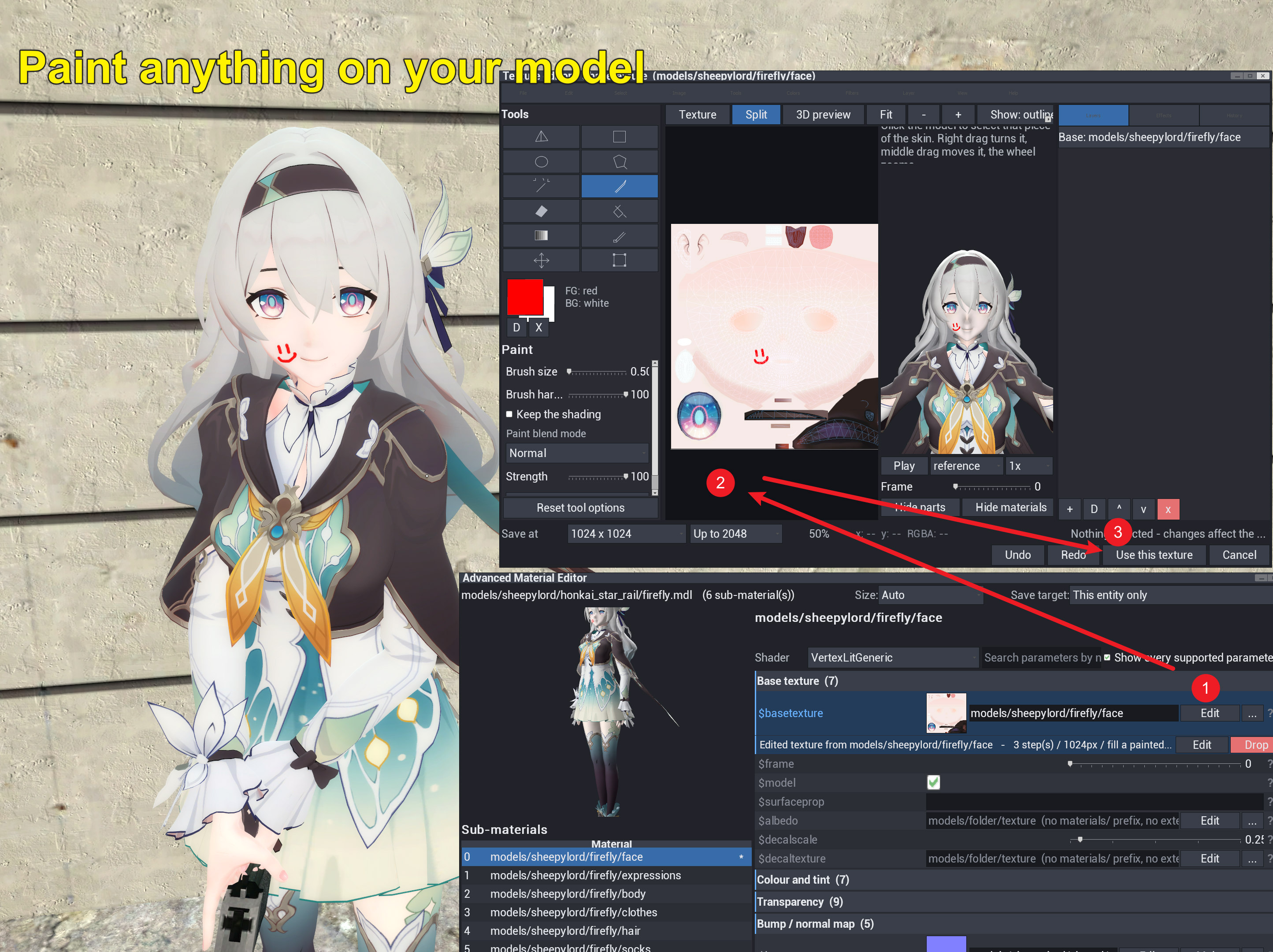
Very Advanced Material Editor is a sophisticated tool which allows users to modify a model's Source/VMT (Vanilla game) or import Blender Principled BSDF usda via NVIDIA Omniverse PBRs (RTX-Remix), directly in game in real time. Any sub-material on a prop, ragdoll, NPC or map surface can be fine-tuned to edit any parameters supported by its shader, and de novo generate / edit the texture. The changes have live preview and can be saved for that entity only or every entity using that model. The edits are session-persistent.
I uploaded 400 addons to the community, thank you for your continued support
This tool was designed for the RTX-Remix version of Garry's Mod, but it also works in vanilla without PBR shader.
The tool is available under Spawn Menu -> Tools -> Render -> Advanced Material Editor
Young in limbs, in judgment old, Your answer had not been inscrolled --- William Shakespeare
Features
- Live VMT, PBR material and shader editing.
- Texture painting with brush, fill, transform, colour adjustment, and model/UV-based area selection
- Generate normal maps, phong exponent maps, and reflection masks from existing textures
- All options have a plain-language help section.
- Supports props, ragdolls, players, NPCs, and map surfaces
- All modifications are shared between all clients in the server.
- Save by entity, model, or material path, with presets and a browser for saved overrides.
- Export .vmt text and export generated images with instructions for addon/map authoring.
- A RTX Remix PBR editor with live RTX replacement (requires a modified RTX-Remix bridge)
- Addon interface is also in English, Chinese, Japanese, Korean, French, and Russian
Credits: Advanced Material Editor by: SheepyLord
This addon has 2 optional submods. They are Procedural Bodygroup Destruction and Advanced Bodygroup Tool
Highlights
From source dataFootprint
Rated a light load on a server.
Last update
Its author last shipped an update 8d ago.
Advanced Material Editor (Tools) on Nxeon
From our catalogue- One-click install
- Supported on Nxeon Garry's Mod servers. We download it from Steam Workshop, place it, and restart the server.
- Server load
- light
- Smallest plan we suggest
- Garry's Mod — 2 GB (2 GB RAM). This follows our own load rating above, not a benchmark.
- Latest build
- 2026-10-08, released 2026-10-08
Game versions by loader
| Loader | Game versions | Newest |
|---|---|---|
| Workshop |
From 1 recorded build of Advanced Material Editor (Tools).
Run Advanced Material Editor (Tools) on a Garry's Mod server
Pick a server or deploy a new one above; it is installed in one click.
What kind of mod it is
From the catalogWeapons, items & crafting
New weapons, gear, items and the recipes to make them.
Compatibility
- Game
- Garry's Mod
Verified at the source
- ✓Steam WorkshopOfficial listing, checked 2026-10-08Open ↗
- ✓AuthorSheepyLord🐑, as published on Steam Workshop
- ✓LicenseNot published by the sourceFree














