About Animated Props
From Steam WorkshopAn addon that spawns animated characters and models, for use in screenshots, videos, scene builds, and more! To get started, hold C to open the context menu, right click on a ragdoll or prop, and…
An addon that spawns animated characters and models, for use in screenshots, videos, scene builds, and more!
To get started, hold C to open the context menu, right click on a ragdoll or prop, and select "Convert to Animated Prop". This will open a control window with a list of animations to choose from, a pause button to freeze it in place, a seek bar to skip between frames, and lots of other options.
Features:
- Animated props work just like normal props for building, and should be usable with every tool, from posers to constraints. Multiple collision types let any model act as a physics prop, or as an effect.
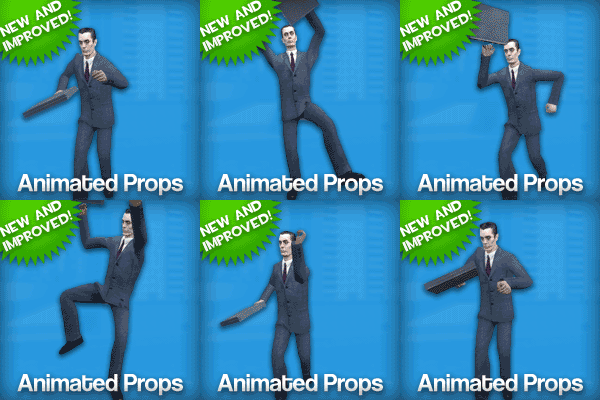
- Remapping feature lets a prop play any other model's animations instead of its own - even between characters from completely different games, like the thumbnail of GMan doing the TF2 conga taunt.
- Ragdollize button spawns a ragdoll in the same pose as the animated prop, letting you use any animation as the base for a ragdoll pose. With the Ragdoll Resizer addon installed, it can spawn posed ragdolls of any size. You can also set props to ragdollize on damage, like killing an NPC.
- Has multiple animation layers for playing gestures, reloads, firing anims and such, with all the same options to choose from - you can pause a layer while the base animation keeps playing, make one fast but the other one slow, make a layer only play on a key press while the base animation always plays, and so on.
- Built from the ground up to be compatible with all the features of the Advanced Bonemerge Tool - you can attach animated props to other models, move and rotate bones while they're animating, or use the advanced bone scaling features on them to make all kinds of strange creations.
- Every feature is 100% dupe and save compatible.[/list]
- [h1]FAQ:[/h1]
- [list][*]How do I make them hold weapons?
- You can attach weapons, hats, and other items by using addons like the Easy Bonemerge Tool or Advanced Bonemerge Tool.
- The context menu won't let me click on certain models, what do I do?
- In case the context menu doesn't work, this addon also includes an Animated Props tool in the Construction category, which you can use to copy a model, spawn an animated prop with that model, or open a control window for a prop you've already spawned.
- The ragdoll poses from Ragdollize keep turning out bad because the ragdolls don't have posable shoulders, is there a way to fix this?
- Try looking for a workshop addon with improved physics. For TF2 models, I like to use this one: Team Fortress 2 Improved Physics Ragdolls
- Is there a way to show the size of their physics boxes? It's hard to tell once they're not in a reference pose any more.
- In the Drawing tab of the context menu, in the same place as the options to draw effect rings or physgun beams, there's an option to draw animated prop physics boxes.
- Is this compatible with the old version of the addon? Some old glitchy behavior it had was part of my workflow!
- Yes, you can use both addons at the same time. Old animated props can be converted to new ones with the context menu, including the old pre-made TF2 stuff from the Entities tab (they'll attach extra parts with Advanced Bonemerge, and particles with Particle Effects+)
- How do I increase the "Animated Prop limit" in multiplayer?
- You can set the convar sbox_maxanimprops in the console, or open the spawnmenu and go to Utilities > Admin > Sandbox Settings to control it with a slider.[/list]
- [h1]Known Issues:[/h1]
- [list][*]Remapping will automatically translate between the bone names of HL2, TF2, HL1, and default GMod character models, but other games and addons could potentially name them anything. If you find a (human/biped) character model that isn't matching bone names by default, then post a link to an addon with that model, and I'll check it out.
- Lots of animated props using bone manips or remapping at the same time can cause FPS drops, though this can be improved by pausing them (this lets them fall asleep and stop recomputing bone positions)
- Remapping and Advanced Bonemerge features aren't compatible with Advanced Duplicator or Advanced Duplicator 2, because they won't copy the custom data tables these features use.
- Gestures can have visual jittering at the ends of the animation sometimes - this seems to be a problem with either gmod's animation layer system, or the animations themselves, since this happens with any entity.[/list]
- Github page: https://github.com/NO-LOAFING/AnimpropOverhaul
Highlights
From source dataFootprint
Rated a light load on a server.
Last update
Its author last shipped an update 45d ago.
Animated Props on Nxeon
From our catalogue- One-click install
- Supported on Nxeon Garry's Mod servers. We download it from Steam Workshop, place it, and restart the server.
- Server load
- light
- Smallest plan we suggest
- Garry's Mod — 2 GB (2 GB RAM). This follows our own load rating above, not a benchmark.
- Latest build
- 2026-08-31, released 2026-08-31
Game versions by loader
| Loader | Game versions | Newest |
|---|---|---|
| Workshop |
From 1 recorded build of Animated Props.
Run Animated Props on a Garry's Mod server
Pick a server or deploy a new one above; it is installed in one click.
What kind of mod it is
From the catalogQuality of life & UI
Small conveniences, tweaks and interface improvements players notice straight away.
Compatibility
- Game
- Garry's Mod
Verified at the source
- ✓Steam WorkshopOfficial listing, checked 2026-10-10Open ↗
- ✓Authorno loafing, as published on Steam Workshop
- ✓LicenseNot published by the sourceFree