







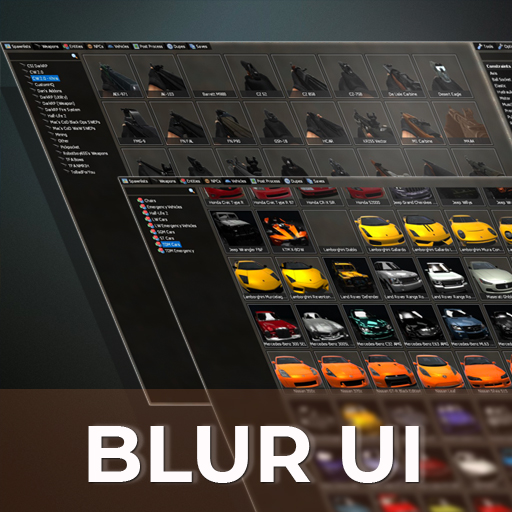
About Blur UI Spawn Menu ( Q Menu )
From Steam WorkshopIT'S SCIENTIFICALLY PROVEN THAT BLUR IMPROVES ANY SERVER. Blur UI Spawn Menu ( Q Menu ) : Overwrites default skin with a nice sleek dark look. Add this to your server and instantly upgrade it. You'll…
IT'S SCIENTIFICALLY PROVEN THAT BLUR IMPROVES ANY SERVER. Blur UI Spawn Menu ( Q Menu ) : Overwrites default skin with a nice sleek dark look. Add this to your server and instantly upgrade it. You'll be at the top of the server list in a blink of an eye.
Blur UI decorates the default gui with mordern epic design. As showcased in the images above you can see how the Blur UI applies very well to the prop, entity, vehicles, ammo panels.
Note this will apply this theme to anything with default derma styling No downloads needed. Everything is done via lua.


Before anyone complains about the banners above I would just like to say this: I work very hard constantly trying to help people within the community. I post gmod lua tutorials entirely free of charge w/out receiving any money from it. I even take it a further step to provide a discord to sit down and diagnose and solve problems for people for free. I'm trying to steer away from making paid addons on gmodstore and release more free stuff like this. When providing free content I would hope you would understand why I'm plugging my own personal services. I'm not asking you to buy life insurance. You don't have to click on these banners to get the free content. Just hit the subscribe button and carry on. The banners below are just a way to support me and the things I do. They're not here to hurt you, I promise.
Highlights
From source dataFootprint
Rated a light load on a server.
Last update
Its author last shipped an update 7 yr ago.
Blur UI Spawn Menu ( Q Menu ) on Nxeon
From our catalogue- One-click install
- Supported on Nxeon Garry's Mod servers. We download it from Steam Workshop, place it, and restart the server.
- Server load
- light
- Smallest plan we suggest
- Garry's Mod — 2 GB (2 GB RAM). This follows our own load rating above, not a benchmark.
- Latest build
- 2019-07-01, released 2019-07-01
Game versions by loader
| Loader | Game versions | Newest |
|---|---|---|
| Workshop |
From 1 recorded build of Blur UI Spawn Menu ( Q Menu ).
Run Blur UI Spawn Menu ( Q Menu ) on a Garry's Mod server
Pick a server or deploy a new one above; it is installed in one click.
What kind of mod it is
From the catalogQuality of life & UI
Small conveniences, tweaks and interface improvements players notice straight away.
Compatibility
- Game
- Garry's Mod
Verified at the source
- ✓Steam WorkshopOfficial listing, checked 2026-10-10Open ↗
- ✓AuthorDanFMN, as published on Steam Workshop
- ✓LicenseNot published by the sourceFree














