







About Chuck's Weaponry 2.0
From Steam WorkshopCheck out 'Intravenous', a stealth/action game that I'm working on! [url=https://docs.google.com/document/d/1FC6Lm7ml6eI-ocwSk5GXq5Sv0hZyrfQK9bMkChHhNNk/edit?usp=sharing]Click here to open the base…
Check out 'Intravenous', a stealth/action game that I'm working on!
Click here to open the base documentation.
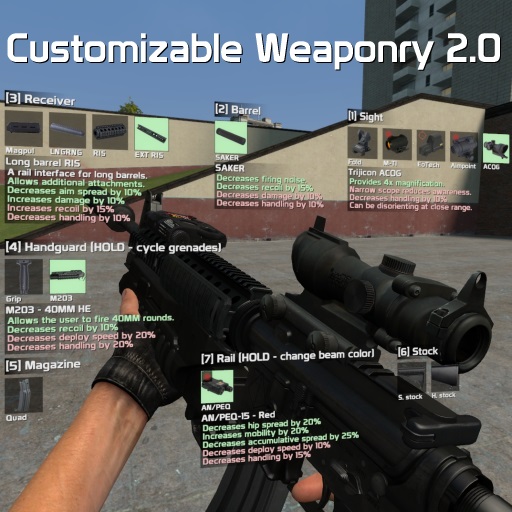
Features: - Dynamic recoil and accuracy - Custom viewmodel movement - Surface ricochet and penetration - Firemodes - Weapon holstering on weapon change - Optional free-aim - Inability to fire weapon when in water/climbing a ladder - Designed for both singleplayer and multiplayer - High weapon customization value - Ability to adjust position of sights - Weapon chambering - Optional blur effects when reloading/aiming/customizing - Ability to turn on simple telescopics and toggle the crosshair - Attachment preset system - Quick grenades - Very flexible, easy to use and modular plug-in system for developers - Heavy weapons slightly slow you down - Custom optional HUD elements for displaying health and ammo (Spawn Menu > Utilities > CW 2.0 > Client)
Attachments: - Kobra, EoTech 553, Aimpoint, Micro T1, Trijicon ACOG, Trijicon RMR, Schmidt&Bender Shortdot, PSO-1, SG1 scope for G3, Nightforce NXS - PBS-1, SAKER, Tundra 9MM, Cobra M2 - AN/PEQ-15, Insight X2 LAM - Varying length barrels for weapons - Various handguards and stocks for weapons - Varying capacity magazines - M203 (underslung 40MM barrel) - Foregrip - Various attachments unique for specific weapons
Ammo types: - Slug rounds and flechette rounds for shotguns - Magnum and match grade rounds for other weapons
Weapons in this pack: AK-74 * 3 AKM AR-15 * 2 MR-96 * 3 HK MP5 * 3 HK G3A3 Desert Eagle * 3 AI L115 SVD FAMAS G2
All weapons marked with a '*' indicate amount of total barrel variants. Weapons not marked indicate one barrel variant.
Controls: PRIMARY ATTACK KEY - fire weapon SECONDARY ATTACK KEY - take aim CONTEXT MENU KEY (C by default) - open customization menu, alternatively bind a key to cw_customize DOUBLE TAP USE KEY WHILE AIMING - switch to back-up sights, if there are any USE KEY (default is E) + RELOAD KEY - switch firemode USE KEY (default is E) + PRIMARY ATTACK KEY - quick grenade (if possible) USE KEY (default is E) + SECONDARY ATTACK KEY - toggle M203 mode (if possible) (IN M203 MODE) - aim down sights and press PRIMARY ATTACK KEY to fire M203 (IN M203 MODE) - press your RELOAD KEY to reload the M203
Useful console commands: cw_disable_all_attachments_on_spawn - don't give any attachments on spawn, admin-only cw_enable_all_attachments_on_spawn - give all attachments on spawn, admin-only cw_dropweapon - drops the currently equipped CW 2.0 weapon
FAQ:
[b]Q: My game crashes with this or the FA:S 2.0 SWEPs. A: Uninstall various addons until the crash stops, Portal Gun is known to cause a lot of conflicts and crashes with other addons.
Q: Where can I get ammo and attachments? A: Open your spawn menu, navigate to Entities, then click on either 'CW 2.0 Ammo' or 'CW 2.0 Attachments' and spawn whichever ammo source/attachment you want[/b]
Q: I can't attach some attachments, why is that? A: Some weapons require special handguards in order to have a slot to place the attachment on.
[b]Q: Why are the attachment icons red? A: A red icon background indicates that you don't have the attachment.
Q: I want THIS weapon! A: Cool. Go make it.
Q: Add more attachments! A: No. Do it yourself.[/b]
Q: I can't reload! A: you either have no ammo or you binge-subscribed to CW 2.0 addons like a fucking retard without reading what they do and now can't reload, disable the CW 2.0 mag system
Q: I can't attach ANYTHING! A: Bind 1 to slot1, 2 to slot2, 3 to slot3, etc. etc. and make sure you have attachments you're trying to attach.
[b]Q: Where can I find the preset files? A: For Windows users: go to garrysmod/data/cw2_0/presets. There you will find multiple folders in case you made presets. They're sorted by weapon class names.
Q: Why do the world models have no attachments on them? A: The focus is on first person features, rather than third person.[/b]
Q: Why the huge filesize for a few weapons? A: The base pack contains all attachment models/textures/icons/etc. Some weapons also have a lot of various options for barrels, stocks and other stuff, which adds to the filesize.
Q: How do I enable free-aim? A: Go to: Spawn Menu -> Utilities > CW 2.0 -> Client and tick "FREE AIM: active?" there. You can also modify various behavior related to free aim there.
Q: Where can I turn on the HUD that's seen in the release video and on the screenshots? A: Open your spawn menu, navigate to Utilities, there you'll see a "CW 2.0" category, click on 'Client', and there you'll see several HUD related checkboxes.
Q: Can you make a SWEP pack that'd use default CS:S models? A: No, they look like shit, have bad animations and are generally a pain to work with.
Credits: tigg - various attachment models tayley - hacking together various models, compiling various attachments and weapon models Matsilagi - compiling AN/PEQ-15 wystan - several attachment models FA:S 2.0 team - particle effects when firing, sounds, some reticle textures Kari-Jukka, >:3, CGNick, marrub, Pyromancer - extensive testing Insurgency team - inhale/exhale sounds
I can't list the actual weapon model creators since it would take up all available space on this Workshop page. However, in case you are the author of one of the models animations/models/textures, rest assured that I take no credits for your work.
[b]Bug reports without providing: 1. the weapon that was used (official or community made) 2. list of addons, especially weapon packs 3. steps to reproduce 4. Lua errors (if any)
will be ignored.
Errors that occur with community made weapons are not my concern. Take it up with the community, not me.[/b]
Highlights
From source dataFootprint
A 353 MB download, rated a light load on a server.
Last update
Its author last shipped an update 4 yr ago.
Chuck's Weaponry 2.0 on Nxeon
From our catalogue- One-click install
- Supported on Nxeon Garry's Mod servers. We download it from Steam Workshop, place it, and restart the server.
- Server load
- light
- Smallest plan we suggest
- Garry's Mod — 2 GB (2 GB RAM). This follows our own load rating above, not a benchmark.
- Latest build
- 2023-01-21, released 2023-01-21, 353 MB
Game versions by loader
| Loader | Game versions | Newest |
|---|---|---|
| Workshop |
From 1 recorded build of Chuck's Weaponry 2.0.
Run Chuck's Weaponry 2.0 on a Garry's Mod server
Pick a server or deploy a new one above; it is installed in one click.
What kind of mod it is
From the catalogWorkshop
Its source category doesn’t say more about what it does, so NxLabs lists it under Other.
Compatibility
- Game
- Garry's Mod
- File size
- 353 MB
Verified at the source
- ✓Steam WorkshopOfficial listing, checked 2026-10-10Open ↗
- ✓Authorsрy, as published on Steam Workshop
- ✓LicenseNot published by the sourceFree














