About Composite Bonemerge Tool
From Steam WorkshopThe Composite Bonemerge Tool (CBT) is an advanced bonemerge tool that lets you modify bonemerged models with any vanilla or custom tool after bonemerging them with other model. The bonemerged models'…
The Composite Bonemerge Tool (CBT) is an advanced bonemerge tool that lets you modify bonemerged models with any vanilla or custom tool after bonemerging them with other model. The bonemerged models' data will be automatically available when you use your favorite tools, as if they truly were a single model. This includes the following data: body groups, skins, submaterials, flexes, eyes, bones and attachments.
Additional cool features:
- Models are added, removed or detached with menus in an intuitive way.
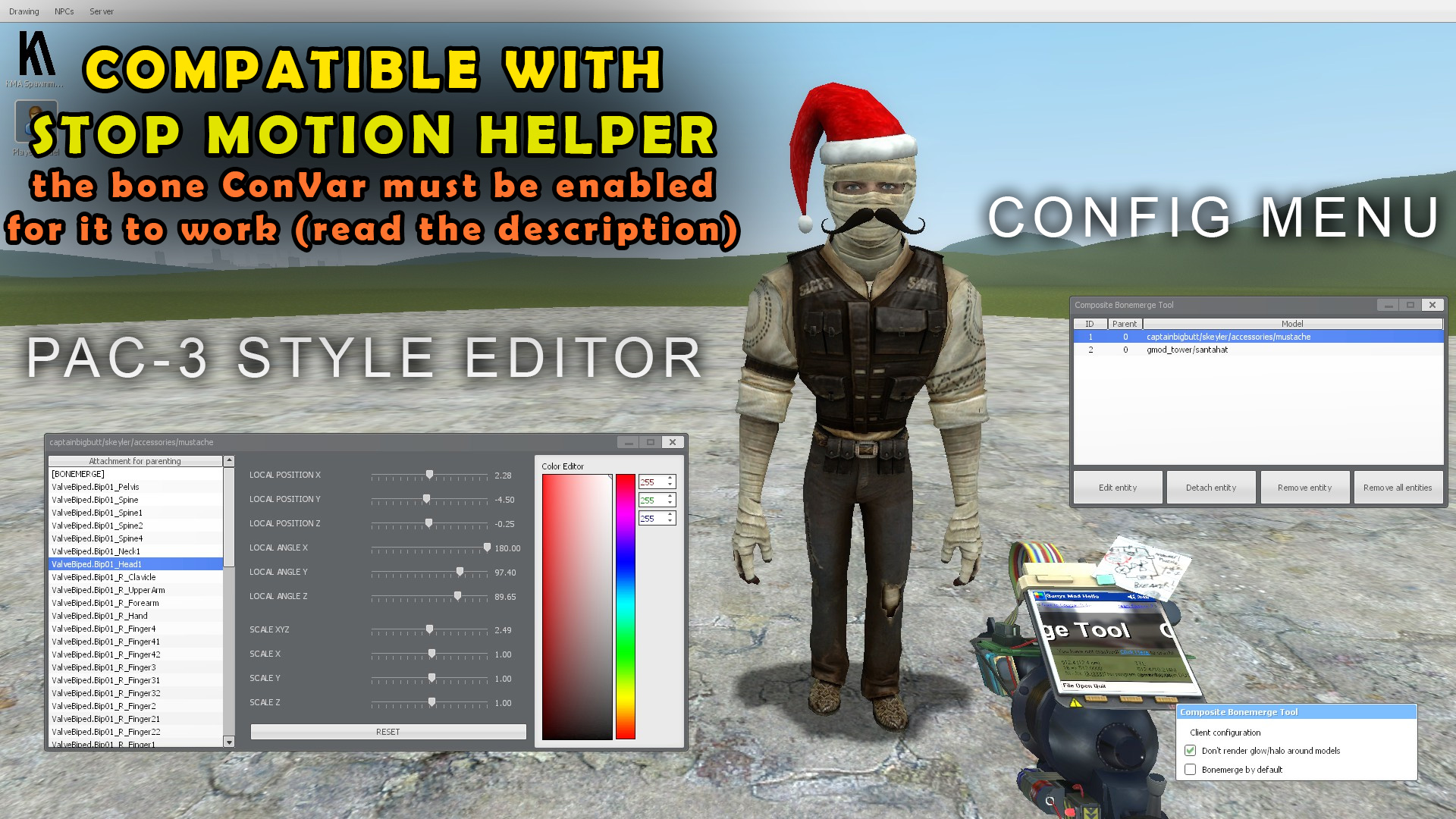
- We can change the position, angle and scale of child models from within a PAC3-style editor.
- Bonemerged models' color can be changed in the editor.
- Players, NPCs and NextBots preserve the models that were attached to them when they die.
- Everything is saved correctly in dupes and saves.
- Flawless ghost preview.
This tool fixes many of the bugs of the Easy Bonemerge Tool as well, for example:
- Halos are drawn smoothly across parent models and their children (see the images above).
- When you attach something to yourself, there aren't bugged shadows in first person view.
- When you remove a child model from its parent, the child's shadow is removed instantly.
INSTRUCTIONS
- R-click: Select the model you want to add or remove models from.
- L-click: Add something to the model on which you right-clicked. Clicking on the selected model allows for removing the models that you merged with it before. KEEP IN MIND THAT THE MENUS WILL ONLY APPEAR WHEN YOU HOLD YOUR C KEY.
- Reload: Select yourself as the model you want to add or remove models from (click again to remove models from yourself).
It's possible to make very complex models with infinite depth. For example, you can bonemerge a prop to another prop that you've already bonemerged before, and so on.
Available convars
- sv_compositeentities_enable: Enable/disable scripted models (those that are created with LUA scripts). See info for developers.
- sv_compositeentities_childboneediting: By default, the feature that lets you transform bones of child models using bone tools is disabled. It can be enabled with this ConVar (set it to 1). Anyway, some bone tools have built-in features for child bone editing (Ragdoll Mover), so you could just use them directly. You should disable this if it causes problems with other addons.
INFO FOR DEVELOPERS
The CBT includes an internal system for bonemerging models automatically when they're spawned using small LUA scripts. The child models specified in these scripts will ALWAYS spawn, even in playermodel selectors. This way, we can make custom playermodels, NPCs, ragdolls, or whatever we want.
Personally, I use this feature for creating very complex models that couldn't have been compiled with Studiomdl (too many vertices, more than 32 materials...).
In order to use this system, you just need to call a special method called addModel in a hook called CompositeEntities_AddModels. This function is used to register a model and returns a registration ID. Then, you can add child models to that model by calling the function again. It has the following parameters:
function CompositeEntities:addModel(modelChild, modelParent, att, localPos, localAng, scale, scale2)
[list]
[*][b]modelChild[/b]: A path to the MDL file of the model you wanna register. If you want to attach this model to multiple parent models, you can either use the registration ID returned by the function in a previous call or just type the path of the MDL file again.

[*][b]modelParent (OPTIONAL)[/b]: A path to the MDL file of the model you wanna use as the parent of modelChild. It must have been registered in a previous call, otherwise the function will fail. You can use its registration ID too. This argument may be nil if you intend to use modelChild as a root model.

[*][b]att (OPTIONAL)[/b]: Name of the bone that you wanna use for parenting (it must exist within the parent model). If this argument is nil, bonemerge will be applied instead. If you use this argument, modelParent, localPos and localAng must be set.

[*][b]localPos (OPTIONAL)[/b]: Relative position (Vector) of the child model within its parent (doesn't work if att isn't set).

[*][b]localAng (OPTIONAL)[/b]: Relative angle (Angle) of the child model within its parent (doesn't work if att isn't set).

[*][b]scale (OPTIONAL)[/b]: Scale (number) of the child model (doesn't work if att isn't set).

[*][b]scale2 (OPTIONAL)[/b]: Scale (Vector) of the child model's root bone (doesn't work if att isn't set).
[/list]

NOTE: You can use the PAC3-style editor in-game for helping you determine localPos, localAng, scale and scale2.
As an example, this's the script I used for my Velikan playermodel. This code was added to a file within the "lua/autorun" folder.
hook.Add("CompositeEntities_AddModels", "CoD: MW Velikan", function(composite)
	local id_pm = composite:addModel("models/kuma96/codmw/characters/velikan/velikan_pm.mdl")
	composite:addModel("models/kuma96/codmw/characters/velikan/velikan_bodygroups.mdl", id_pm)
end)
Recommended Addons
Use this along with Overhauled Bone Tool to do head swaps. Enable the "Scale child bones" checkbox for better results. Remember that sv_compositeentities_childboneediting must be set to 1.
Highlights
From source dataFootprint
Rated a light load on a server.
Last update
Its author last shipped an update 2 yr ago.
Composite Bonemerge Tool on Nxeon
From our catalogue- One-click install
- Supported on Nxeon Garry's Mod servers. We download it from Steam Workshop, place it, and restart the server.
- Server load
- light
- Smallest plan we suggest
- Garry's Mod — 2 GB (2 GB RAM). This follows our own load rating above, not a benchmark.
- Latest build
- 2024-08-22, released 2024-08-22
Game versions by loader
| Loader | Game versions | Newest |
|---|---|---|
| Workshop |
From 1 recorded build of Composite Bonemerge Tool.
Run Composite Bonemerge Tool on a Garry's Mod server
Pick a server or deploy a new one above; it is installed in one click.
What kind of mod it is
From the catalogQuality of life & UI
Small conveniences, tweaks and interface improvements players notice straight away.
Compatibility
- Game
- Garry's Mod
Verified at the source
- ✓Steam WorkshopOfficial listing, checked 2026-10-10Open ↗
- ✓Authorkuma7, as published on Steam Workshop
- ✓LicenseNot published by the sourceFree