About Doors Crucifix
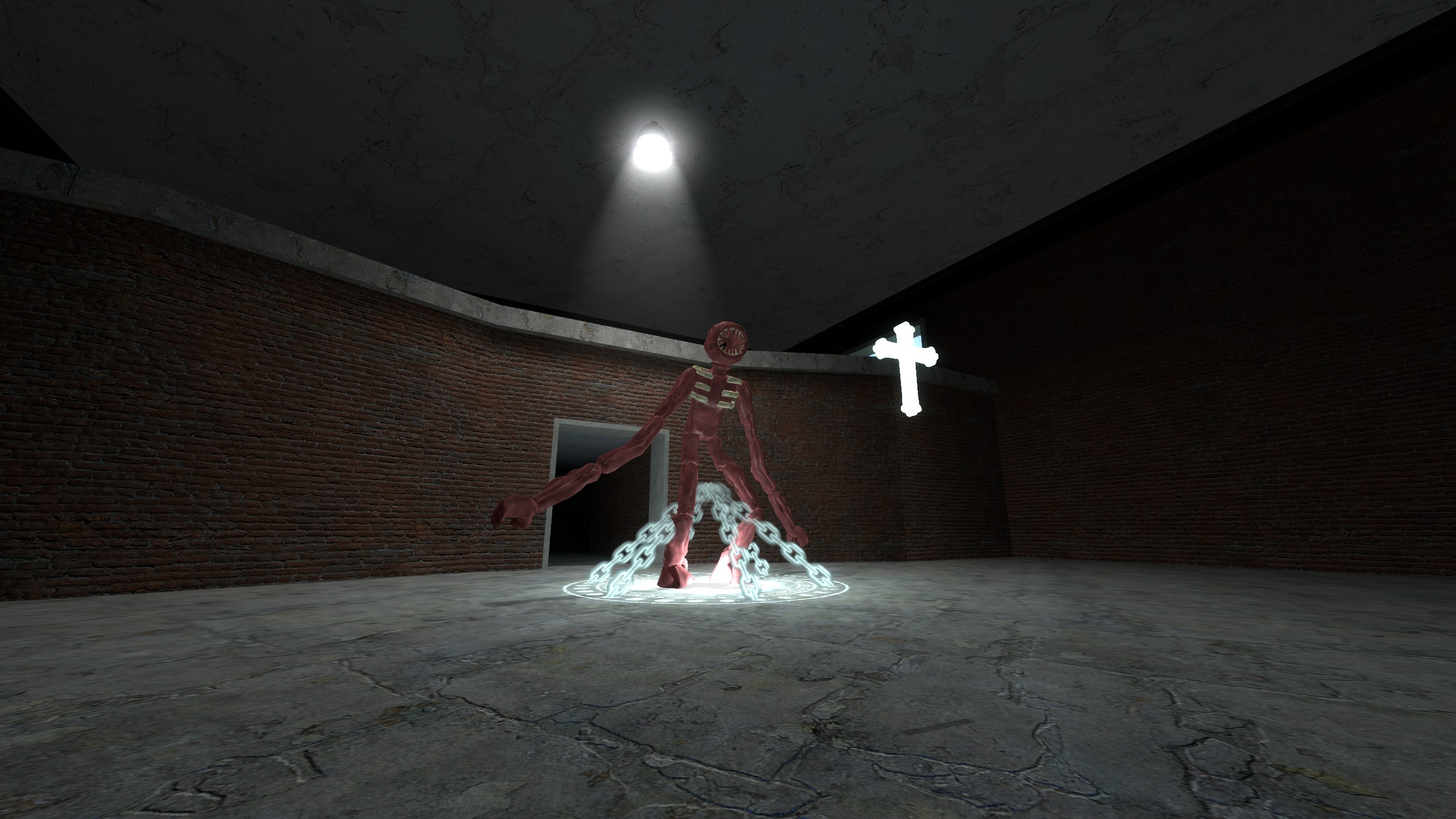
From Steam Workshopnew update : ragdolls can be crucified also can be toggled in behaviour THANK YOU : I cannot thank this community enough for liking this mod, we have hit 1.9K likes!!!!! INFO : This contains a…
new update : ragdolls can be crucified also can be toggled in behaviour
THANK YOU :
I cannot thank this community enough for liking this mod, we have hit 1.9K likes!!!!!
INFO :
This contains a crucifix weapon (based off of a game called 'DOORS' made for roblox), it is located under Weapons->Doors->Crucifix Designed to work with Temy's Doors and Doors Nextbots. Also try these guys as a recent patch to the crucifix made them work properly! It also contains settings, it is located under Options->Crucifix Any bugs should include console logs and be sent in the 'Bugs discussion'
The Crucifix is fragmented....
Go to Tools->Doors->Spawn Crucifix Fragment There are 5 fragments, gather them all and find out what happens.
CUSTOMISATION :
If you want to use the material tool manually spawn the crucifix on the floor in front of you, once it is picked up material and colour changes SHOULD apply.
If you want a default texture then find the texture you want in the material tool's options and copy it into Options->Crucifix->Graphics->Default Crucifix Material. The next time you pickup the crucifix it should have the new material applied.
If you want to change certain colours (like chains) you can do so in Options->Crucifix->Graphics->[Color option name here].MAKE SURE THERE ARE 4 NUMBERS SEPARATED WITH SPACES (NO COMMAS!)
The colour format is: RED GREEN BLUE ALPHA with a range between 0-255
Here is an example colour for reference: 0 255 0 255 <- Solid Green (not transparent) 173 229 244 255 <- Default Crucifixion Colour
AN ERROR?
Running the command doors_developer [level] will let you figure out what is going on if the addon acts odd. The doors_developer command has several levels: 1 - Lots of printing 1+ - visual elements show more the higher the number It is also recommended you use 'developer 1' for visual debugging elements to show
COMMANDS :
use these if you don't want to use the options menu ui
The prefix for all commands 'doors_crucifix_'
usedistance - How far away from which the crucifix can be used. uses How many times - can the crucifix be used for? can_crucifyself - Should we crucifix to be used on self by reloading.
usetime - How long does the crucifix last?
auto_attack - Should the crucifix automatically attack (see ranged and attack for more). auto_attackranged - Should the crucifix automatically attack when a nextbot is in range? (only works on image nextbots) auto_attackranged_range - Crucifix auto attack range. auto_attackattack Should - the crucifix automatically attack when the player is attacked? (blocks damage and crucifies inflictor)
use_special_behaviour - Special behaviour is when the crucifix detects the entities name and acts upon it. For example, npc_rush would be killed but npc_seek would be released.
use_special_behavioursounds - Play a sound from doors depending on the npc. (For example, if ambush got crucified he would scream)
customisation_only_admin - Make the customisation options only for admin. (Doesn't affect how commands work)",0,1)
use_only - Only pickup when weapon is 'used' (usually this means when you press E on it).",0,1)
force_kill - This will override special behaviour and cause any entity to be killed on curcifix. only_npcs - Should we only allow npcs, nextbots and players to be crucified?",0,1) breakout_chance - % chance of an entity breaking out of crucifix, 0 disabled.
use_experimental_lighting - Should a light be placed on crucify? experimental_lighting_brightness - Brightness of lighting. place_chains_onground - Should the chains (and the symbols) be placed on the ground? force_nextbot_images - Should all nextbots be treated as image nextbots. (only use if you are having issues) disable_animations - Disable crucifix and chains spinning.
auto_material - Detects if the entity is ambush,rush,eyes,halt or glitch and replaces the texture with a one from this addon. Useful for when an entity from doors has an incorrect texture.
default_material - Default material for crucifix default_color - Default color for crucifix. RBGA FORMAT Example : 0 0 255 255 (green and opaque). BUG : Transparency only visble in the viewmodel. disable_star_circlespin - Disable the star (on the floor) spinning in a circle. reduce_dynamic_chains - Reduces amount of dynamic chains for performance. dynamic_chains_gfxlevel - Sets dynamic chains gfx level. 0 off, 1 low quality, 2 max quality (LAGGY IN LARGE NUBMERS OR WITH LARGE OBJECTS)
crucifiy_color - The color of the chains and crucifix during crucifixion. crucifiy_failcolor - The color of the chains and crucifix when crucifixion fails. animation_spinspeed - How fast the crucifix/chains gain spin.NUBMERS OR WITH LARGE OBJECTS)
crucifiy_color - The color of the chains and crucifix during crucifixion. crucifiy_failcolor - The color of the chains and crucifix when crucifixion fails. animation_spinspeed - How fast the crucifix/chains gain spin.
DEVELOPMENT:
MARKING YOUR ENTITY AS A NEXTBOT :
--non DrGBase specific-- - If you set DC_ImageNextbot on your entity to true (in the server code) the crucifix will treat your nextbot as an image nextbot. --DrGBase specific--
Highlights
From source dataFootprint
Rated a light load on a server.
Last update
Its author last shipped an update 3 yr ago.
Doors Crucifix on Nxeon
From our catalogue- One-click install
- Supported on Nxeon Garry's Mod servers. We download it from Steam Workshop, place it, and restart the server.
- Server load
- light
- Smallest plan we suggest
- Garry's Mod — 2 GB (2 GB RAM). This follows our own load rating above, not a benchmark.
- Latest build
- 2024-04-10, released 2024-04-10
Game versions by loader
| Loader | Game versions | Newest |
|---|---|---|
| Workshop |
From 1 recorded build of Doors Crucifix.
Run Doors Crucifix on a Garry's Mod server
Pick a server or deploy a new one above; it is installed in one click.
What kind of mod it is
From the catalogBuilding & decoration
Blocks, furniture, decorations and building tools.
Compatibility
- Game
- Garry's Mod
Verified at the source
- ✓Steam WorkshopOfficial listing, checked 2026-11-01Open ↗
- ✓Authortriggered∞idiot, as published on Steam Workshop
- ✓LicenseNot published by the sourceFree