






About Enhanced ThirdPerson
From Steam WorkshopFeatures Multiple Customization Options Customize Camera Angle & FOV Customizable Crosshair Playermodel doesn't clip through solid objects. Smooth Camera Movement Option Camera Sync Options Properly…
[h1] Features [/h1] [olist] [*]Multiple Customization Options
- Customize Camera Angle & FOV
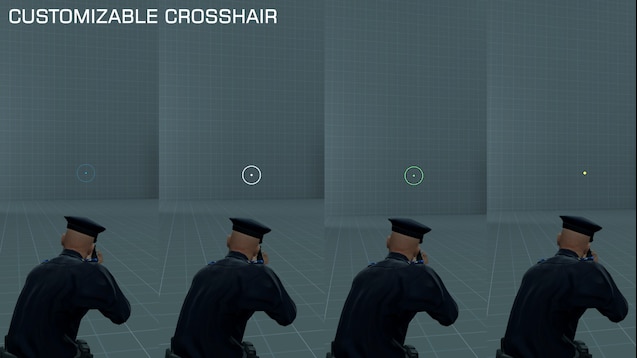
- Customizable Crosshair
- Playermodel doesn't clip through solid objects.
- Smooth Camera Movement Option
- Camera Sync Options
[*]Properly adjusted crosshair [*]Presets [*]Bind Thirdperson without using console commands! [/olist]
[h1] Customization [/h1] You can customize Enhanced ThirdPerson by going to:
 Spawn Menu / Utilities / User / Thirdperson [/code]
For more advanced customization settings, visit "Console commands and variables" section.

[h1]
Console commands and variables
[/h1]
You could view almost all the varaibles using now working preset editor, but here's the full list of all the commands/variables:

[table]
[tr][th]Console variable/command[/th][th]Type[/th][th]Description[/th][/tr]
[tr][td]thirdperson_etp[/td][td]Boolean(0/1)[/td][td]Disables or enables third person mode[/td][/tr]
[tr][td]thirdperson_enhanced_toggle[/td][td]Command[/td][td]Toggles thirdperson mode[/td][/tr]
[tr][td]+thirdperson_etp_free
-thirdperson_etp_free[/td][td]Command[/td][td]Enables free-look mode while bind is pressed. Free-look mode locks your move direction allowing you to look and shoot around while going into the same direction.[/td][/tr]
[tr][td]thirdperson_etp_vehicles_sync[/td][td]Boolean(0/1)[/td][td]Disables or enables synchronisation with vehicles third person mode[/td][/tr]
[tr][td]thirdperson_etp_addons_sync[/td][td]Boolean(0/1)[/td][td]Disables or enables support of the addon that I cannot remember the name of. Syncs thirdperson_etp command with "gtvh_firstperson" command[/td][/tr]
[tr][td]thirdperson_etp_headpos[/td][td]Boolean(0/1)[/td][td]Snaps your view to your head bone. Used in "firstperson" preset[/td][/tr]
[tr][td]thirdperson_etp_cameracollisionmode[/td][td]Number(0/1/2)[/td][td]Camera collision mode. 0 - collide with everything, 1 - ignore players and NPCs, 2 - collide only with the map[/td][/tr]
[tr][td]thirdperson_etp_offset_x
thirdperson_etp_offset_y
thirdperson_etp_offset_z[/td][td]Number[/td][td]X Y Z offset of third person camera view[/td][/tr]
[tr][td]thirdperson_etp_aim[/td][td]Boolean(0/1)[/td][td]Enables or disables aiming with a mouse. If disabled, all the view angles are controlled by three console variables below. Useful for filmmaking[/td][/tr]
[tr][td]thirdperson_etp_angle_x
thirdperson_etp_angle_y
thirdperson_etp_angle_z[/td][td]Number(0-360 for yar roll, -90-+90 for pitch)[/td][td]Pitch/yaw/roll of third person camera view angle. Works only if thirdperson_etp_aim is 0[/td][/tr]
[tr][td]thirdperson_etp_fov[/td][td]Number(0-infinity)[/td][td]Thirdperson camera field of view[/td][/tr]
[tr][td]thirdperson_etp_smoothing[/td][td]Boolean(0/1)[/td][td]Thirdperson camera position smoothing. Smoothes thirdperson camera position changes which makes the motion more smooth but a bit less responsive[/td][/tr]
[tr][td]thirdperson_etp_smoothing_speed[/td][td]Number(0-100)[/td][td]Thirdperson camera position smoothing speed/strength. Controls how responsive camera position is transitioned. Higher the value - more responsive. Low values useful for cinematic filmmaking. Works only if thirdperson_etp_smoothing is 1[/td][/tr]
[tr][td]thirdperson_etp_bind[/td][td]Number[/td][td]Internal variable that is used to store the bind to toggle thirdperson. Corresponds to VK_KEY code and is used by bind control in the spawnmenu[/td][/tr]
[tr][td]thirdperson_etp_crouchadd[/td][td]Number[/td][td]Additional Z offset that is applied to thirdperson camera position when player is in crouch. Doesn't work if thirdperson_etp_headpos is 1[/td][/tr]
[tr][td]thirdperson_etp_crosshair[/td][td]Boolean(0/1)[/td][td]Enables or disables custom thirdperson crosshair[/td][/tr]
[tr][td]thirdperson_etp_crosshair_dot[/td][td]Boolean(0/1)[/td][td]Enables or disables custom thirdperson crosshair center dot. Works only if thirdperson_etp_crosshair is 1[/td][/tr]
[tr][td]thirdperson_etp_crosshair_style[/td][td]Number(0/1/2)[/td][td]Style of the thirdperson crosshair spread display. 0 - Nothing, no spread display. 1 - Cone, circle showing your spread. 2 - Lines, indicating your spread display, CS style. Works only if thirdperson_etp_crosshair is 1[/td][/tr]
[tr][td]thirdperson_etp_crosshair_gap[/td][td]Number(0-infinity)[/td][td]Thirdperson crosshair spread display center pixel gap. How far away lines/cone spread display should be from the center. Works only if thirdperson_etp_crosshair is 1 and thirdperson_etp_crosshair_style is not 0[/td][/tr]
[tr][td]thirdperson_etp_crosshair_size[/td][td]Number(1-infinity)[/td][td]Thirdperson crosshair size. How thick lines/cone and center dot are. Works only if thirdperson_etp_crosshair is 1[/td][/tr]
[tr][td]thirdperson_etp_crosshair_r
thirdperson_etp_crosshair_g
thirdperson_etp_crosshair_b
thirdperson_etp_crosshair_alpha[/td][td]Number(0-255)[/td][td]Red/green/blue/alpha components of the crosshair color. Works only if thirdperson_etp_crosshair is 1[/td][/tr]
[tr][td]thirdperson_etp_crosshair_outline[/td][td]Boolean(0/1)[/td][td]Enables or disables crosshair outline. Works only if thirdperson_etp_crosshair is 1[/td][/tr]
[tr][td]thirdperson_etp_crosshair_outline_r
thirdperson_etp_crosshair_outline_g
thirdperson_etp_crosshair_outline_b
thirdperson_etp_crosshair_outline_alpha[/td][td]Number(0-255)[/td][td]Red/green/blue/alpha components of the crosshair outline color. Works only if thirdperson_etp_crosshair is 1 and thirdperson_etp_crosshair_outline is 1[/td][/tr]
[/table]

If you're familiar with source engine console variables editing, then you could do interesting stuff with these variables.
For example, here's a bind command that switches your shoulder side when you press B key.
[code]bind b "toggle thirdperson_etp_offset_y -40 40"
Bugs
Highlights
From source dataFootprint
Rated a light load on a server.
Last update
Its author last shipped an update 9 mo ago.
Enhanced ThirdPerson on Nxeon
From our catalogue- One-click install
- Supported on Nxeon Garry's Mod servers. We download it from Steam Workshop, place it, and restart the server.
- Server load
- light
- Smallest plan we suggest
- Garry's Mod — 2 GB (2 GB RAM). This follows our own load rating above, not a benchmark.
- Latest build
- 2026-01-09, released 2026-01-09
Game versions by loader
| Loader | Game versions | Newest |
|---|---|---|
| Workshop |
From 1 recorded build of Enhanced ThirdPerson.
Run Enhanced ThirdPerson on a Garry's Mod server
Pick a server or deploy a new one above; it is installed in one click.
What kind of mod it is
From the catalogCosmetics, visuals & audio
Skins, textures, shaders, models and sound — how the game looks and sounds.
Compatibility
- Game
- Garry's Mod
Verified at the source
- ✓Steam WorkshopOfficial listing, checked 2026-10-10Open ↗
- ✓AuthorDRIV, as published on Steam Workshop
- ✓LicenseNot published by the sourceFree














